FLIRTG165USERGUIDEDocumentIdentifier:TG165‐en‐US_AA
18
9.2BasicNavigationandEditing
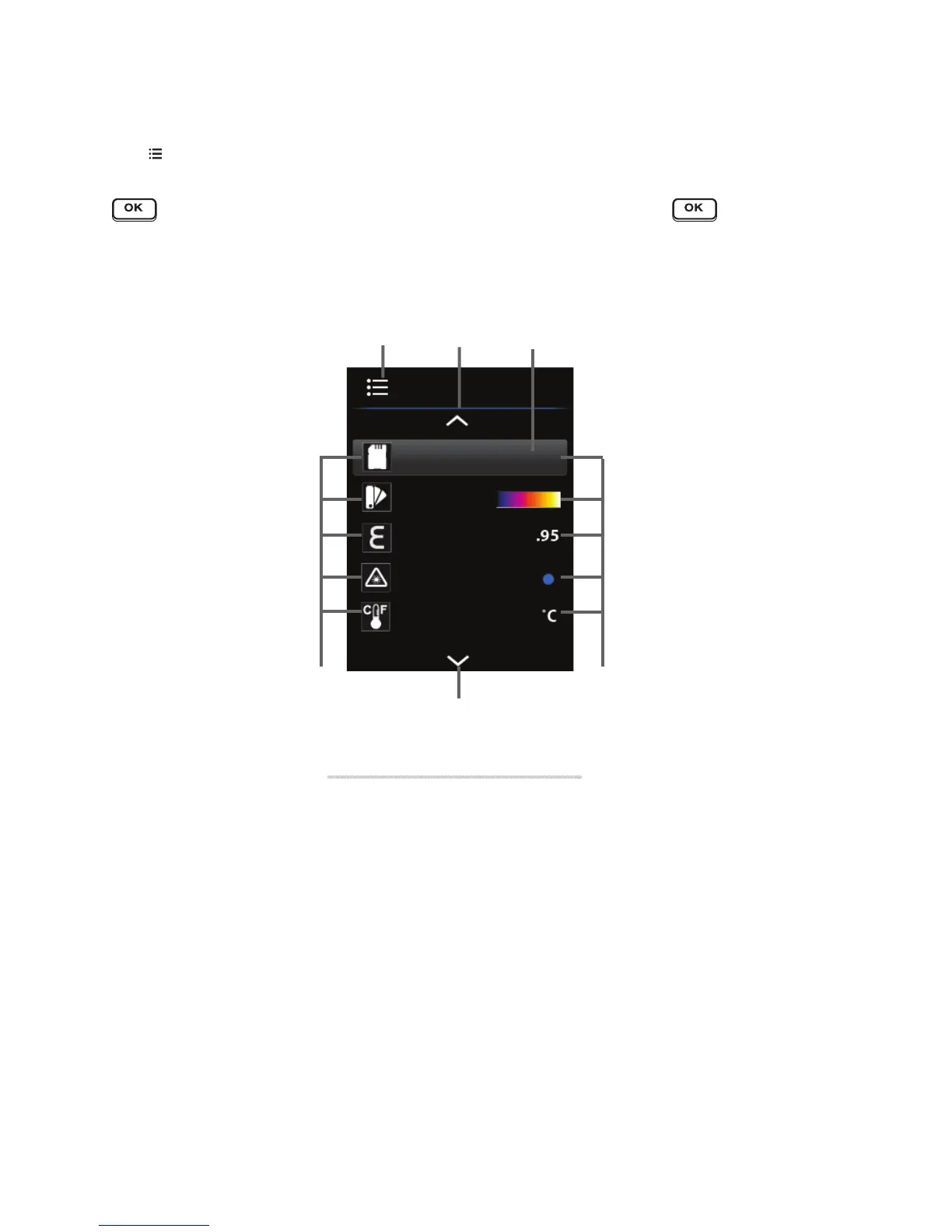
Press toentertheSettingsMenu(seeFig9‐2).Usethearrowbuttonstoscrollthroughthedisplayedmenu
itemsandpages(notallofthemenuitemscanbeseenononepage).Thecurrentoptionwillbehighlighted.Press
toopenamenuitemortotoggleanoption(itemsthatcanbetoggledusingthe buttonare:color
palette,laserpointerON/OFF,TemperatureUnitsC/F,andCrosshairsON/OFF).
Eachmenuitemisdetailedinthefollowingsections.
1. SettingsMenuicon
2. Scrollupicon(usetheUparrowbuttontoviewmoremenuitems)
3. Highlightedbackgroundindicatestheselecteditem
4. Menuitem
icons(scrolltheseusingthearrowbuttons)
5. Scrolldownindicator(usetheDownarrowbuttontoviewmoremenuitems)
6. Currentmenuitemsettings
Fig9‐2NavigatingtheMainMenu
12
4
5
3
6



 To Next Page