17
4. Installing a Cascading Kit on a
250 A Circuit
Follow the instructions below to install a cascading kit on a 250 A circuit.
Use the 100 A cascading kit model including 2 double-circuit 100 A breakers (part number ACPE001100). Use
AWG 4/0 90 °C copper or aluminum conductors for the installation. Refer to the
Electrical Circuits on Different
Configurations
section for more information about the circuit configurations.
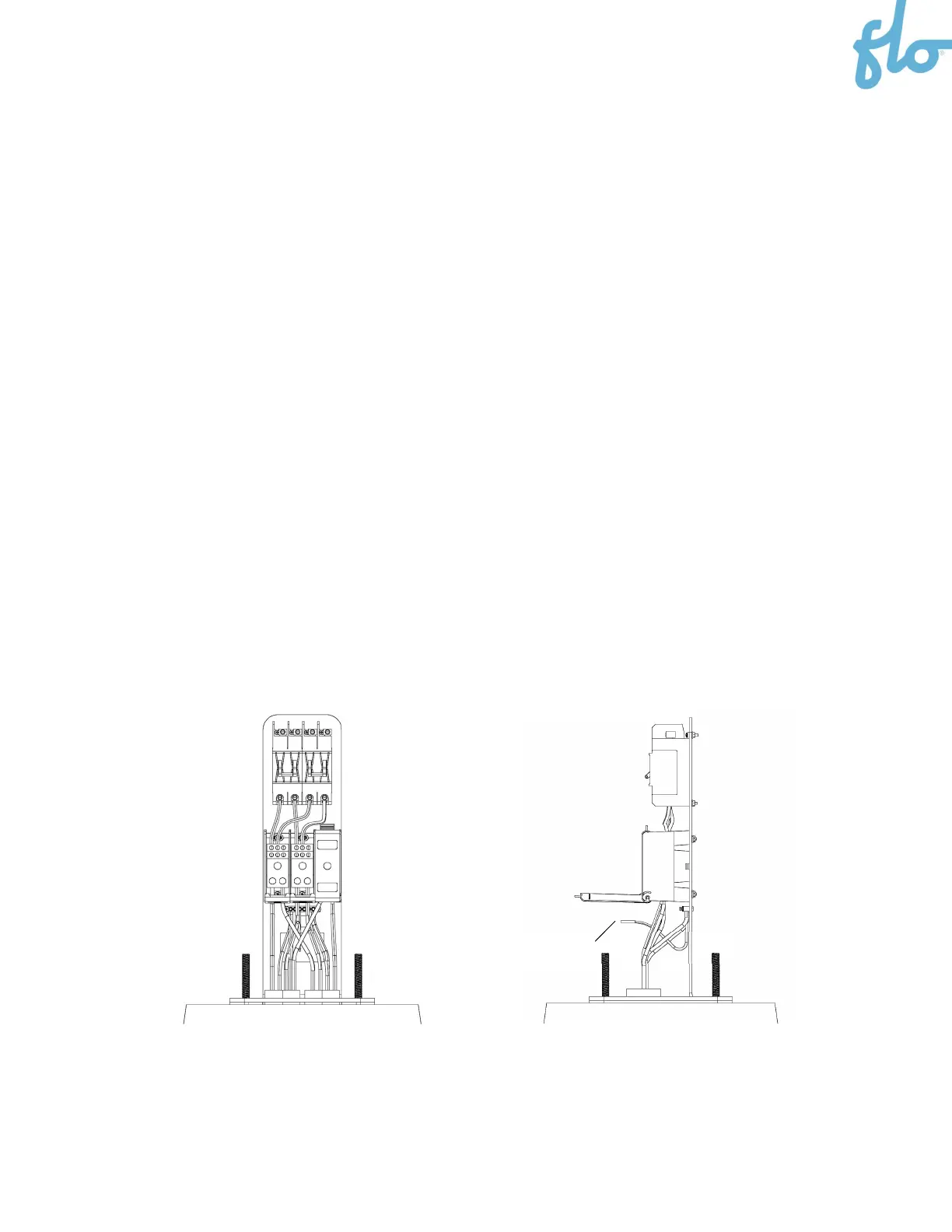
1. Install the power supply cables coming from the previous charging station and the power supply cable
going to the next one, letting 1 foot (30 cm) of cable protrude from the conduit.
2. Place the cascading kit mounting bracket on the concrete base, ensuring that the anchor’s threaded
rods pass through the 4 holes in the base of the bracket.
3. Connect the power supply cables to the bottom of the terminal blocks. See the
Electrical Circuits on
Different Configurations
section for more information.
4. Connect the ground cables from the circuit to the non-isolated (ground) terminal.
5. Connect another ground cable to the non-isolated (ground) terminal and leave the other end
unconnected. Make sure it is long enough to be connected to the pedestal ground terminal (see the
following steps).
NOTE: Refer to the stickers on the cascading kit mounting bracket for the proper wire connection
information.
Unconnected ground cable


 To Next Page