20
5. Programming Parameters
5.1 Enter the Programming Menu
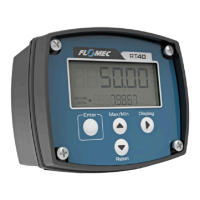
To enter the programming menu the user must simultaneously hold the Max/Min (up
arrow) button and the Reset (down arrow) button for a period of 5 seconds. While the user
is holding these buttons the LCD screen will display a countdown from 5 to 1. Once this is
complete the display will energise all segments to allow inspection of the LCD and
identification of any damaged display segments, before finally entering the programming
menu. At each level of the programming menu the user presses the Enter key to allow
adjustment of a setting, the Up and Down arrow keys to edit the setting, and the Enter key
again to accept the change.
5.2 PIN Protection
By default, the PIN protection function is off. When entering the programming menu for an
RT40 display which does not have a PIN enabled the user will be asked if they want to enter a
PIN. Selecting “N” will leave the PIN protection feature OFF and will progress to the next stage
of the programming menu.
If the user selects ‘Y’ they will have enabled the PIN protection feature and may enter a PIN.
Any PIN other than 0000 will engage PIN protection of the program settings, or if 0000 is
entered the PIN protection feature will return to OFF.
After the PIN protection mode is enabled failure to input the correct PIN will deny the user the
ability to change any of the program parameters but will allow read only access to the user so
that they may view existing program settings.
Only one PIN may be set at any one time, but this can be changed at any time by entering the
programming mode, entering the existing PIN, and then changing the PIN to a new number. A
second backup PIN exists in the software which can be used should the user programmed PIN
be lost – contact the manufacturer should you require the backup PIN.
5.3 Engineering Units
The engineering units for the instrument may be selected from any in the following table. The
factory default units are Litres, however the user may change the display units using the
programming menu, or the USB software utility. Once the user has selected an alternative
display unit the instrument will recalculate all of the required parameters so that no further
data entry is required by the user.


 To Next Page