Operating the Machine
38
14/03/2023 212601
Emergency stop button (push-button)
The control panel emergency stop button is used by the operator as a safety
switch while working on and with the machine.
You can use the emergency stop button to stop all drives and movements of
the machine in the event of imminent danger, regardless of the currently se-
lected operating mode or function.
In the event of an interruption by emergency stop, the machine and the
movements triggered by the actuation push-buttons are stopped, i.e. they do
not continue to move. The drive motor and drill light are switched off.
To stop the machine, simply press the emergency stop button.
Note
However, you should normally not use the emergency stop button to shut
down the machine (normal shutdown), since this immediately stops the con-
trolled movement of the machine.
Always press the emergency stop button only in case of danger or to reset the
control system.
The emergency stop button is self-locking. This means that you cannot oper-
ate the machine until you have eliminated the cause for the interruption and
unlocked the actuated emergency stop button.
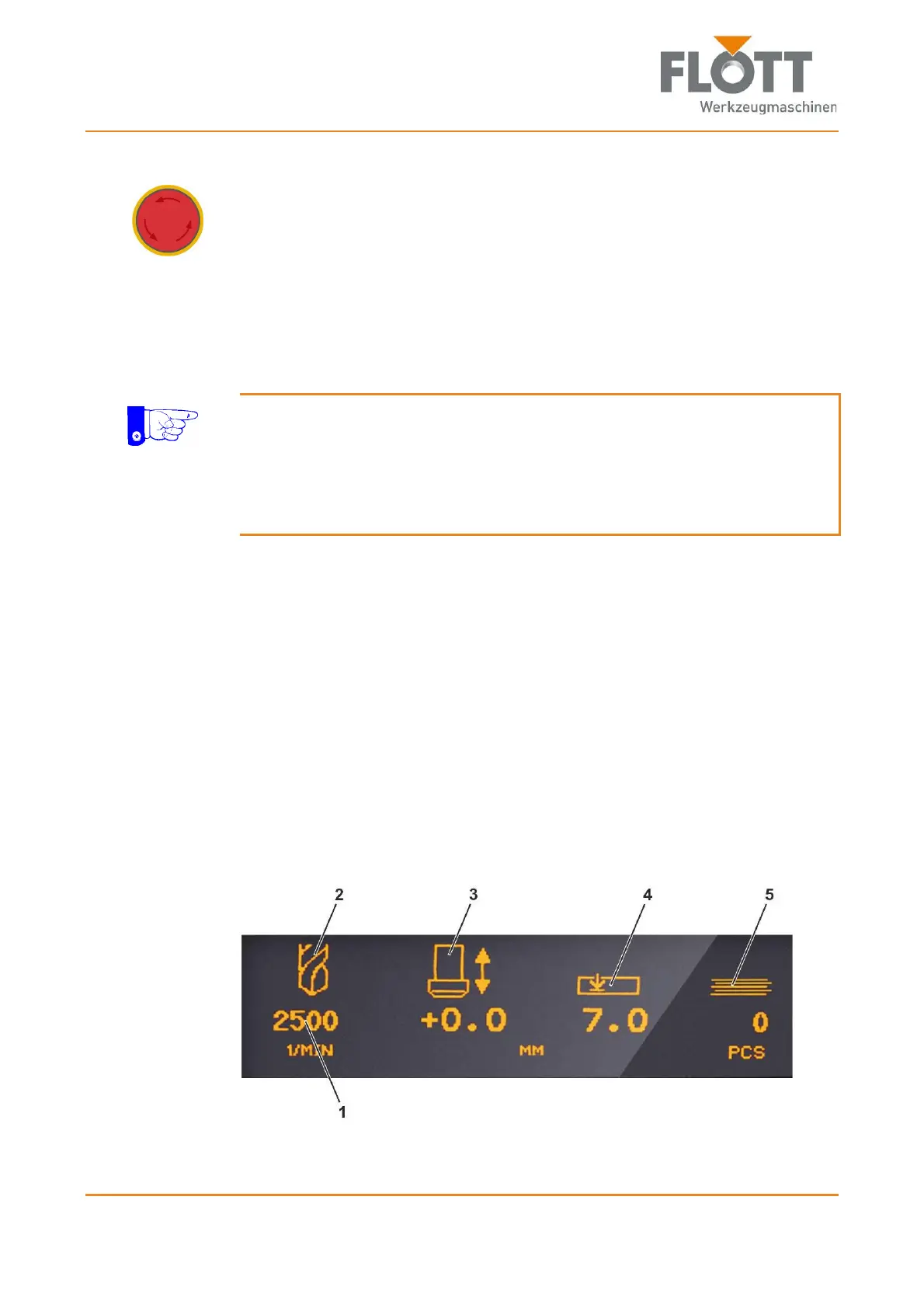
Digital display
The display is integrated into the control panel and is used to display
error messages (superimposed on all other displays)
(1) Spindle speed
(2) Display of active drilling style (drilling or tapping)
(3) Drilling depth as actual value
(4) Drilling depth as setpoint
(5) Piece counter of already executed holes



 To Next Page