23
Limitorque L120-85 Installation, Operation and Maintenance FCD LMENIM1202-03-A4 – 06/15
flowserve.com
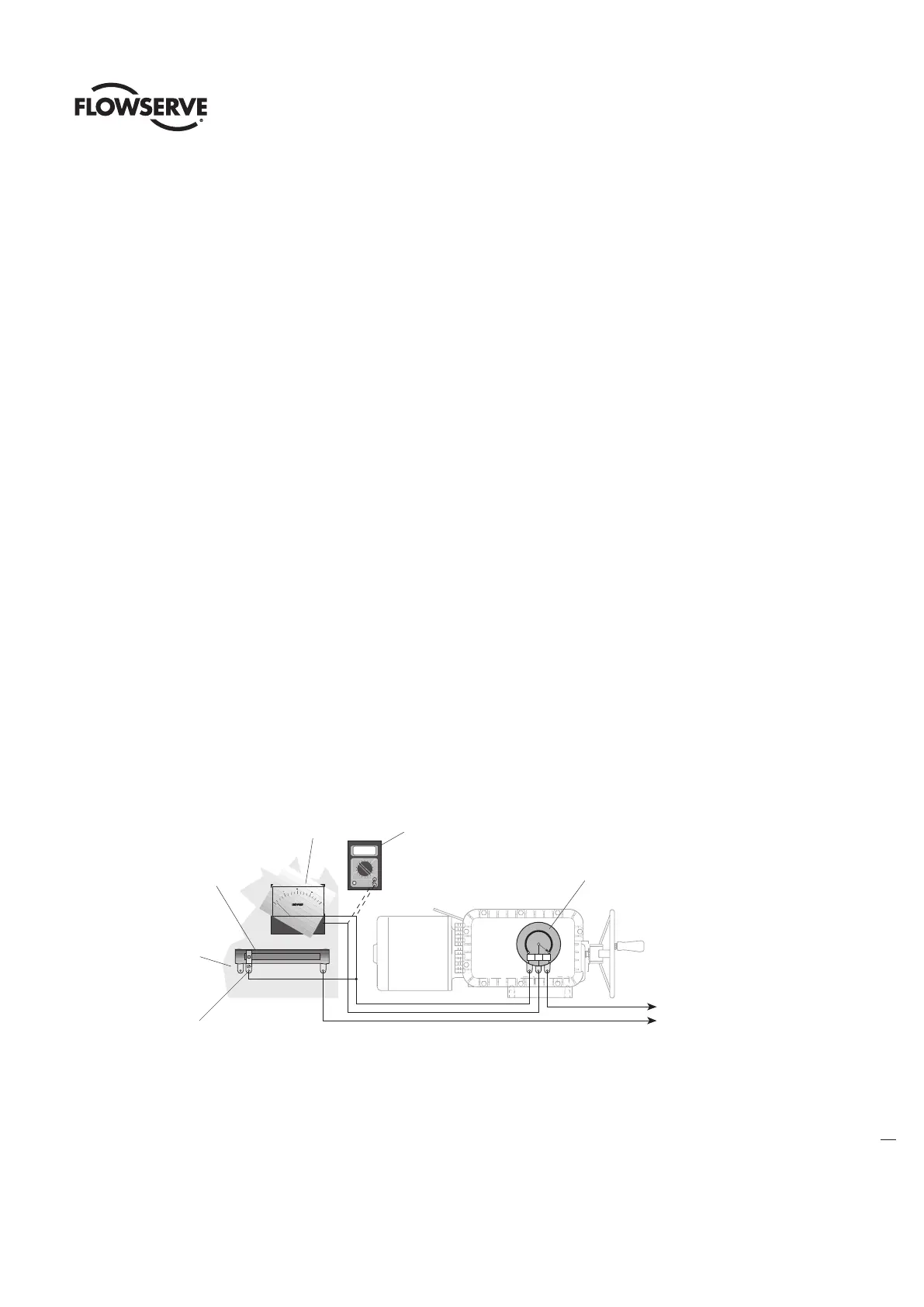
1. Mount the Adjustable Resistor as close as possible to the Remote Voltmeter Indicator.
2. Turn power to the actuator OFF and connect all wiring as shown in Figure 14. For now, connect the wires leading to the Remote
Voltmeter Indicator to your test meter so you can conduct voltage readings during the setup.
3. Move the Adjustable Resistor Slider to the extreme opposite end of the Resistor from the Power Connection.
4. Open the Electrical Compartment Cover (piece 200-1). Loosen the Hex Head Retaining Nut at the base of the Potentiometer Bracket
and dis-engage the Spur Gear from the Potentiometer Drive Gear. This will allow manual rotation of the Potentiometer Assembly. See
figure 14.
5. Manually position the valve in the fully CLOSED position. As you are rotating the Handwheel to the CLOSED position, notice the
direction the Potentiometer Spur Gear would be turning the Potentiometer Shaft/Wiper Arm inside the Potentiometer.
6. When the valve is CLOSED, turn the Potentiometer Shaft to the end-of-travel position that corresponds to the CLOSED position of
the Potentiometer. Carefully reposition the Potentiometer Spur Gear onto the Potentiometer Shaft to re-engage with the gear train.
Re-tighten Hex Head Retaining Nut at the base of the Potentiometer Bracket.
7. Turn power to the actuator ON. Your Test Meter should read “0” or almost “0”. If not, go back through the above steps 1–7 to get your
Potentiometer calibrated to the proper end-of-travel.
8. Now manually position the valve in the fully OPEN position.
9. Move the Adjustable Resistor Slider toward the Power Connection end until the Test Meter reads 10 volts.
10. Turn actuator power OFF, disconnect the Test Meter and connect the leads to the Remote Voltmeter Indicator.
11. Turn actuator power ON. Your Remote Voltmeter Indicator should read full OPEN.
12. Further adjustment may be necessary. If the Remote Voltmeter Indicator reads less than full OPEN, carefully move the Adjustable
Resistor Slider ahead being careful not to exceed the full OPEN position on the Remote Voltmeter Indicator. If the Indicator reads more
than “0” when the valve is CLOSED, repeat this procedure.
13. When the Indicator properly shows valve position, lock the Adjustable Resistor Slider in place.
Figure 14: Remote Position Indicator Calibration Configuration
P1 P2 P3
CLOSED
Valve Position
1
4
1
2
3
4
OPEN
LIMITORQUE CORPORATION
LYNCHBURG VA.
25 watt, 50 ohm Potentiometer
type Variable Resistor mounted
in a Limitorque Actuator Housing
10.00
Digital Multitester
Control voltage range
110 volts to 480 volts
175 watt, 2500 ohm
Adjustable Resistor
located adjacent to
Remote Position
Indicator for voltage
adjustment
Voltmeter
Indicator
Ohmmeter
for calibration
Adustable
Resistor Slider
Mounting
Surface








 To Next Page