EasyManua.ls Logo

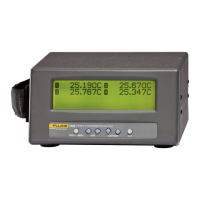
Fluke 1523 - User Manual

Fluke 1523
105 pages
Print Icon
To Next Page IconTo Next Page
Loading...
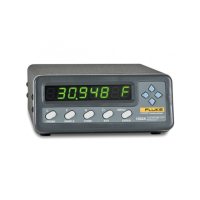
1523, 1524
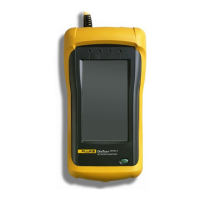
Reference Thermometer
Technical Guide
Revision 991701
Shop for Fluke products online at:
1.877.766.5412
www.MyFlukeStore.com

Table of Contents

Questions and Answers

  • J
    James RogersAug 17, 2025
    Why does my Fluke Thermometer show incorrect resistance values?
    • F
      Felicia PachecoAug 17, 2025
      If your Fluke Thermometer displays an incorrect or erratic value while measuring resistance, it could be due to a few reasons. First, examine the probe's wiring for any poor or incorrect connections, referring to the manual for guidance. Also, check for open, shorted, or damaged sensor or lead wires, and verify the resistance across the sensor using a handheld digital multi-meter. Ensure there's no conductivity between the leads and the probe sheath. Use a high-quality sensor to minimize errors from drift or insulation leakage, and ensure the probe stem is properly immersed in the medium. Electrical interference can also cause erratic readings; try eliminating the source or moving the thermometer to a different location.
  • N
    ngarrettAug 19, 2025
    What to do if my Fluke 1523 Thermometer display is blank?
    • M
      Matthew ThompsonAug 20, 2025
      If the display on your Fluke Thermometer is blank when it should be showing measurements, ensure the instrument has power from the batteries or AC adapter. Check that the initialization information appears when the power is switched on. Verify that a probe is properly connected and that the INFO-CON connector is programmed correctly using the 9940 software.
  • M
    Mrs. Jennifer AdamsAug 22, 2025
    What does 'locked' mean on my Fluke Thermometer?
    • D
      David GillespieAug 23, 2025
      If your Fluke Thermometer displays “locked”, it means an incorrect probe is attached to the unit. Attach the correct probe or have the instrument properly programmed for the new probe.
  • S
    Sandra WilliamsAug 26, 2025
    What to do if my Fluke Thermometer says 'Waiting for Data'?
    • L
      Linda ButlerAug 26, 2025
      If your Fluke Thermometer displays “Waiting for Data” when a probe is plugged in, the instrument is unable to detect that a probe is connected. Check that a probe with a properly programmed INFO-CON connector is attached.
  • C
    Christopher RussellAug 28, 2025
    Why can't I change INFO-CON settings on my Fluke 1523?
    • R
      Robert CarterAug 28, 2025
      If you cannot change INFO-CON settings on your Fluke Thermometer using the 9940 software or manually through the serial port, the pass code entered was not correct. The factory set pass code is 1234.
  • H
    Henry HunterSep 2, 2025
    What does "locked" mean on my Fluke 1523?
    • A
      Austin LittleSep 2, 2025
      If your Fluke Thermometer displays "locked", it means the meter is set to accept only the probe with the given serial number to the specified channel. To resolve this, attach the correct probe or have the instrument properly programmed for the new probe.
  • S
    smithwilliamSep 5, 2025
    What to do if Fluke 1523 says "Waiting for Data"?
    • G
      gmyersSep 5, 2025
      If your Fluke Thermometer displays "Waiting for Data" when a probe is plugged in, the instrument is unable to detect that a probe is connected. Ensure that you have attached a probe with a properly programmed INFO-CON connector.
  • J
    Jeffrey EricksonSep 7, 2025
    Why does my Fluke 1523 display 'locked'?
    • J
      Joseph TranSep 8, 2025
      If your Fluke Thermometer displays “locked”, it means the incorrect probe is attached to the unit or channel. Attach the correct probe or have the instrument properly programmed for the new probe. The meter is set to accept only the probe with the given serial number to the specified channel.
  • M
    Mary FoxSep 12, 2025
    What to do if Fluke 1523 shows 'Waiting for Data'?
    • K
      Keith ZimmermanSep 12, 2025
      If your Fluke Thermometer displays “Waiting for Data” when a probe is plugged in, the instrument is unable to detect that a probe is connected. Check that a probe with a properly programmed INFO-CON connector is attached.
  • A
    Aaron SanfordSep 13, 2025
    What to do if the battery symbol is displayed on my Fluke 1523 Thermometer?
    • E
      Erica BallardSep 13, 2025
      If the battery symbol appears on your Fluke Thermometer, it means the battery is low and needs to be changed. Replace the batteries to ensure the accuracy of readings.

Summary

Before You Start

Introduction

Provides an overview of the Reference Thermometers' capabilities and design.

Standard Equipment

Lists the components included with the 1523/1524 Reference Thermometer.

Safety Information

Details hazards and precautions to avoid user injury or instrument damage.

CE Comments

Discusses compliance with European directives like EMC and Low Voltage.

Using Clamp-On Ferrites

Explains how to attach and use clamp-on ferrites for EM interference reduction.

Emissions Testing

States the instrument fulfills limit requirements for Class B emissions.

Low Voltage Directive (Safety)

Confirms compliance with the European Low Voltage Directive for safety.

Authorized Service Centers

Lists contact information for authorized service centers for product support.

Quick Start

Setup

Guides the user through the initial setup and connection of the instrument.

Specifications

Provides detailed technical specifications and performance characteristics of the instrument.

General Operation

Battery

Provides instructions for battery installation and care for instrument power.

DC Power Source

Explains the use of the AC adapter as an external DC power source.

Probe

Details the types of probes supported and their connection to the instrument.

TC Internal Reference Junction

Explains how internal reference junction compensation works for thermocouples.

TC External Reference Junction

Explains how external reference junction compensation works for thermocouples.

Probe Lock Function

Describes how to lock the instrument to a specific probe for quality control.

INFO-CON Connector

Explains the function and connection of the INFO-CON probe connector.

Display Functions and User Interface

Main Screen

Describes the main LCD display and its primary information presentation.

STATS

Explains how to view minimum, maximum, average, and standard deviation of readings.

°C °F

Details how to switch between Celsius and Fahrenheit temperature units.

HOLD

Describes the function to freeze the displayed measurement value.

SETUP

Allows configuration of instrument settings, channels, and system parameters.

SAVE

Describes how to save measurements to the demand log.

ARROWS, UP, DOWN

Explains the function of the arrow keys for navigation and selection.

ENTER

Describes the function of the ENTER key for selecting options and saving.

RECALL

Accesses the menu for reviewing, sending, or deleting logged data.

NEXT

Moves to the next field or option within a menu.

SHIFT

Activates secondary functions indicated in yellow on the keypad.

RESET

Resets statistics (min, max, avg, std dev) and exits STATS mode.

Ω mV

Toggles the display between temperature units and Ohms/mV readings.

TREND

Switches between numeric and graphic display modes for trend analysis.

LOG

Allows setup and control of data logging sessions.

HOME

Returns the user to the main screen from any menu.

LOGS

DEMAND LOG

Logs and recalls up to 25 data points, retaining data after power off.

AUTO-LOG

Stores up to 15,000 readings at specified intervals, affected by Auto-Off.

Digital Communication Interface

Wiring

Details the physical wiring and connection of the RS-232 interface.

Command Syntax

Describes the structure and rules for sending commands to the instrument.

Serial Commands by Function or Group

Organizes serial commands into functional groups for easier reference.

Serial Commands - Alphabetic Listing

Provides an alphabetical listing and description of all available serial commands.

Calibration of Your Reference Thermometer Readout

General

Provides general notes and recommendations for the calibration procedure.

Introduction

Discusses the importance of uncertainties for reference resistors and voltage sources.

Terminology

Defines the term "Unit Under Test" (UUT) as used in calibration.

Fundamentals

Assumes user familiarity with guides, connections, and voltage sources.

Environmental Test Conditions

Specifies the required temperature and humidity conditions for calibration.

Calibration Equipment

Lists the necessary equipment and minimum specifications for calibration.

Manual Calibration

Outlines the manual process for calibrating the Reference Thermometer.

Preparation for Reference Thermometer Calibration

Details the necessary preparations before starting the calibration process.

Manual Calibration Process

Details the step-by-step process for performing manual calibration.

Troubleshooting

Maintenance

Fluke 1523 Specifications

General IconGeneral
Resolution0.001°C
DisplayLCD
Data LoggingYes
Input TypesRTD, Thermocouple
InterfaceRS-232
Power SupplyAC adapter
Accuracy±0.005°C

Related product manuals