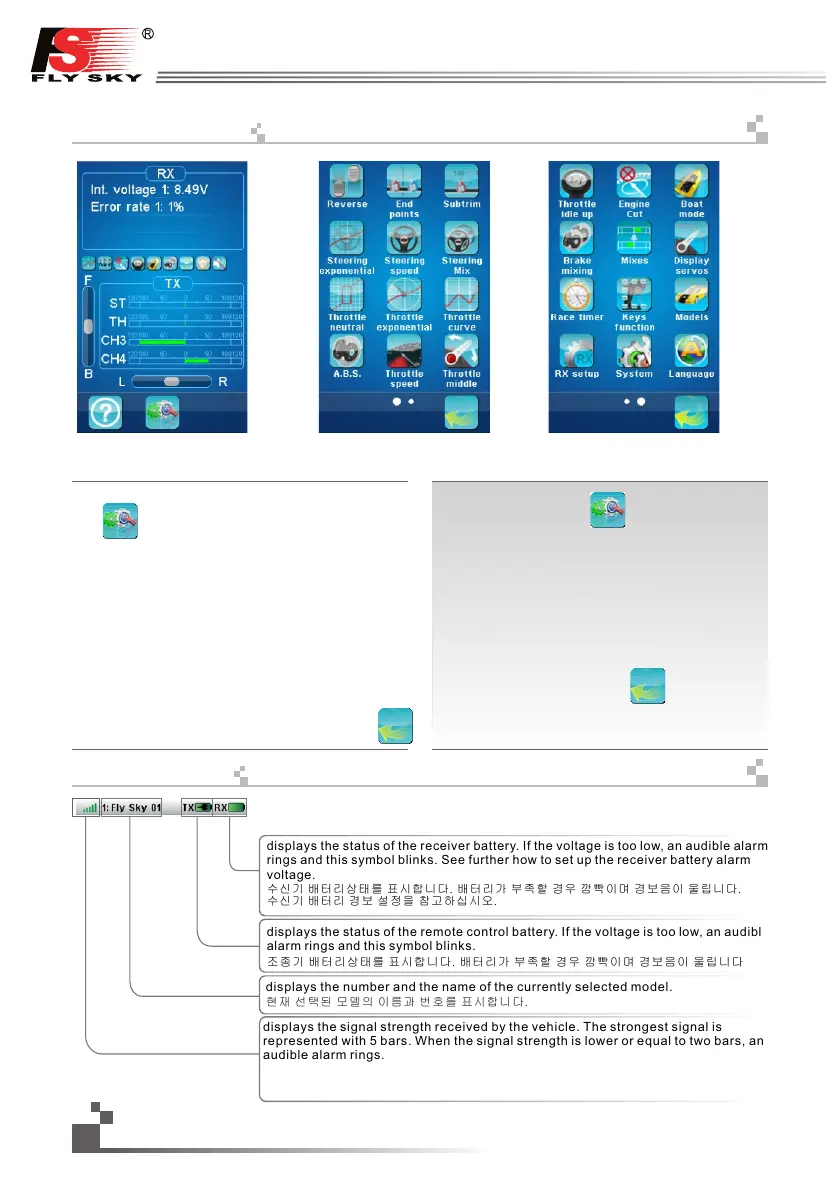
he main menu can be accessed by touching the settings
icon at the bottom of the main screen.
The main menu is organized in horizontal pages. Each
page contains up to 12 icons representing 12 different
functions.
The white balls in the bottom tray indicate which menu page
is displayed. The big white ball represents the currently
displayed page.
To display the next page, touch the current page anywhere
on its right part and slide it to the left.
To display the previous page, touch the current page
anywhere on its left part and slide it to the right.
To enter a function, simply touch its corresponding icon.
To return to the main screen, touch the back button
in the bottom tray.
메인매뉴
Main menu page 1 Main menu page 2
화면 하단에 있는 설정
아이콘을 터치 하여 메인
메뉴를 열 수 있습니다.
메인메뉴는 가로로 구성되어 있습니다. 각 페이지에는
다양한 기능의 최대 12개 아이콘이 있습니다.
하단 트레이의 흰색 볼들 중 큰 볼은 현재 표시된
페이지를 나타냅니다.
다음 페이지로 넘어 가려면 스크린 아무곳을
터치한뒤 오른쪽 부분에서 왼쪽으로 밀어주면 됩니다。
이전 페이지로 넘어 가려면 스크린 아무곳을
터치한뒤 왼쪽 부분에서 오른쪽으로 밀어주면 됩니다.
기능을 실행하려면 해당 아이콘을 누르면 됩니다. 메
인화면으로 돌아가려면
하단트레이에 있는
뒤로 버튼을 터치하면 됩니다.
상단 상태표시줄
The top tray of the screen constantly displays the main status of the whole system.
화면 상단트레이는 전체 시스템의 주요상태를 표시합니다
displays the signal strength received by the vehicle. The strongest signal is
represented with 5 bars. When the signal strength is lower or equal to two bars, an
audible alarm rings.
displays the status of the receiver battery. If the voltage is too low, an audible alarm
rings and this symbol blinks. See further how to set up the receiver battery alarm
voltage.
수신기 배터리상태를 표시합니다. 배터리가 부족할 경우 깜빡이며 경보음이 울립니다.
수신기 배터리 경보 설정을 참고하십시오.
displays the status of the remote control battery. If the voltage is too low, an audible
alarm rings and this symbol blinks.
조종기 배터리상태를 표시합니다. 배터리가 부족할 경우 깜빡이며 경보음이 울립니다
displays the number and the name of the currently selected model.
현재 선택된 모델의 이름과 번호를 표시합니다.
연결된 모델과의 연결 신호 강도를 표시합니다. 최대 5개의막대기가표시되며
연결신호강도가2칸이하로낮아질경우경보가울립니다.
18
http://www.flysky-cn.com
15. Mainmenu
16. Toptray


 To Next Page