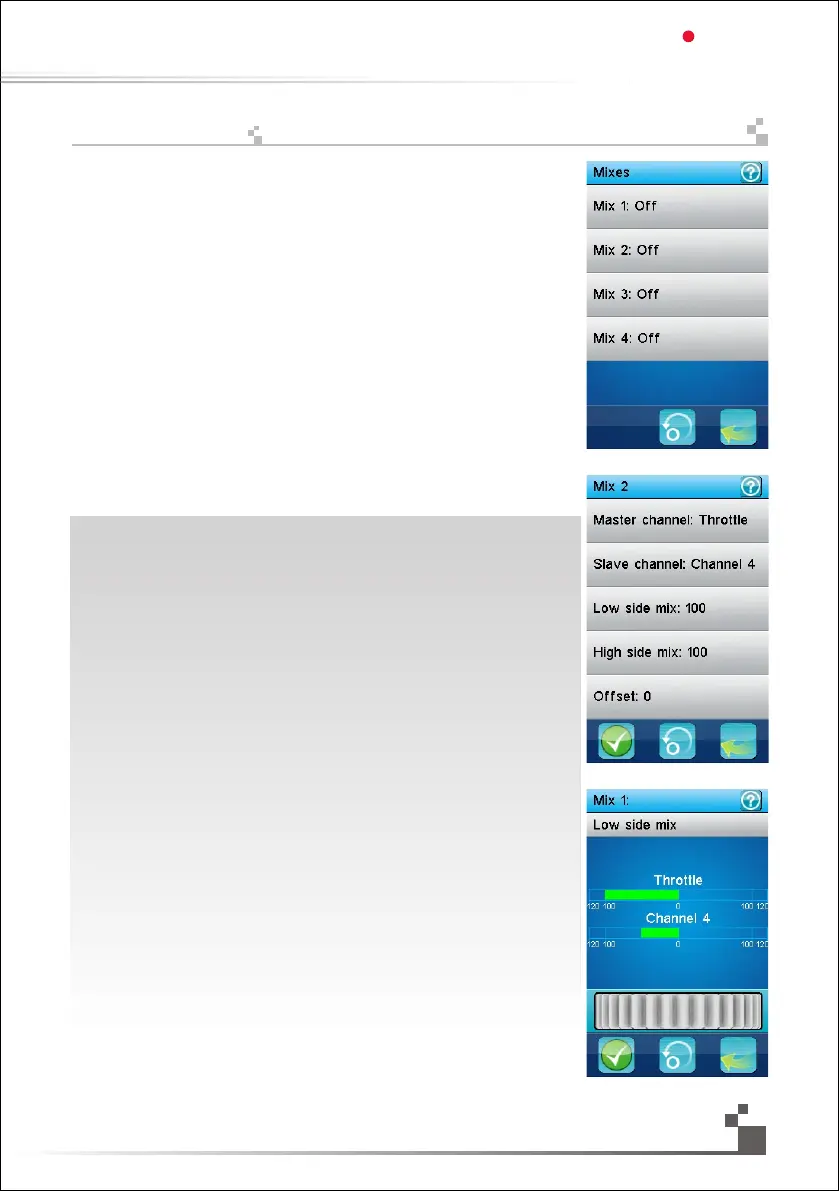
4 independent mixes can be applied between any master and slave channel.
Each mix, when activated, will let the slave channel be influenced by its master channel.
A fraction of the master channel, eventually negative, is added to the slave channel.
Furthermore, the slave channel can be shifted up or down by a given value.
The first menu selects the mix to modify.
The second menu selects the parameter of the previously selected mix to modify.
Master channel: select the channel that will influence the slave channel.
Slave channel: select the channel that will be influenced by the master channel.
Low side mix: set how much influence the master channel will have when on its low side
(left side for the steering channel and brake side for the throttle channel). A negative value
will influence the slave channel on the opposite direction. 50% adds half of the master to the
slave.
0% doesn’t influence the slave.
Low side mix: same as the low side mix but on the high side of the master channel (right
side for the steering channel and acceleration side for the throttle channel).
Offset: adds the offset value to the slave channel. A negative value will shift the slave
channel toward its low side.
When modifying the low side mix, the high side mix or the offset, the master channel
(at the top) and the slave channel (at the bottom) are displayed in real time.
In this example, the first mix is activated, the throttle is the master, the channel 4 is the slave
and the low side mix is set to 50% thus having the channel 4 being added half of the value
of the throttle when braking.
The activation of each of the 4 mixes function can be assigned to a push button.
The low side of each mix can be assigned to a trim switch.
The high side of each mix can be assigned to a trim switch.
The offset of each mix can be assigned to a trim switch.
독립적인 4개의 설정은 어떤 메인채널 과 보조채널 사이에 적용 될수 있습니다.
각각의 설정 이 활성되었을때 보조채널은 메인채널의 영향을 받게 됩니다.
메인채널의 부분은 결국 보조채널에 추가됩니다.
더욱이 보조채널은 주어진 값에 의해 위 아래로 옮겨질 수 있습니다.
첫 번째 메뉴는 설정을 선택합니다.
두 번째 메뉴는 이전에 선택된 설정값의 변수를 선택합니다.
메인채널:보조채널의 영향을 줄 채널을 선택합니다
보조채널:메인채널의 영향을 받게될 채널을 선택합니다.
낮은값설정:낮은값일때 얼마나 많은 영향을 메인채널이 가질지를 설정합니다
(핸들 채널에 관계한것은 왼쪽,가속기 채널에 관계 한것은 방아쇠로 조절)
마이너스 값은 반대방향의 보조채널에 영향을 줄것입니다.50%가 보조채널쪽에 메인채널의
절반이 추가됩니다.0%는 보조채널에 영향을 주지않습니다.
높은값설정:낮은값 설정과 동일합니다.
(핸들 채널에 관한것은 오른쪽,가속 채널에 관한것은 방아쇠)
편차:보조채널에 편차값을 넣으십시오.(-)의 값은 보조채널을
낮은값으로 이동 시킬것입니다.낮은쪽설정을 수정할때 높은쪽설정
또는 편차 상단 메인채널(버튼)과 하단 보조채널(버튼)은 실시간으로 표시됩니다.
이 예에서 첫 번째 설정은 활성화 되고 메인채널은 가속기,보조채널은 채널4가 됩니다.
낮은쪽설정은 50% 설정되어서 제동할때 가속기 값이 절반이 추가되어진 채널4가 됩니다.
4개의 설정활성화는 누름버튼 으로 선택합니다.
각각 설정의 낮은쪽설정,높은쪽설정,편차는 미세스위치로 조절할 수 있습니다.
29
설정
Digital propotional radio control system
FS-IT4S
17.17:
Mixes



 To Next Page