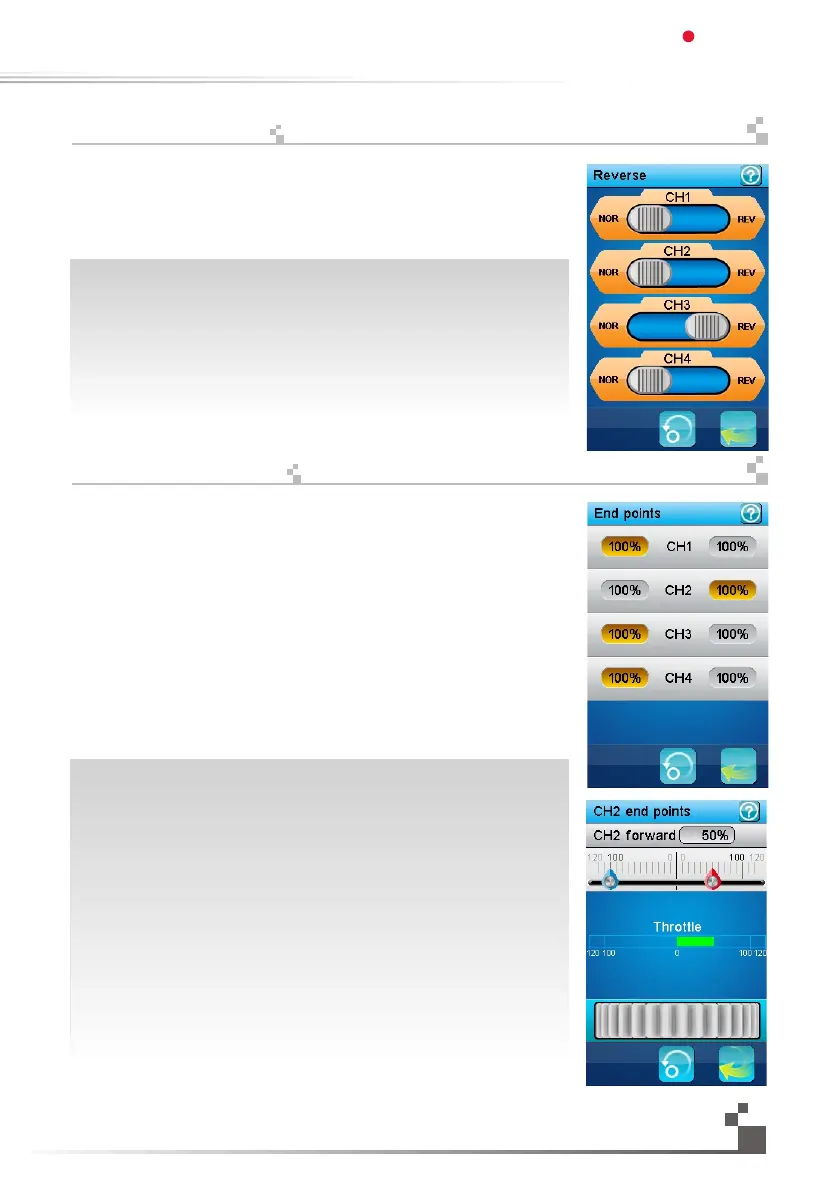
The reverse function individually reverses the direction of operation of the servos
on the 4 channels.
This dialog box contains 4 big check boxes, one for each channel.
To toggle the reverse state of a channel, just touch it.
In this example, only the third channel is reversed, the other channels operate
normally.
역방향 기능은 4개의 채널중 각각을 따로 역방향 상태로 설정할수 있습니다.
이 대화상자는 각 채널을 나타내는 4개의 체크상자로 되어있습니다.
터치를 하면 채널의 역방향 상태를 껏다켤수가 있습니다.
예를 들어 세번째 채널만 역방향으로 설정되면 다른 채널은 정방향으로
작동합니다.
The end points function individually adjusts the low and high travel limit of each servo on
the 4 channels. Set the end points according to your model mechanics.
To choose the side of the channel 1 end point to set (steering), move the steering wheel
to the desired low or high side. The selected side will be highlighted in yellow.
To choose the side of the channel 2 end point to set (throttle), move the throttle trigger to
the desired low (brake) or high (acceleration) side. The selected side will be highlighted
in yellow.
To choose the side of channels 3 or 4 end point to set, use its corresponding trim or
switch to control it. A trim switch or push button has to be previously associated with that
channel to be able to control it.
In this example, the throttle trigger was moved to it acceleration side thus selecting
the high side end point of the channel 2.
To modify the selected end point, simply touch the corresponding channel button.
The red needle represents the selected side. Use the wheel to move it and modify
the end point value.
The position of the corresponding channel is displayed in real time.
In this example, the acceleration side of the throttle is selected and the throttle
trigger is half accelerating.
끝지점은 4개의 채널을 개별적으로 조절할 수 있습니다.
모델에 맞는 끝지점을 설정합니다.
채널1의 핸들 끝지점을 선택하여 낮은값이나 높은값쪽으로 움직일 수 있습니다.
선택한쪽이 노란색으로 표시됩니다.채널2의 가속기 끝지점을 선택하여
낮은쪽(브레이크) 또는 높은쪽(가속)을 설정할 수 있습니다.
선택한쪽이 노란색으로 표시됩니다
미세스위치를 조절하기 위해서는 채널3,4 를 선택합니다.
미세조절 스위치 또는 누름버튼은 해당채널과 연결되어 제어할 수 있습니다.
화면에서 가속기 방아쇠는 채널2의 높은측 끝지점이 설정되어 있습니다.
선택한 끝지점을 수정하려면 해당 채널버튼을 터치하십시오.
빨간 바늘이 선택한 쪽을 표시합니다.
설정값으로 끝지점값을 수정할수 있습니다.
실시간으로 해당채널의 위치가 표시됩니다.
화면은 가속기에 선택되었고 가속기값은 설정값으로 조정할 수 있습니다.
21
역방향
끝지점
Digital propotional radio control system
FS-IT4S
17.01:
Reverse
17.02:
Endpoints


 To Next Page