17.10:
A.B.S.
The automatic brake system (A.B.S.) pulses the brakes to avoid blocking the wheels and losing
control of the vehicle.
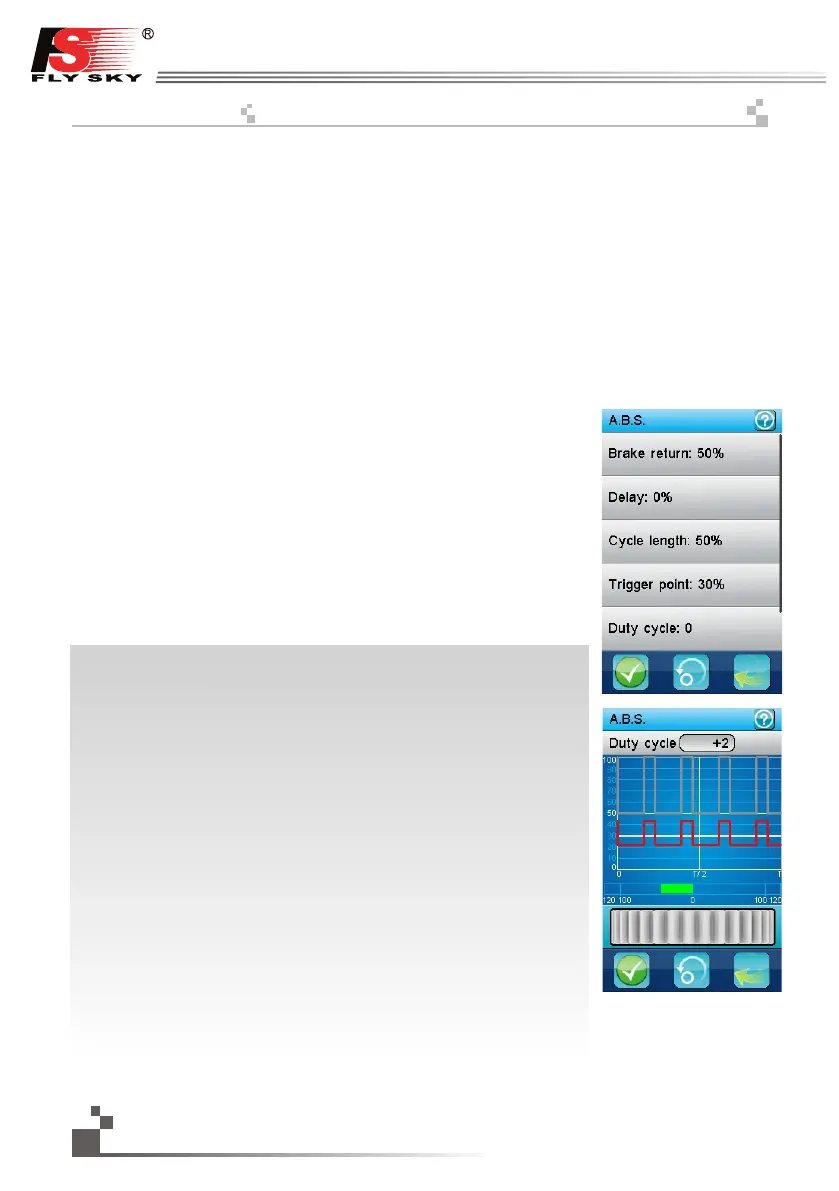
A first menu selects which one of the 6 parameters to modify.
Brake return: determines how much the brakes will be released at each pulse. 100% completely
releases the brakes and the servo returns to its neutral position at each pulse. 0% disables the
function.
Delay: if not 0%, inserts a delay between the ABS triggering and the activation of the brakes
pulses. 100% inserts a delay of around 2 seconds.
Cycle length: determines the length of a brake-release cycle. 20% is the shortest cycle length
(around 100ms) and 100% is the longest (around 500ms).
Trigger point: the ABS function is performed only if the brakes are applied over this threshold.
100% activates the ABS only at full brake.
Duty cycle: set the proportion of the time the brakes are applied and the time the brakes are
released. The lowest value (-4) releases the brakes only 10% of the time and the highest value
(+4) releases the brakes 90% of the time.
Steering mix: a positive value (N) will activate the ABS only if the steering
wheel is within the specified range around the neutral position. A negative
value (E) will activate the ABS only is the steering wheel is outside of that
same range around the neutral position.
Once a parameter is selected, a second dialog box allows to modify it.
The dark gray curve represents the ABS function at full brakes.
The red curve represents the actual ABS function.
The white line represents the trigger point beyond which the ABS
function is performed.
The bar graph at the bottom displays the channel 2 (throttle) in real time.
In this example, the duty cycle parameter is selected and is set to +2
mostly releasing the brakes all the time. The brakes are applied at 43%,
above the trigger point set to 30%.
The activation of the ABS function can be assigned to a push button.
The ABS brake return can be assigned to a trim switch.
The ABS delay can be assigned to a trim switch.
The ABS cycle length can be assigned to a trim switch.
The ABS trigger point can be assigned to a trim switch.
The ABS brake return can be assigned to a trim switch.
The ABS duty cycle can be assigned to a trim switch.
ABS 는 기기통제 불능상태를 막기위해 브레이크를 활성화 시킵니다.
첫번째 메뉴에서 설정하고자 하는 메뉴를 선택 합니다.
브레이크복귀: 브레이크의 진동 반응값을 설정합니다. 100%는 브레이크를 완
전히해제하고 서보는 중립 위치로 돌아갑니다. 0%는 기능이 비
활성화 됩니다.
지연: 0%가 아닌경우, 방아쇠 작동시 브레이크ABS는 해지되지 않습니다.
감도: 브레이크 해제 주기를 설정합니다.
20%는 100ms 정도의 짧은 주기이고 100%는 500ms정도의 가장 긴 주기입
니다.작동시점: ABS 기능은 작동시점 를 초과하는 경우에 작동합니다.100%
는 풀브레이크 시 작동합니다.
작동주기: 브레이크 작동되는 시간과 해제되는 시간의 비율을 설정합니다.
가장 낮은값 -4 는 10%의 시간동안 브레이크를 해제 하고 최고값 +4는 90%
의 시간동안 해제합니다.
조향설정: 양의 값 N 은 핸들의 중립위치주변 정해진 범위에서 ABS를 작동
하게 합니다.
음의 값 E 는 스티어링휠이 중립위치주변 정해진 범위를
벗어날 시작동하게 합니다.
선택을 통해 대화상자를 열어 값을 설정 할 수 있습니다.
어두운 회색 곡선은 풀브레이크의 ABS기능을 나타냅니다.
붉은 곡선은 실제 ABS 기능을 나타냅니다.
흰색 선은 ABS기능이 수행되는 작동시점를 나타냅니다.
하단의 막대 그래프는 실시간 채널2 (가속기) 를 표시합니다.
이 사진은, 작동주기 값 설정 화면이며 +2로 설정 되어있습니다.
작동시점는 30%로 설정되어 있고 43%로 작동됩니다.
누름버튼으로 ABS 셋팅을 완료 할 수 있습니다.
미세 스위치에 ABS 브레이크복귀 를 지정 할 수 있습니다.
미세 스위치에 지연 을 지정 할 수 있습니다.
미세 스위치에 감도 를 지정 할 수 있습니다.
미세 스위치에 작동시점 을 지정 할 수 있습니다.
26
http://www.flysky-cn.com


 To Next Page