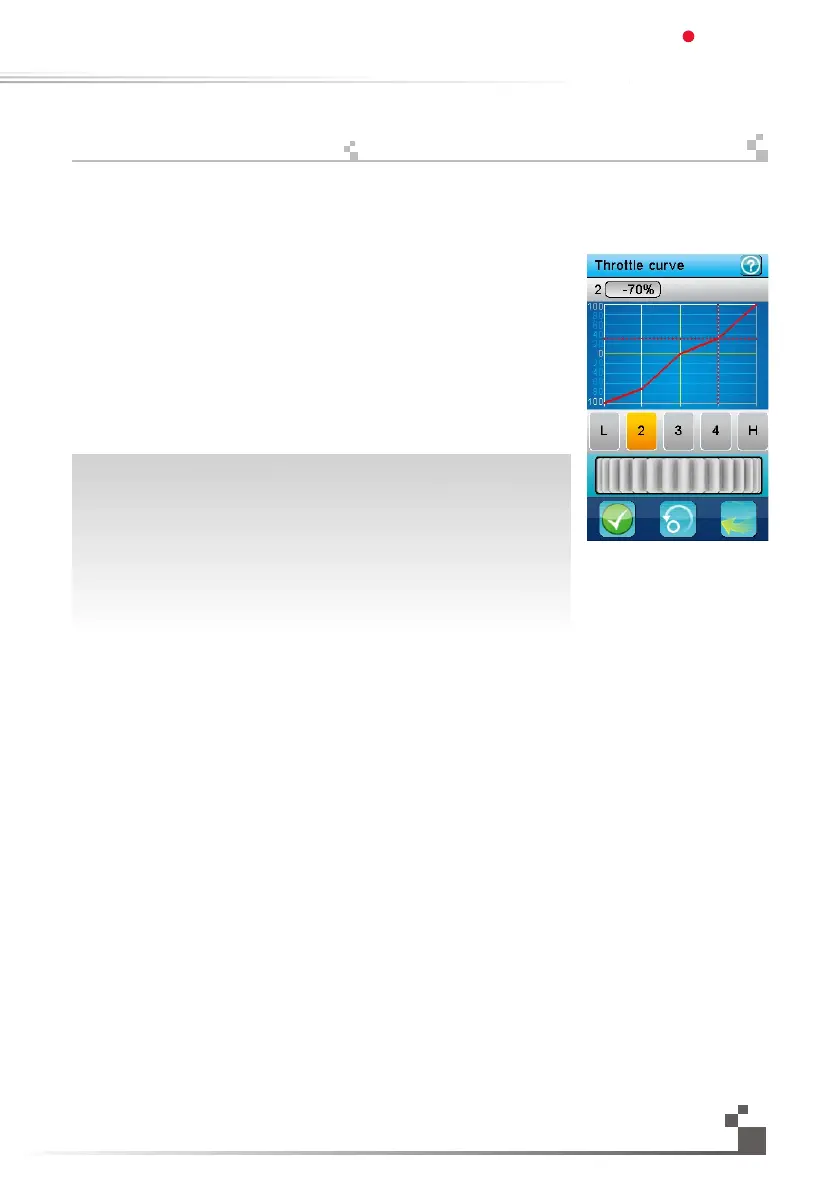
The throttle curve defines a 5 points broken-line transfer curve between the
throttle trigger and the throttle servo.
5 buttons select one on the 5 points to adjust.
Each point can be independently adjusted from 0% (full brake) to 100%
(full throttle).
The vertical dotted line displays in real time the throttle trigger position.
The horizontal dotted line displays in real time the position of the throttle
servo after the
throttle curve function has been applied.
In this example, the second point is selected and set to 15% and the curve
is defined to compensate a throttle servo that is too fast in the first middle
and slower in the second middle. Similarly, this curve compensates a brake
that isn’t efficient enough in the first middle and too efficient in the second
middle.The activation of the throttle curve function can be assigned to a
push button.
가속기변환은 가속기방아쇠와 가속기서보 사이의 전송곡선중 5개지점을 나타냅니다.
5개의 지점중 버튼을 이용해 한 지점을 선택할 수 있습니다.
각지점은 각각 0%(최고속도)~100%(풀브레이크)로 조정할 수 있습니다.
수직점선은 가속기방아쇠의 실시간 위치를 표시합니다.
수평점선은 가속기변형위치와 가속기서보위치를 표시합니다.
이그림은 두번째버튼으로 선택하여 15%로 설정하였고 곡선은 가속기서보를
설정 하였습니다.첫번째 중간은 빠르고 두번째 중간은 느리게 설정되어 있습니다.
마찬가지로,이 곡선의 첫번째 중간은 비효율적으로 브레이크가 설정되어 있으며
두번째중간은 효율적으로 설정되어 있습니다.
누름버튼으로 가속기 곡선기능을 실행할 수있습니다.
25
속도변환
Digital propotional radio control system
FS-IT4S
17.09:
Throttlecurve


 To Next Page