환경설정
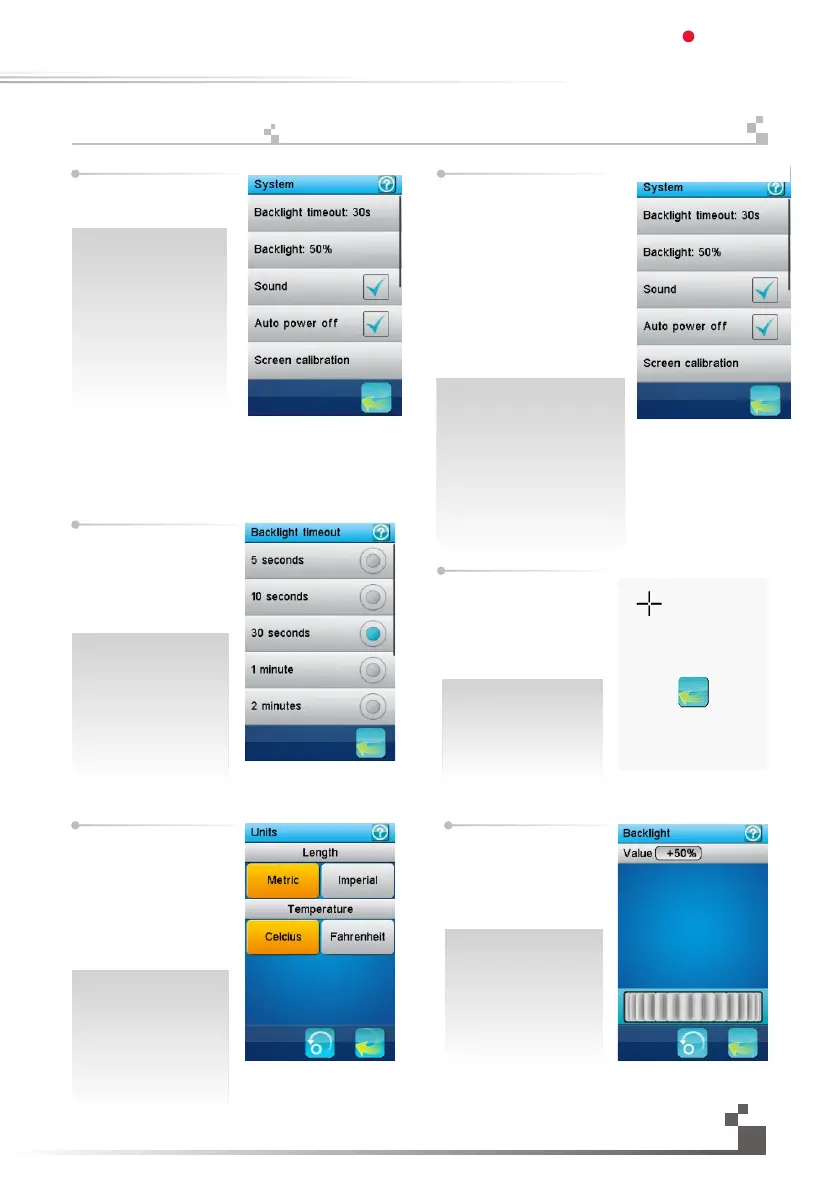
The system menu sets
various system wide
parameters
Backlight timeout: set how
much time the LCD backlight
will stay on if no key is pressed
and the screen is not touched.
The longer the LCD backlight
stays on, the shorter the
battery of the transmitter lasts.
환경설정 메뉴는 시스템
전반의 환경을 설정합니다.
조명꺼짐시간:
키가 눌러지지 않거나 스크
린이 터치되지 않을때 LCD
화면이 켜져있을 시간을 설
정하세오.설정시간이길수
록,조종기 배터리 수명은 짧
아집니다.
화면조정:
터치스크린이 정확하지않
는경우 이를 교정하는기능
입니다.교정하기위해서는
지속적으로 나타나는 십자
형의 중앙부분을 터치하세
요.
Backlight: adjust the level of
the backlight. A high brightness
can be useful in a very bright
environment like a sunny
weather. The brighter the
backlight is, the shorter the
battery of the transmitter lasts.
조명꺼짐시간:
키가 눌러지지 않거나 스크린이
터치되지 않을때 LCD화면이 켜
져있을 시간을 설정하세오.설정
시간이길수록,조종기 배터리 수
명은 짧아집니다.
화면밝기:
화면 밝기를 조정하세요.화창한
날씨등의밝은환경에서는 높은
밝기가 적당합니다.화면이 밝을
수록,조종기 배터리수명은짧아
집니다.소리:조종기의 음량을 높
이거나 음소거 할 수 있습니다.
Sound:
Turn on or turn off the sound
of the transmitter.
Auto power off:
After five minutes of no
operation, the transmitter
will sound an alarm and
flash its LED. After five
more minutes of no
operation, the transmitter
with automatically shut
down. Touch "Auto power
off" to cancel automatic
power off function.
Screen Calibration:
This function can be used
to calibrate if touch screen
is not accurate enough.
Touch the appearing cross
center point constantly to
calibrate.
37
Units: select length and the
temperature unit.
Length: Metric uses
millimeter, kilometer and
kilometer per hour. Imperial
uses inch, mile and mile per
hour.
Temperature: select between
Celsius and Fahrenheit
degree.
단위:길이와 온도의 단위
를 선택하세요.
길이:밀리미터,킬로미터,
그리고 시간당 킬로미터
(km/h)를 사용합니다.
다른 단위로는 인치,마일,
시간당 마일(mi/h)을
사용합니다.
온도:섭씨와 화씨중에
선택하세요.
화면밝기:화면 밝기를조
정하세오.화창한 날씨등
의 밝은환경에서는 높은
밝기가 적당합니다화면
이 밝을수록,조종기 배터
리 수명은 짧아집니다.
Digital propotional radio control system
FS-IT4S
17.23:
System


 To Next Page