http://www.flysky-cn.com
36
수신기설정
사진1
사진2
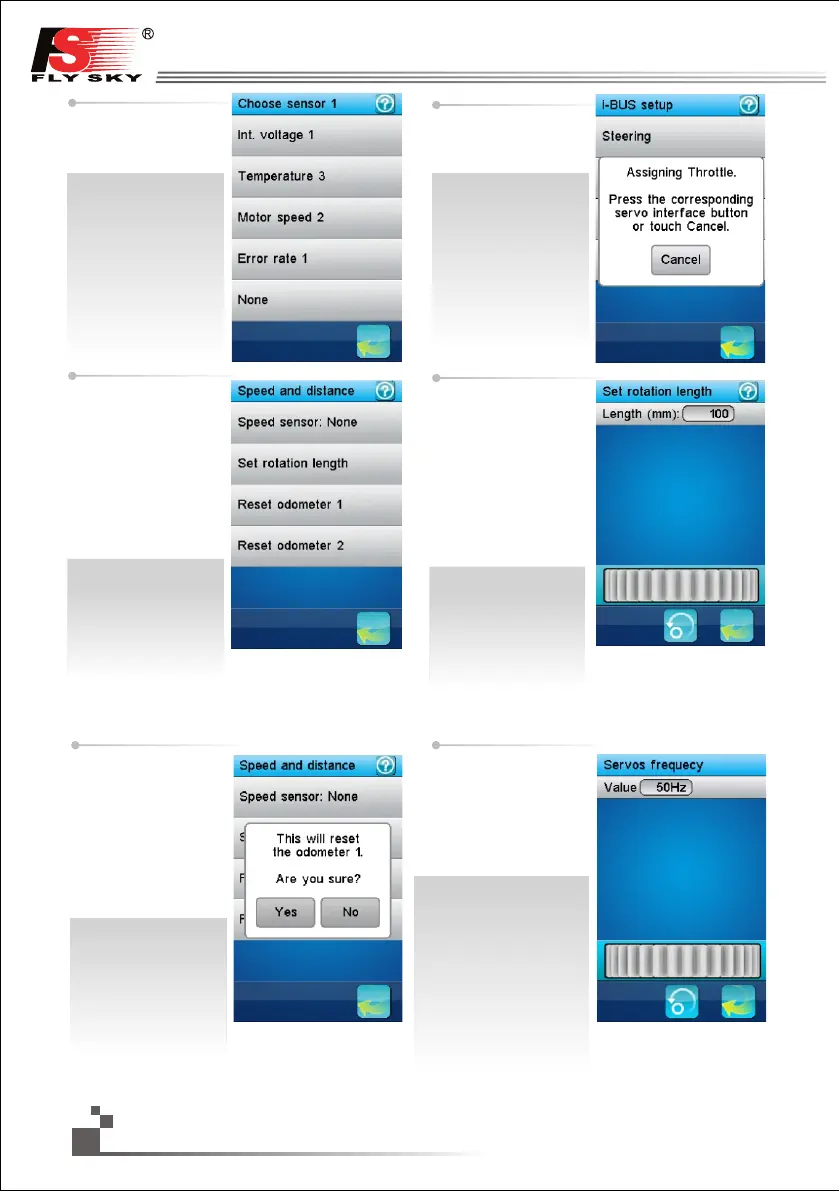
Speed and distance:
As shown in picture 1, if a
rotation speed sensor is
connected to the receiver,
this function set up the
virtual speed and
odometers sensors.
Speed sensor:
Select the rotation speed
sensor to use. If none is
selected, this function is
disabled.
Servo frequency selection:
Reset odometer:
Touch "Reset odometer 1
” or “Reset odometer 2" to
reset the corresponding
odometer.
Odometer 1: it is used for
recording the distance
traveled by the vehicle one
time
Odometer 2: it is used for
recording total distance
traveled by the vehicle.
The next menu lists all
available sensors. Touch
the desired sensor or press
the back button to cancel.
If an interface setup button
is pressed, a message box
indicates what assignment
was made.
Set rotation length:
Set the vehicle travel
distance corresponding to
one rotation speed sensor.
This distance is used to
control the virtual speed
and odometers sensors.
Touch “Set rotation length”
to set distance traveled by
the vehicle in one revolution
of wheel or gear. (Unit: mm)
As shown in picture 2, touch
back button to go back.
Rolling idler wheel to set
data of frequency,it will
be saved after exit. Click
“servo frequency” menu,
you can check the data of
current frequency.
서보 주파수 선택:
이기능은 수신기에 연결된
서보의 주파수를 설정합니다.
주파수가 잘못 설정되면,
서보가 오동작 할 수있습니다
주파수 는 서보의 사용
설명서를 참조하십시오.
주파수값은 수신기의
메모리에 저장되기 때문에,
수신기는 켜져 있어야 합니다.
기록초기화:
주행기록1,2를 초기 설정
으로 되돌립니다.
주행기록계1: 한번 운행
에 차량의 이동 거리를
측정합니다.
주행기록계2:차량의 총
이동 거리를 측정합니다.
속도센서가 수신기에 연
결되어 있는 경우,가상속
도와 주행거리 측정이 가
능합니다.
속도센서:연결되어 있는
속도센서를 선택합니다.
아무것도 연결되어 있지
않은 경우 이 기능은 사용
되지 않습니다.
회전길이설정:바퀴 지름
을 설정하여,속도와 주행
거리를 측정 합니다.
다음 메뉴는 사용 가능한
센서들을 나열한 것입니다.
원하는 센서를 선택
하거나 이전 버튼을
눌러 취소하십시오.
인터페이스 설정 버튼을
누르면, 어떤 임무를
수행했는지 나타내는
메시지 상자가 나타날
것입니다.
회전길이 설정 :
바퀴의 지름을 입력하여
현재 속도와 주행거리를
기록합니다


 To Next Page