기능조작
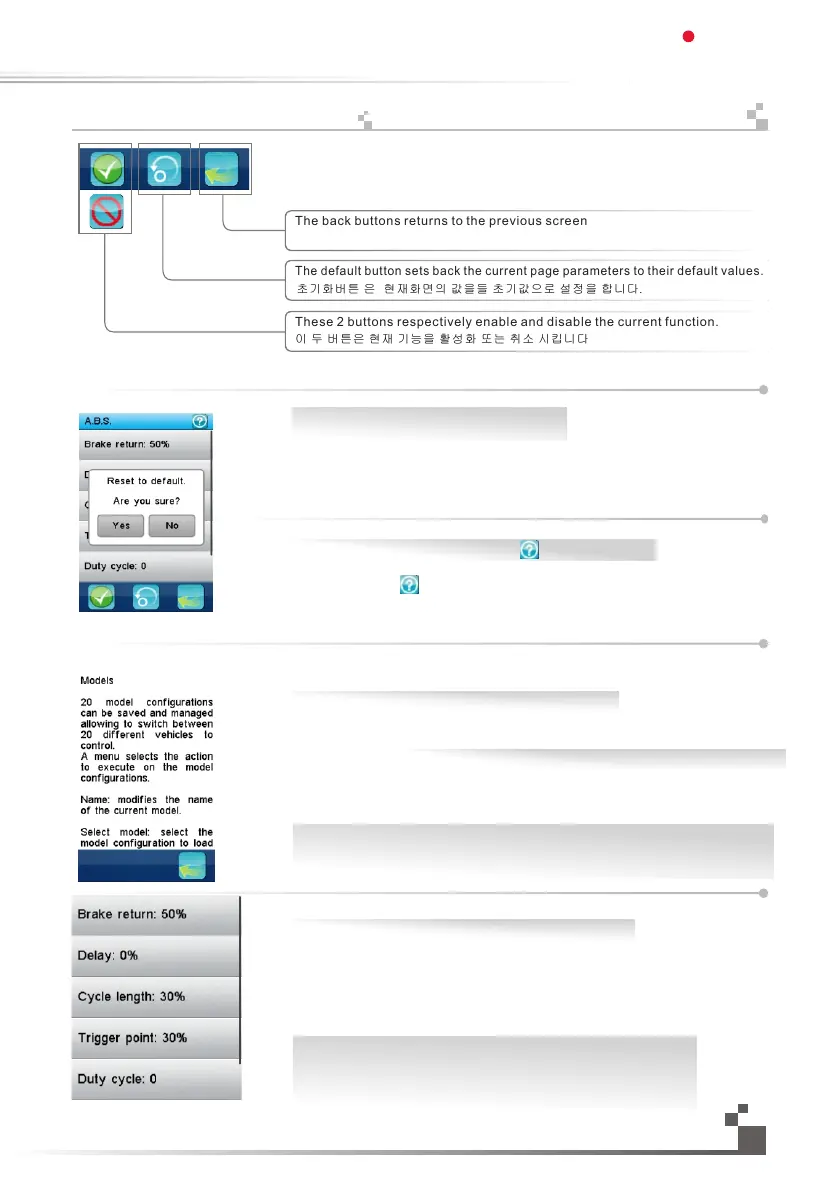
All functions use a set of standard user interface objects.
The bottom tray can contain the following buttons:
The back buttons returns to the previous screen
The default button sets back the current page parameters to their default values.
These 2 buttons respectively enable and disable the current function.
A title bar displays the name of the current function or menu.
A white exclamation mark on the right of a title bar indicates that contextual help
is available. Touch it and it will be displayed.
To scroll down a help page, touch it anywhere on its bottom part and slide it up.
To up down a help page, touch it anywhere on its top part and slide it down.
To return to the calling function, touch the back button in the bottom tray.
하단 트레이의 모든 기능버튼들은 아래와 같은 기능을 가지고 있습니다.
이전버튼 은 이전 화면으로 돌아갑니다.
초기화버튼 은 현재화면의 값을들 초기값으로 설정을 합니다.
이 두 버튼은 현재 기능을 활성화 또는 취소 시킵니다
제목표시줄에는 현재 기능이나 메뉴를 표시합니다.
제목표시줄의 오른쪽 흰색물음표를 터치하여 상황에 맞는 도움말을 불러올수 있습니다.
화면의 하단부분 아무곳을 누르고뒤 위로 밀면 도움말페이지를 내릴수 있습니다.
화면의 상단부분 아무곳을 누른뒤뒤 아래로 밀면 도움말페이지를 내릴수 있습니다.
기능선택 페이지로 돌아가려면 하단트레이의 이전버튼 을 터치하십시오.
A vertical menu allows to select one option among several.
This example selects the ABS parameter to set. The right gray vertical bar
indicates the lengths of the menu and the current position in it.
To scroll down a vertical menu, touch it anywhere on its bottom and slide it up.
To scroll up a vertical menu, touch it anywhere on its top and slide it down.
To select one of the menu items, simply touch it.
세로로 된 몇가지 메뉴중 하나의 옵션을 선택할수 있습니다.
ABS 값 설정을 누른 화면입니다. 오른쪽 회색세로줄은 화면에서의
현재 위치를 나타냅니다.
메뉴를 아래로 내리려면,버튼의 아무부분을 밀어서올리세요.
메뉴를 위로 올리려면, 버튼의 아무부분을 아래로 내리세요.
터치하여 매뉴항목을 선택할 수 있습니다.
Yes: 현재 표시된 기능을 초기값으로 되돌리기
No: 아니오
Yes: reset to default the current displayed function
No: no operation
19
도움말을 보시려면 오른쪽 상단모서리의 버튼을 터치하세요.
Please touch the“ ”in the top right corner to get help information
Digital propotional radio control system
FS-IT4S
17.
Functionsinterface


 To Next Page