This is the beginning of
the push button functions
list menu.
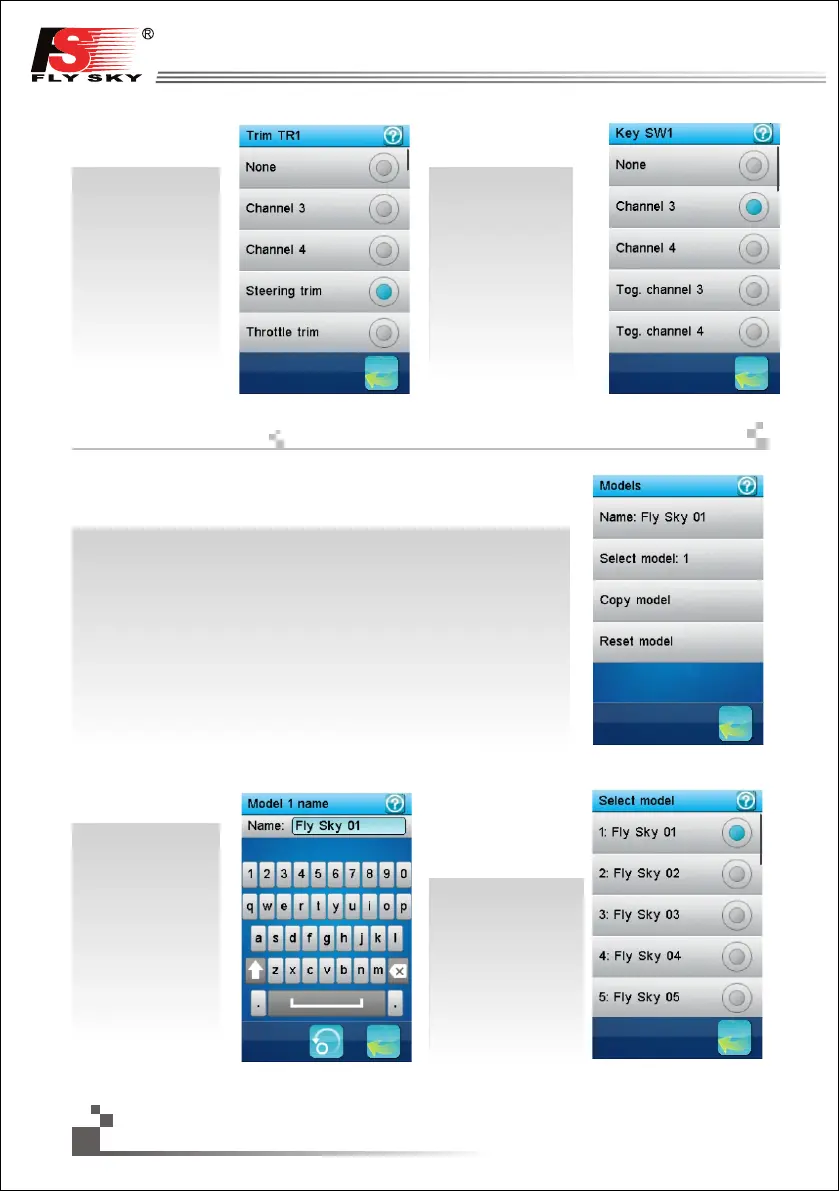
20 model configurations can be independently saved and managed allowing to instantly
switch between 20 different vehicles to control.
A menu selects the action to execute on the model configurations
Name:
modifies the name of the current
model.
Select model:
select the model
configuration to load and use.
In this example, the first
model is selected. Simply
touch another model menu
item to load and use it.
이것은
미세 스위치기능 메뉴의
시작부분입니다.
이것은 누름 버튼
기능 메뉴의
시작부분입니다.
20개의 모델구성은 각각 독립적으로 20개의 다양한 차량으로
즉시 조종 할 수 있게 저장 및 관리 할 수 있습니다.
메뉴는 모델구성에 수행할 작업을 선택합니다.
이름: 현재 모델의 이름
을 수정합니다
모델선택:실행할 모델을
선택합니다.이예시에서는,
첫 번째 모델이
선택되었습니다.
다른 모델을 사용하기
위해서는 다른 메뉴
아이템을 선택하십시오.
This is the beginning of the
trim switch functions list
menu.
32
http://www.flysky-cn.com
모델
17.21:
Models


 To Next Page