ELIOS 2 USER MANUAL Page 101 of 106
Changing a Bumper
REQUIRED TOOLS:
-
T8 screwdriver
-
Bumper
-
M5 bumper screw
-
2.5mm zip ties
1-
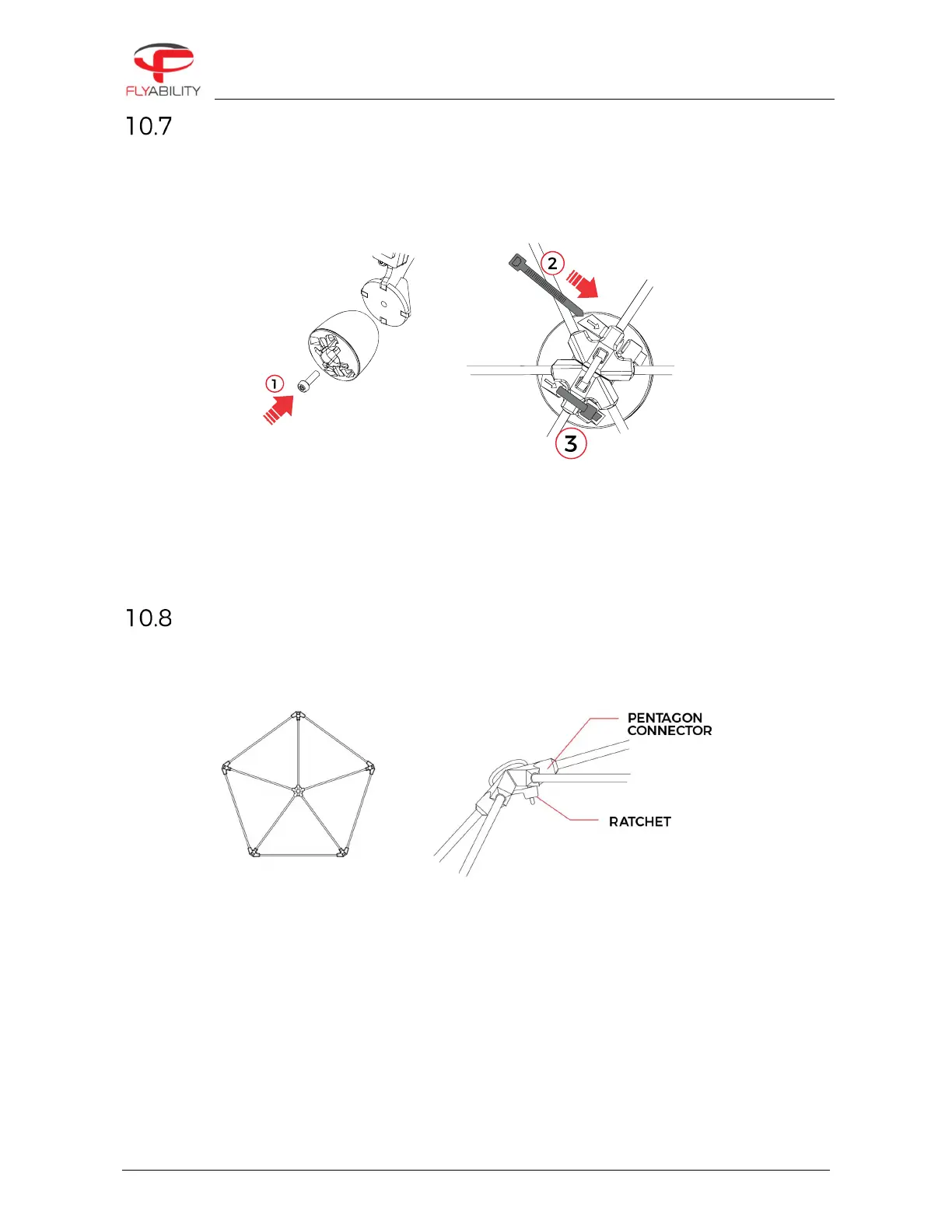
Screw the bumper on the frame arm with the M5 bumper screw.
2-
Insert the zip tie through the bumper following the engraved arrow. The gear tracks have to be towards
the outside.
3-
Tighten and trim the zip tie. The ratchet should be placed in the bumper’s ratchet holder.
Changing a pentagon
A protective cage with damaged elements becomes softer and more fragile. Not maintaining the cage can
significantly reduce its collision tolerance.
–
Cut the surrounding zip ties with the cutting plier and remove the damaged pentagon.
–
Place the new pentagon and attach it with new zip ties.
–
Be careful to place the zip ties’ ratchet on the inner side of the cage.
–
Using the gripping plier tighten the zip ties.
–
Using the cutting plier, trim the zip ties’ tape



 To Next Page