ELIOS 2 USER MANUAL Page 16 of 106
TO REMOVE THE BATTERY, DO NOT PULL ON THE CABLES. IT MAY
DAMAGE THE BATTERY.
Refer to the
Battery Safety Guidelines
for more battery information and specifications.
Setting up the ground control system
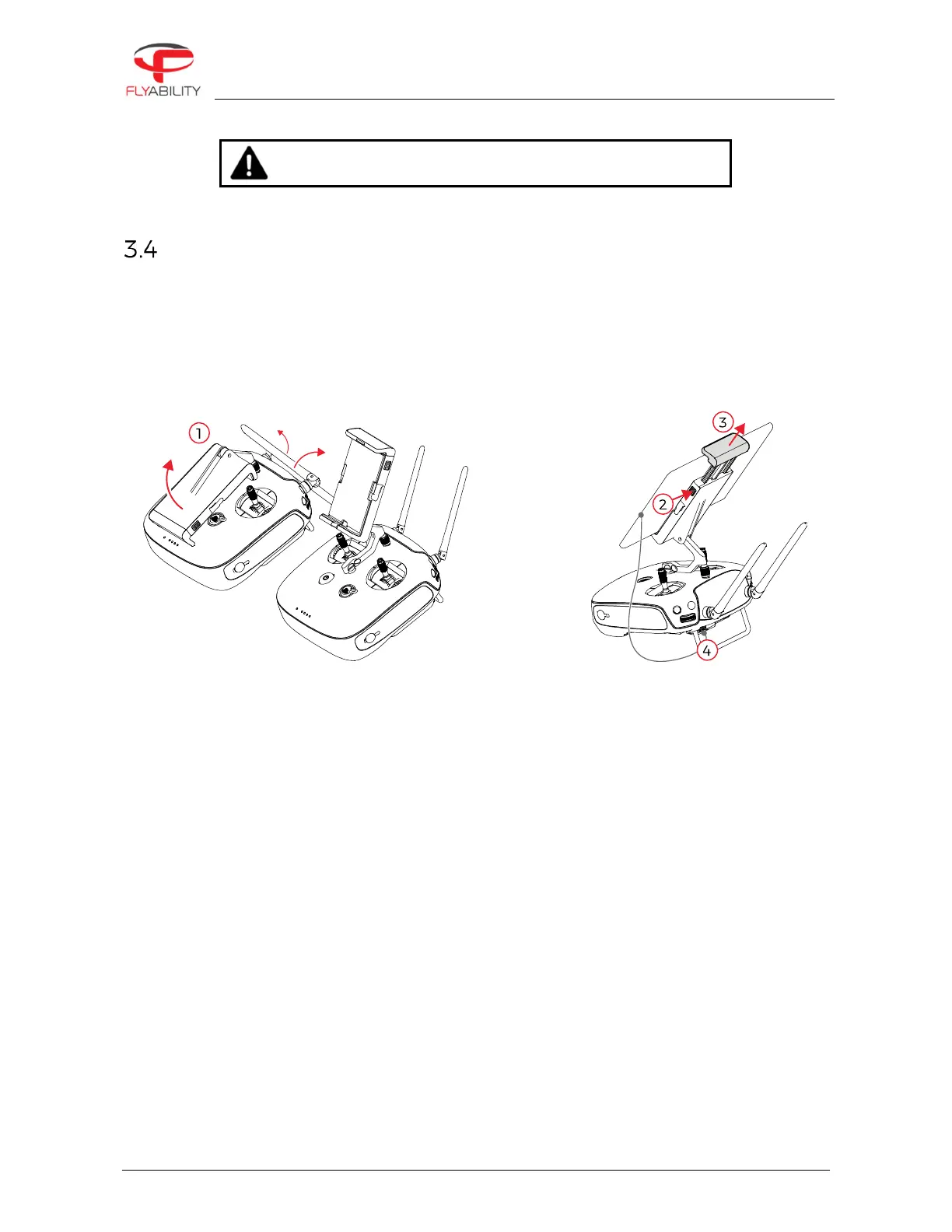
MOUNT THE TABLET
To mount the GCS, follow these steps:
1.
Put the antennas and the tablet holder in a vertical position.
2.
Press the button on the side of the tablet holder to release the clamp.
3.
Secure the Tablet inside the clamp.
4.
Connect your tablet to the remote controller via the USB cable.
Figure 3.4: Assembly of the GCS
POWER ON THE CONTROLLER
To turn the controller on/off:
–
press the power button once; it will display the battery level on the LED
–
Press it again and hold
The controller will turn on; the same sequence can be used to turn it off again.
POWER ON THE TABLET
–
To turn on/off the tablet, press and hold its power button.
RUN THE COCKPIT APP
–
The cockpit app is used to view the live video and telemetry data from the drone.



 To Next Page