ELIOS 2 USER MANUAL Page 47 of 106
Radio panel
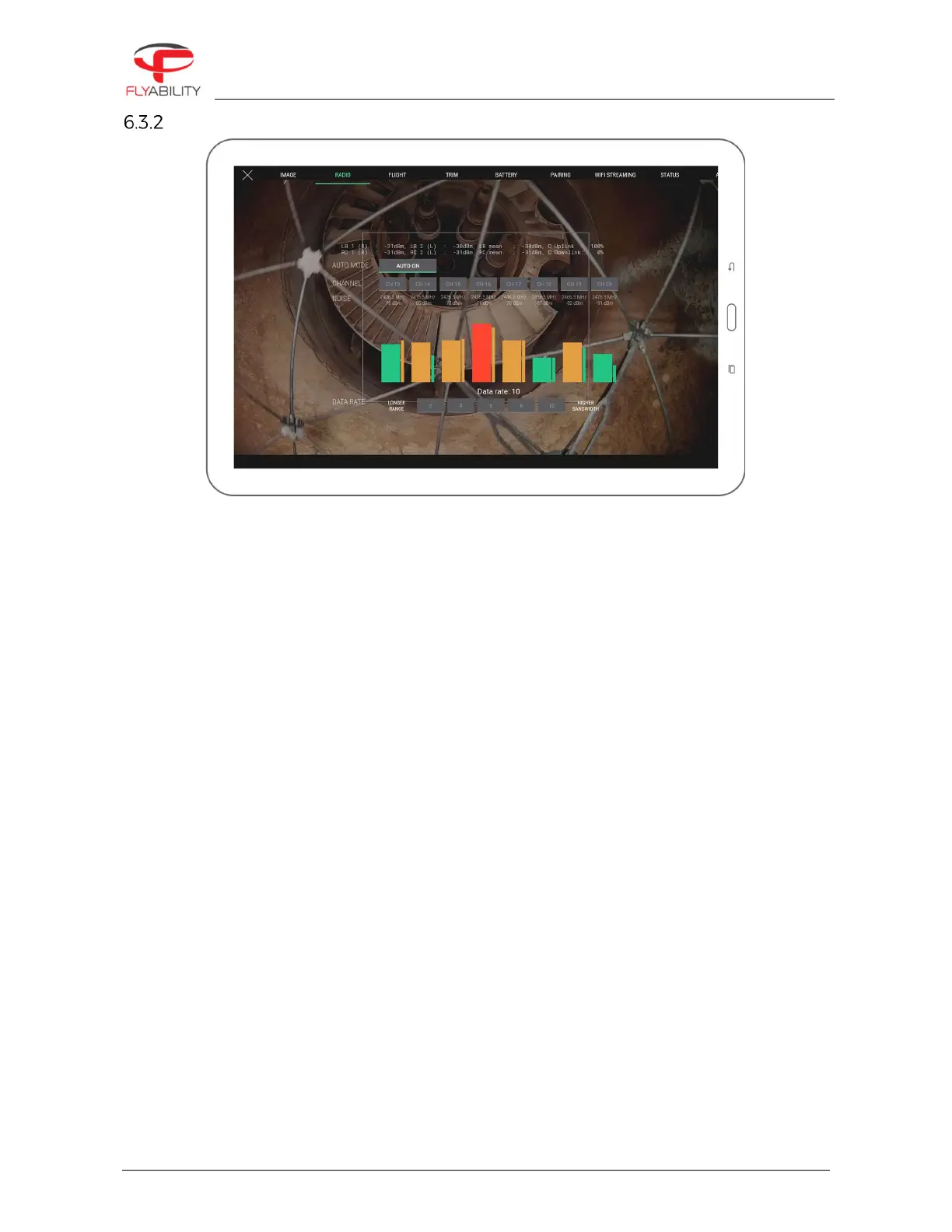
This panel displays detailed data about the radio link quality between the controller and the aircraft.
Regular flight operation should not require changing settings shown here. However, if you are in an
environment challenged by parasite radio signals, have other aircraft flying in the same area or have particular
constraints by plant radio equipment, you can select a specific channel.
This screen shows the noise on each radio channel which the underlying system is able to use to stream the
video feed. By default, the automatic mode is enabled, making an automatic jump to a different channel if the
current one is deemed too busy for a quality link. You can force using a specific channel by tapping the
corresponding button.
Noise readings are related to how busy each channel is. A higher reading probably means that other radio
communications already operate on the same channel in the surroundings; the closer the radio operation
happens, the bigger the noise. Below each channel, the large bar is an average reading, and the small one is
an instantaneous reading. Colors go from green to orange, then red as the noise level is higher.
When manually choosing a channel, select one which has the lowest noise reading for best signal quality. Once
you select the channel, you may see the corresponding noise level raising; this is expected behavior as radio
transmission starts on the selected channel.
By tapping the Auto button, you can resume the automatic mode for channel choice.



 To Next Page