ELIOS 2 USER MANUAL Page 54 of 106
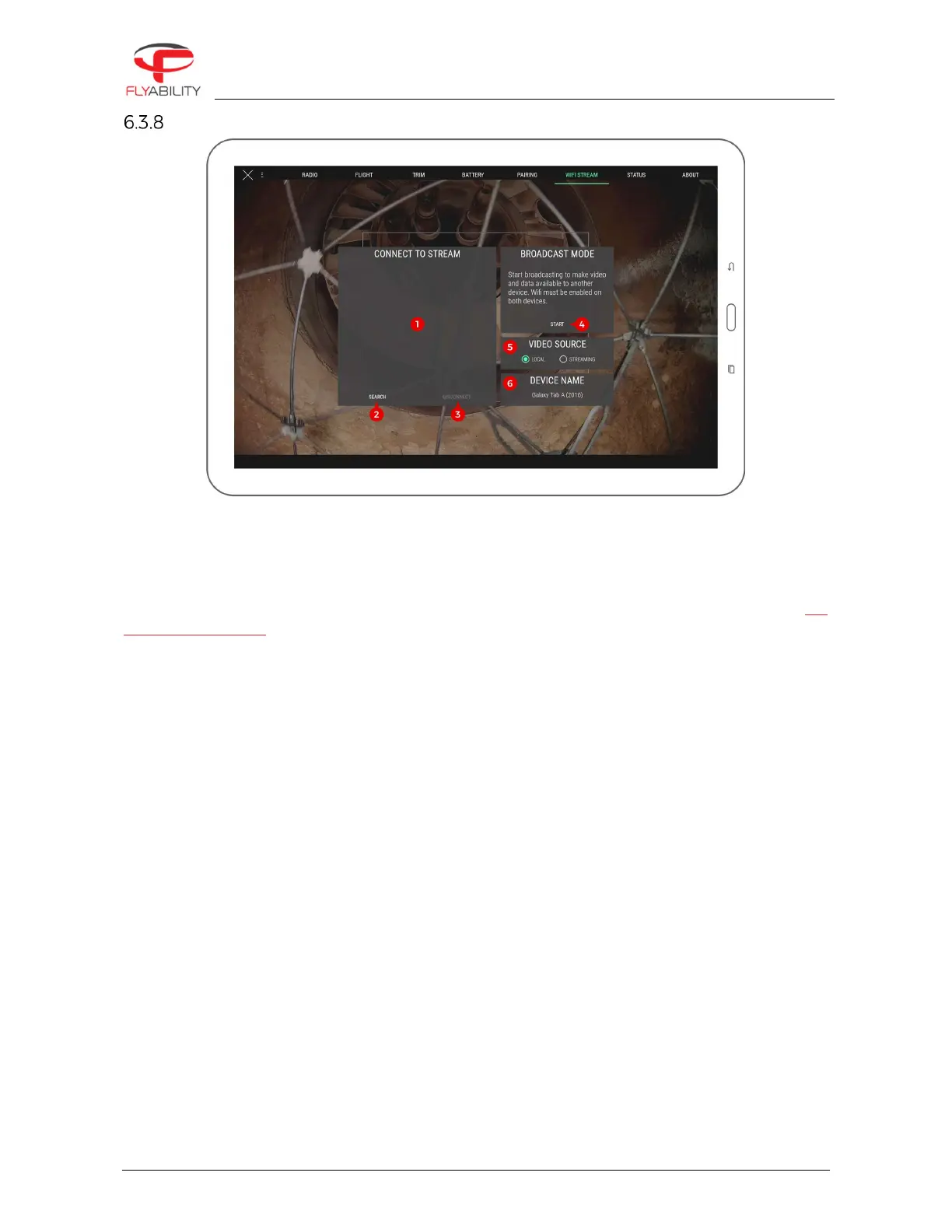
Wifi streaming panel
This panel controls everything related to data streaming between two devices through wifi. Wifi streaming
allows using a secondary device as a simple viewer without needing to connect it to an actual remote
controller; thus, two people can monitor a flight while using a single remote controller. Wifi streaming requires
all devices to support Wi-Fi Direct.
Detailed processes on how to work with wifi streaming are explained in standard procedures. See the wifi
streaming procedures.
1.
List of detected Wi-Fi direct devices (used to connect to a streaming device when in receiving role)
2.
Streaming devices search button (starts a new search of devices around)
3.
Disconnect button (disconnects active connection, available when a connection is established)
4.
Broadcast start/stop button (starts streaming from the current device and makes it visible from other
devices)
5.
Video source selection for easy switching
Local: locally-connected RC and aircraft through USB cable (default)
Streaming: video streamed over wi-fi from another device
6.
Name of this Android device as listed in wi-fi system options; refer to this name when searching the
current device from another device in receiving role.



 To Next Page