ELIOS 2 USER MANUAL Page 56 of 106
About panel
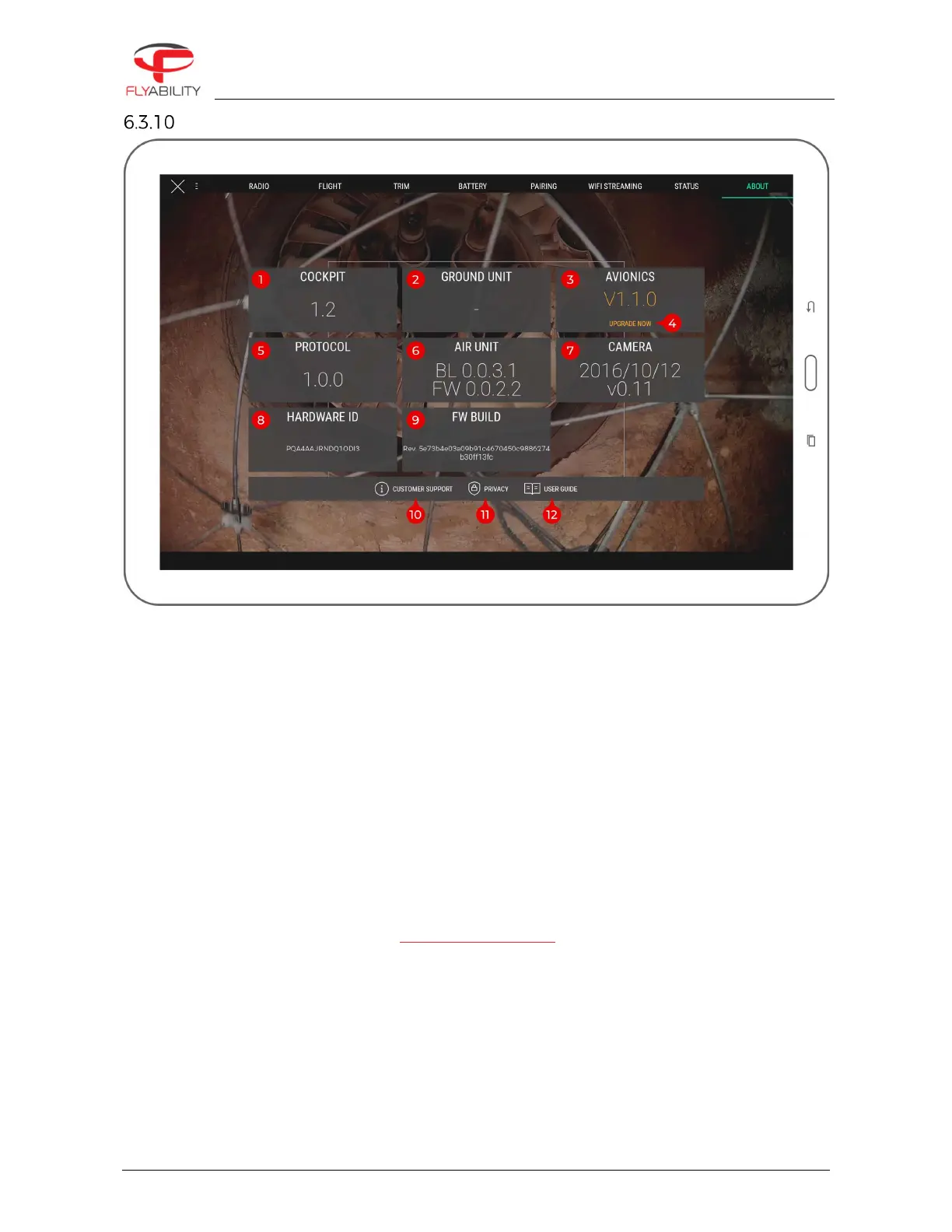
The different version numbers and identifiers of the Elios system are mentioned on this page.
In any incident report, please make sure to include the data shown here; this information helps Flyability to
troubleshoot the issue you are experiencing and expedites incident response time.
1.
Cockpit version
2.
Ground unit (remote controller firmware) version
3.
Avionics version of connected aircraft
4.
Only on ELIOS 1 – Avionics upgrade button (visible if connected aircraft requires a firmware upgrade,
open the firmware upgrade tool)
5.
Protocol version of connected aircraft
6.
Air unit version of connected aircraft
7.
Camera firmware version of connected aircraft
8.
Hardware identifier of connected aircraft
9.
Build revision of connected aircraft
10.
Customer support information button (shows support contact information)
11.
Privacy settings button (opens the privacy settings window)
12.
User guide button (shows this user guide)



 To Next Page