ELIOS 2 USER MANUAL Page 86 of 106
-
Transparent overlay. This feature works on systems with Windows 8 or higher.
-
Full screen
Camera distance
The telemetry displays the distance measured by the Camera distance sensor. This value can be used to assess
the distance from the drone to the surface located in front. This value is only measured on Elios 2.
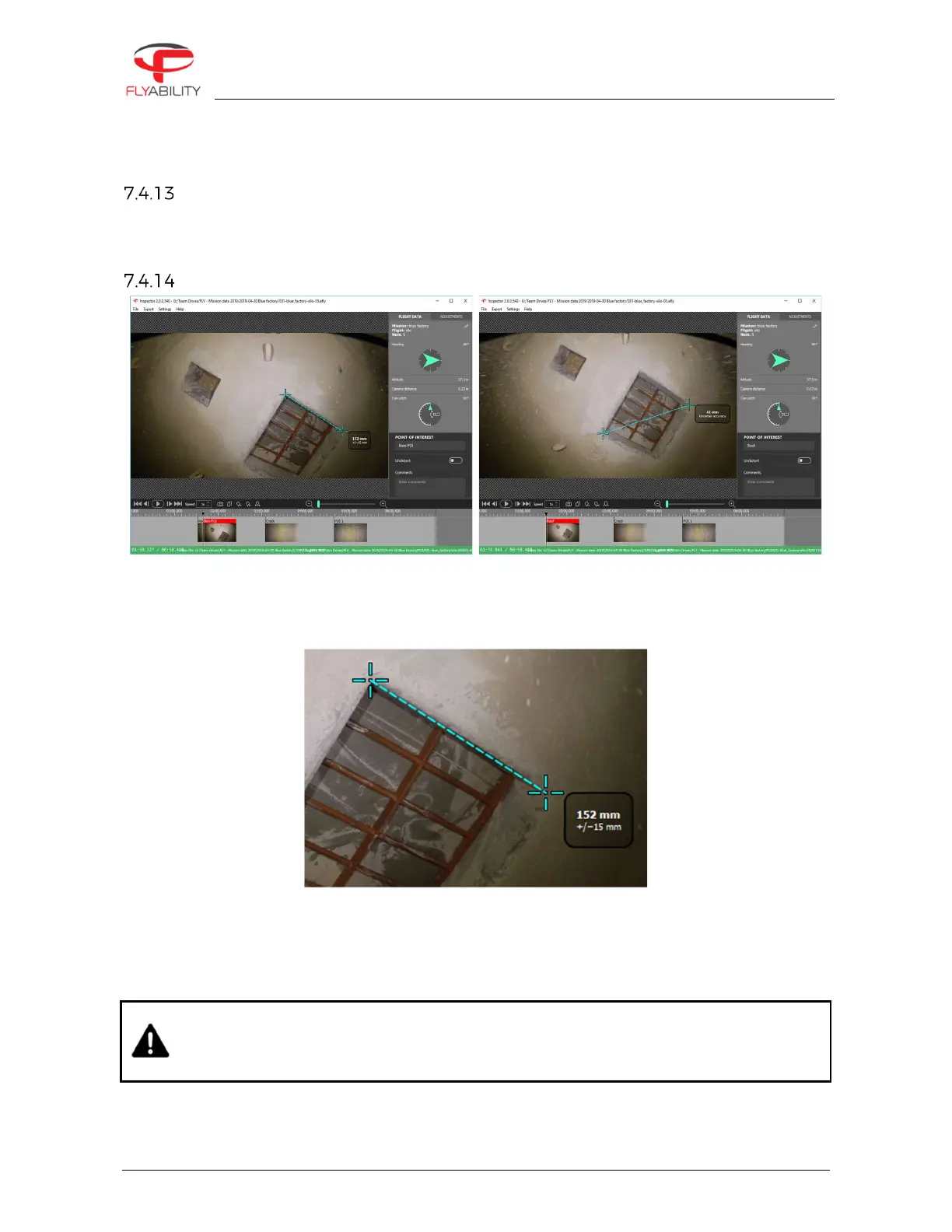
2D measurement
-
Create or edit a POI
-
Click on the frame where to place the first crosshair
-
Click on the frame where to place the second crosshair
-
To redo the 2D measurement click on the image and repeat those steps
The 2D measurement result is displayed on the frame with its estimated accuracy.
If the 2D measurement is not available due to missing or unreliable Camera distance data, Inspector is issuing
the warning “Unable to perform 2D measurement on this frame”.
This feature is only available with data from Elios 2.
THE USER MUST ASSESS IF THE MEASUREMENT MAKES SENSE BY UNDERSTANDING ITS
LIMITATIONS AS DESCRIBED IN THE CHAPTER 2D MEASUREMENT AND IF THE CAMERA
DISTANCE MAKES SENSE.
FLYABILITY DOES NOT GUARANTEE ITS ACCURACY.



 To Next Page