140 141
EN
5. FLYER with Bosch motor
5.1 Operating the Bike with the
Intuvia Control Unit
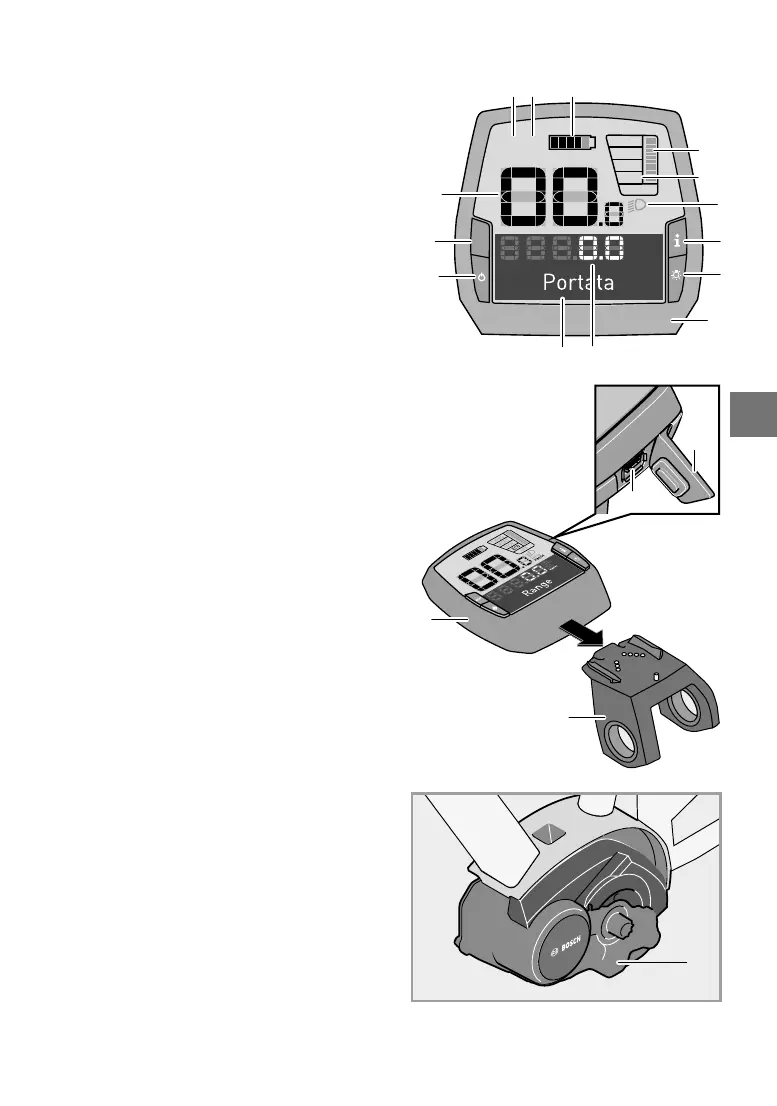
1. “i” display function button
2. Lighting button
3. Control computer
4. Control computer holder
5. On-off button for the control unit
6. “RESET” button
7. USB socket
8. USB protective cover
9. Drive unit
Control computer display elements
a Motor power indicator
b Support level indicator
c Lighting display
d Text display
e Values display
f Tachometer display
g Gear Recommendation: the higher gear
h Gear Recommendation: the lower gear
i Battery charge status indicator
You have the following options for switching on
the e-bike system:
• The e-bike system is automatically switched on
if the controls are on and inside their holder.
• Briey press the controls’ on/off button 5 once
the controls and the battery have been inserted.
• Press the battery on/off button once the con
-
trols have been inserted.
You have the following options for switching off
the e-bike system:
• Press the controls’ on/off button 5.
• Switch off the battery using its on/off switch
(see operating instructions of the battery).
• Remove the controls from their holder.
Switching the controls on/off
Briey press the on/off button 5 to switch on
the controls. The controls can also be switched
on when they have not yet been inserted into the
holder (if the battery is sufciently charged).
Press the on/off button 5 to switch off the controls.
For about 10 minutes, neither move the FLYER
nor push any buttons on the control unit. The
e-bike system will automatically turn off to save
energy.
9
7
8
4
3
TURBO
SPORT
TOUR
ECO
OFF
MPH
KM/H
AMM
PMWH
MIN
MPH
KM/H
RESET
6
5
f
g
h
1
a
i
b
d e
c
2
3



 To Next Page