8
Hardware Features
Front Panel
1 2
24
5 5
4 2
6
7
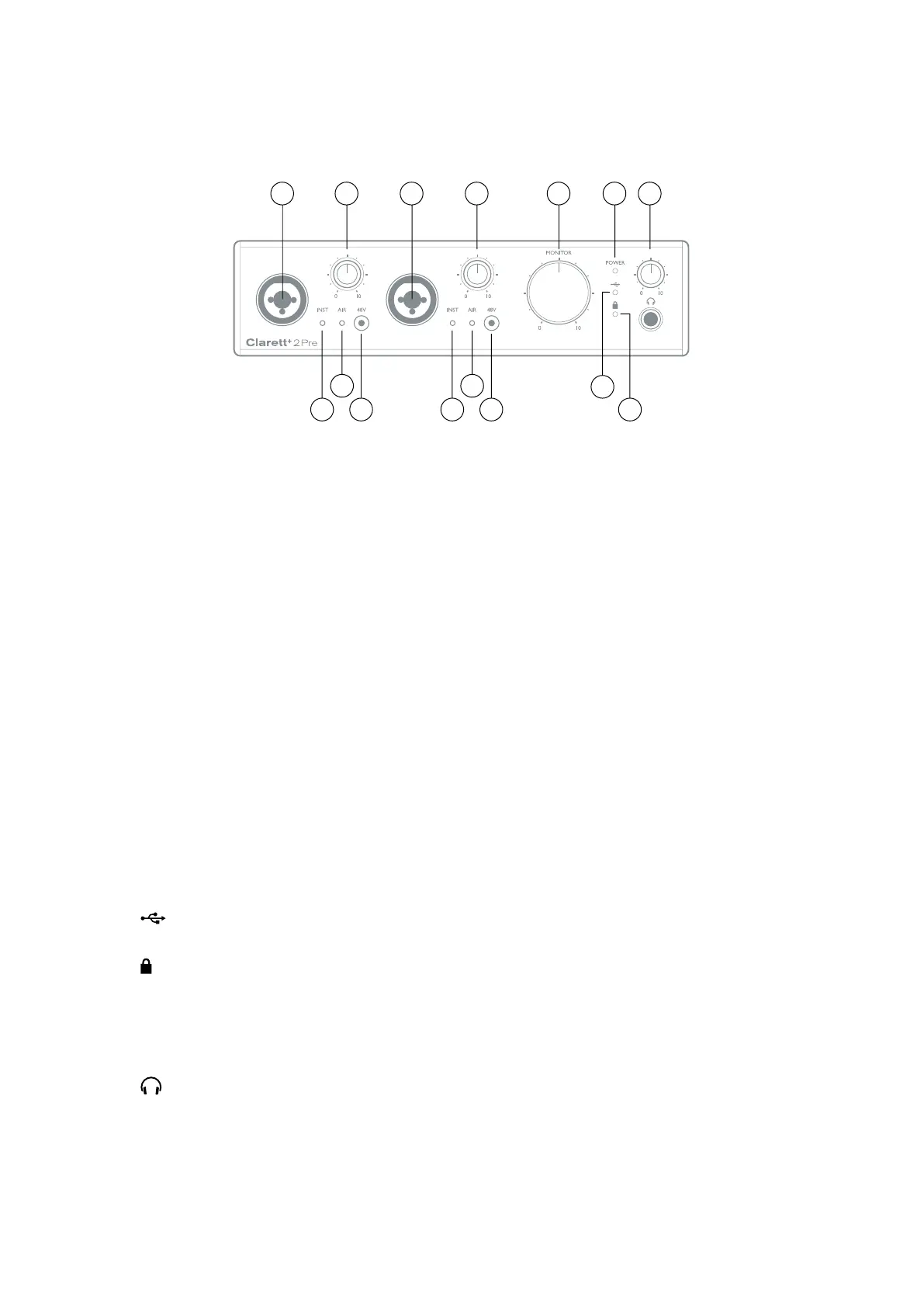
The front panel includes input gain controls and input connectors for Mic, Line and Instrument
signals for both channels, and also monitoring controls.
1. INPUTS 1 & 2 – Combo XLR input sockets for each channel - connect microphones via an
XLR connector, or instruments (e.g., guitar) or line level signals via ¼” jacks. Either TRS
(balanced) or TS (unbalanced) jack plugs can be used for instruments or line level signals.
2. 48V – two switches enabling 48 V phantom power at the Combo connectors’ XLR contacts for
mic inputs 1 and 2. Each switch has a red LED to show when phantom power is enabled. Note
that not all microphones require phantom power. If you are unsure whether your microphone
needs it to work, please read the microphone documentation.
3. Gain 1 and 2 – two rotary controls: adjust input gain for signals at Inputs 1 and 2 respectively.
The gain controls have LED ‘halos’ to confirm signal level: green indicates an input level of
at least -42 dBFS (i.e., ‘signal present’), the ring then turns orange when the signal level
reaches -6 dBFS, and red at 0 dBFS.
4. INST – two red LEDs which illuminate when Instrument mode is selected for the jack Inputs
1 or 2 from Focusrite Control software. When Instrument mode is selected, the line input is
converted to a high impedance unbalanced input. You can connect instruments via a 2-pole
(TS) jack plug here.
5. AIR – two yellow LEDs which illuminate when the AIR function is selected for each input
from Focusrite Control. AIR modifies the input stage’s frequency response to model classic,
transformer-based Focusrite ISA microphone preamps.
6.
(USB active) – a green LED which illuminates when the unit has established a connection
with the computer to which it is connected.
7.
(Locked) – a green LED which confirms clock synchronisation, either to the Clarett+ 2Pre’s
internal clock or to the external digital input.
8. MONITOR – main monitor output level control – this control will normally control the level at
the main monitor outputs on the rear panel, but can be configured in Focusrite Control to
adjust both pairs of analogue outputs.
9.
(Headphones) – connect a pair of stereo headphones at the ¼” TRS jack socket below the
control. The headphone output always carries signals routed to analogue outputs 3 and 4 (as
a stereo pair) in Focusrite Control.
10. POWER – green LED confirming DC power is connected.














 To Next Page