01134592 – REF20/25 LB, PH, BB 11
Alarming Contacts
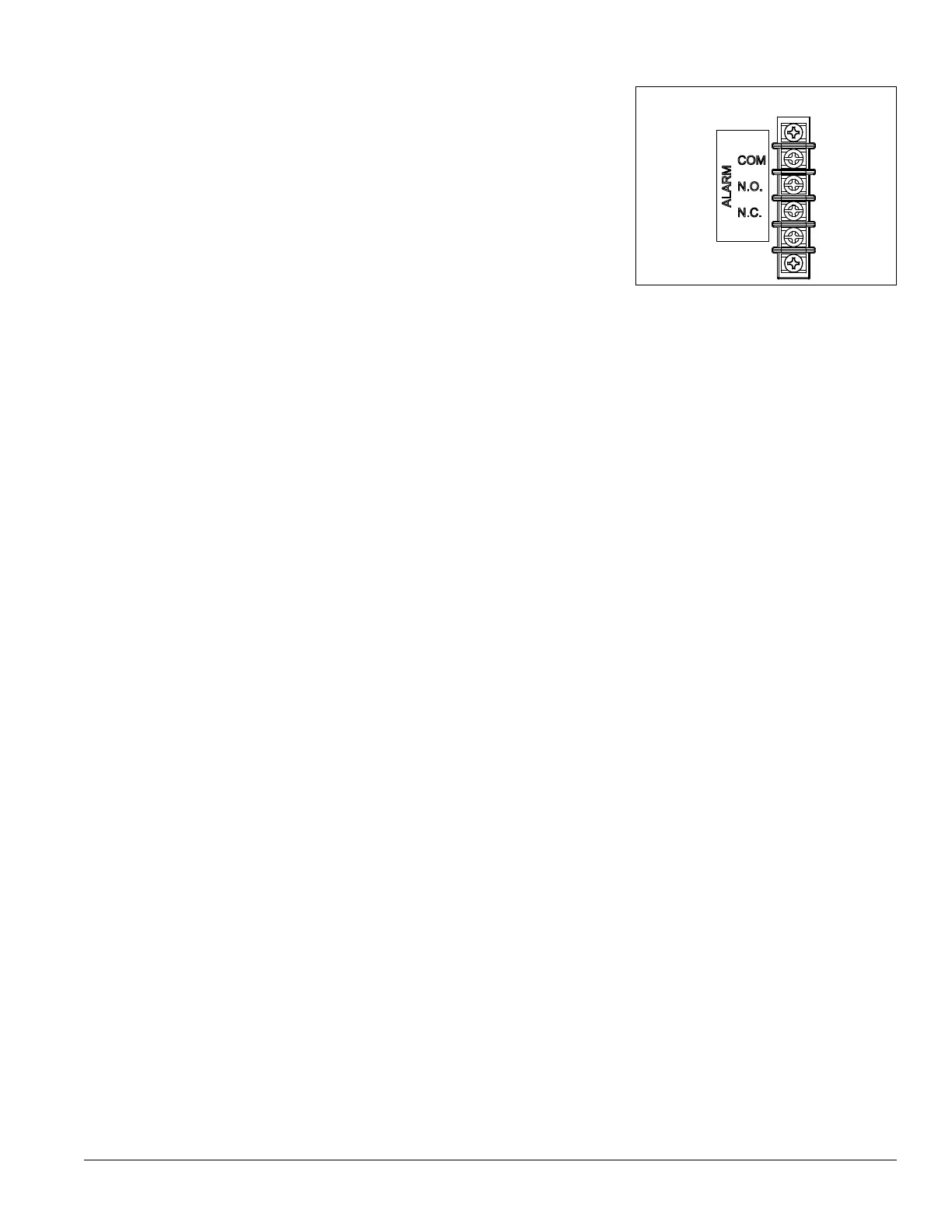
This unit is equipped with dry contacts that may be connected to a third
party monitoring system. The contacts are located on the back of the
facade. Touchscreen units utilize Alarm 1. Each set of dry contacts has a
Common, a Normally Open and a Normally Closed connection point. By
default, Alarm Relay 1 is set to activate with any of the following alarms:
Alarm 1 High temp, Alarm 1 Low temp, Door Open Alarm, and Power Loss
Alarm.
Refer to the wiring diagram in this document for more information.
Fig. 17
REAR PANEL CONNECTIONS
Probe calibration
The temperature probes can be offset –9.9 to +9.9 in the Advanced Menu
settings to deliver a more precise temperature reading.
1. Select Settings
2. Select Advanced settings and enter code 1,1,1,1. Conrm with
Check mark
3. Using the DOWN arrow, scroll through Advanced Settings to
Calibrate screen and select Calibrate
4. Place desired probe (P1-control, P2-Defrost, P4-Top probe,
P5-Bottom probe) in an ice bath and allow 3-5 minutes for
temperature stabilization.
5. Press “Offset” and use the UP/DOWN arrows to offset the probe
reading to the proper value.
Note: In the event of a factory reset, the offset value will return to 0.
Screen saver
The screen saver will replace the home screen and display a blank screen,
time and date, or the temperature. When the screen is touched or the unit
has an alarm or event, it will return to the home screen. The screen saver
can be changed in the advanced setting.
Screen saver function: blank, time and date, or temperature.
Screen saver time (sec): 0—600 seconds between the last touch of the
screen to the activation of the screen saver.




 To Next Page