14 01134592 – REF20/25 LB, PH, BB
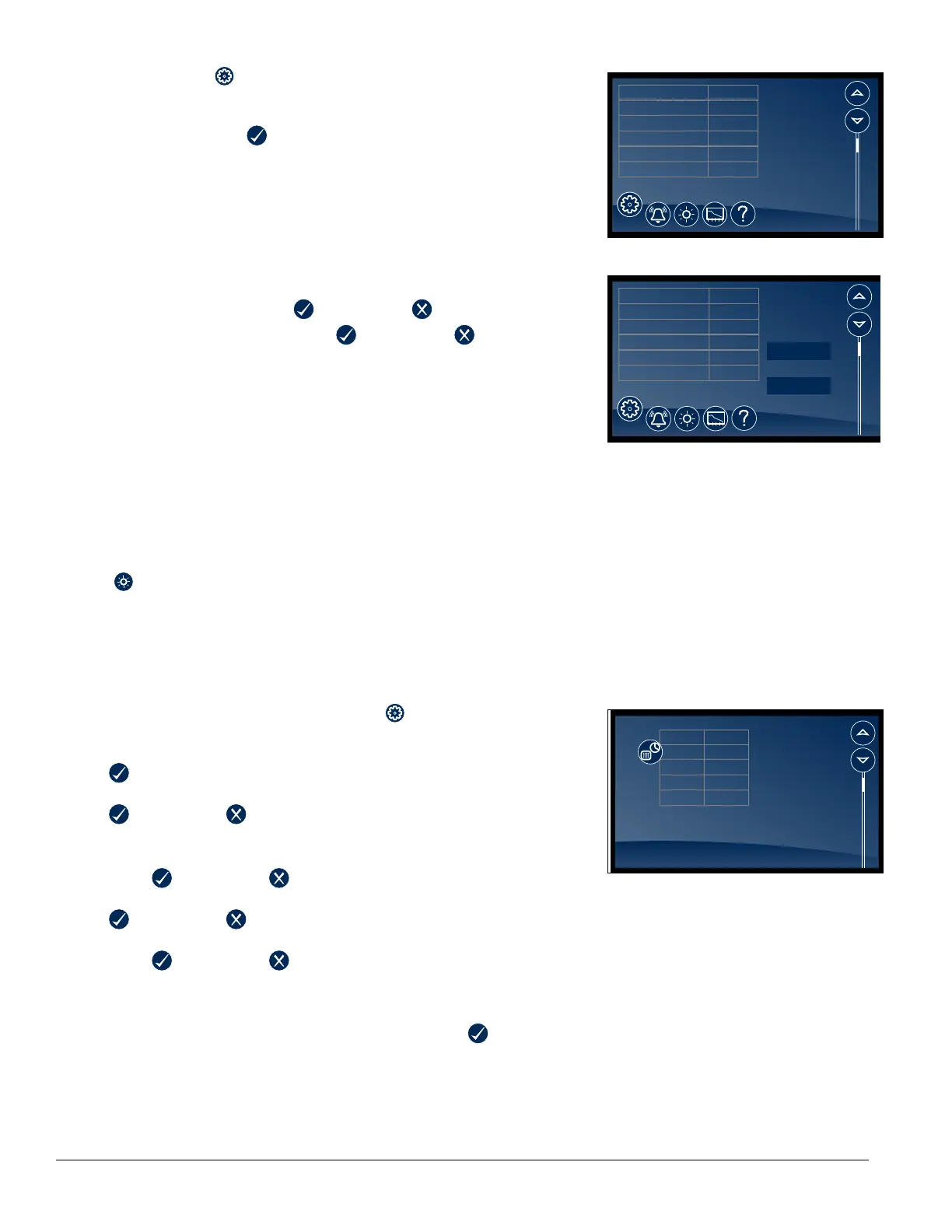
Changing and Adding the User Codes
1. Touch Settings
icon.
1. Touch Advanced Settings, enter your 4-digit user access code
(factory default is 1 1 1 1) in the keypad that appears, and touch
the checkmark icon
to access advanced settings screens.
2. Time and date will be displayed. Scroll using the UP and DOWN
arrows until Change Access Code is displayed in the Display
Setup screen.
3. Touch Change Access Code and enter the master code [ENTER].
(By default, the master code is 1 2 3 4 5 6.)
4. Touch the screen to the right of the user code 2 to 40 to overwrite
or add the user code.
5. Enter the new code. Press
to accept or to cancel.
6. Enter the new code again. Press to accept or to cancel.
7. Press DONE when nished entering access codes.
Fig. 24
38.4 F
Sleep Function yes
Sleep Timer 0
Screen Saver Function temperature
Screen Saver Timer 0
Change Access Code Change
Display Setup (cont)
Fig. 25
38.4 F
User Access Code 01 123456
User Access Code 02 123456
User Access Code 03 200000
User Access Code 04 Empty
User Access Code 05 Empty
User Access Code 06 Empty
Done
Edit Master Code
User Access Codes
Electronic Lock Override
§ Insert key, turn lock.
§ Remove panel.
§ Depress plunger with screwdriver.
Light
§ To turn the interior light on (or off), touch the Light icon or the Light Off
icon.
§ Light timer is in advanced settings.
§ The light will also come on when the door is open.
Time and Date
§ To set time and date, press the Settings
icon.
§ To display options, touch Advanced Settings, enter your 4-digit user
access code in the keypad that appears, and touch the checkmark icon
to access advanced settings screens (factory default is 1111).
§ Time: touch displayed time and use the keypad to enter the time. Press
to accept or to cancel.
§ AM/PM: touch displayed value to toggle between AM and PM.
§ Month: touch number displayed and use the keypad to enter the month.
Press to accept or to cancel.
§ Day: touch number displayed and use the keypad to enter the day. Press
to accept or to cancel.
§ Year: touch number displayed and use the keypad to enter the year.
Press
to accept or to cancel.
Fig. 26
38.4 F
Set Time and Date
AM/PM AM
Month
1
Time
9:27 AM
Year 2014
Day
16
Advanced Settings
§ Touch Advanced Settings, enter your 4-digit user access code in the
keypad that appears, and touch the checkmark icon to access
advanced settings screens (factory default is 1111).




 To Next Page