The SystemWhen You Say
Makes a best guess from the media
candidate list; you may still occasionally be
asked questions.
"MEDIA CANDIDATE LISTS OFF"
Clarifies your voice command for media
candidates.
"MEDIA CANDIDATE LISTS ON"
Makes a best guess from the phone
candidate list; you may still occasionally be
asked questions.
"PHONE CANDIDATE LISTS OFF"
Clarifies your voice command for phone
candidates
"PHONE CANDIDATE LISTS ON"
Changing the Voice Settings Using the
Multifunctional Display
1. Press the MENU button.
2. Select SYNC-Settings.
3. Select Voice Settings.
USING SYNC® WITH YOUR
PHONE
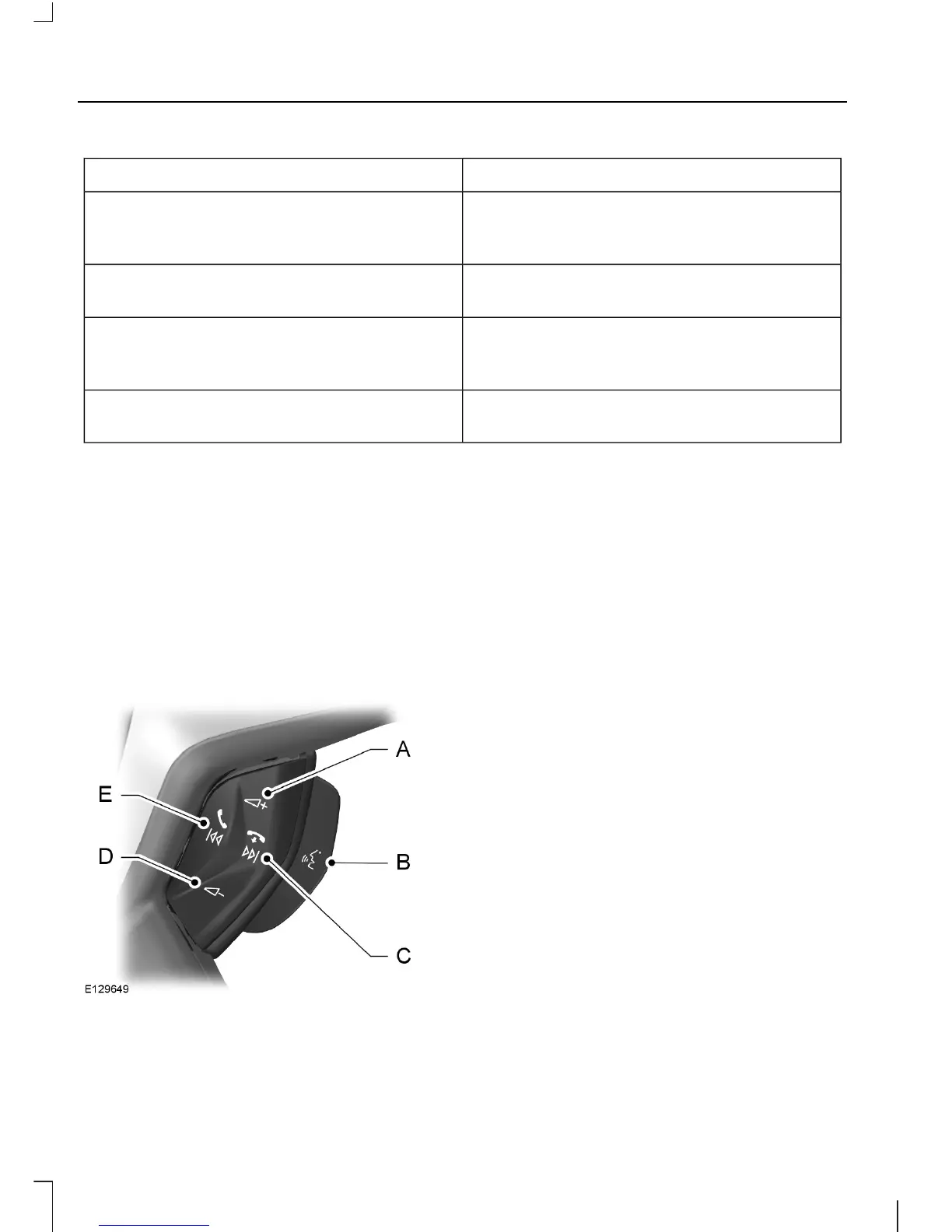
Volume upA
Voice buttonB
End callC
Volume downD
Receive callE
Hands-free calling is one of the main
features of SYNC. While the system
supports a variety of features, many are
dependent on your mobile phone's
functionality. At a minimum, most mobile
phones with Bluetooth® wireless
technology support the following
functions:
• Dialing a number
• Answering an incoming call
• Ending a call
• Redialing
• Call waiting notification
• Join calls
• Using privacy mode
• Caller ID
Other features such as text messaging
using Bluetooth and automatic phonebook
download are phone-dependent features.
To check your phone's compatibility, refer
to your phone's user manual and visit
www.fordsync.com.
10
SYNC



 To Next Page