31
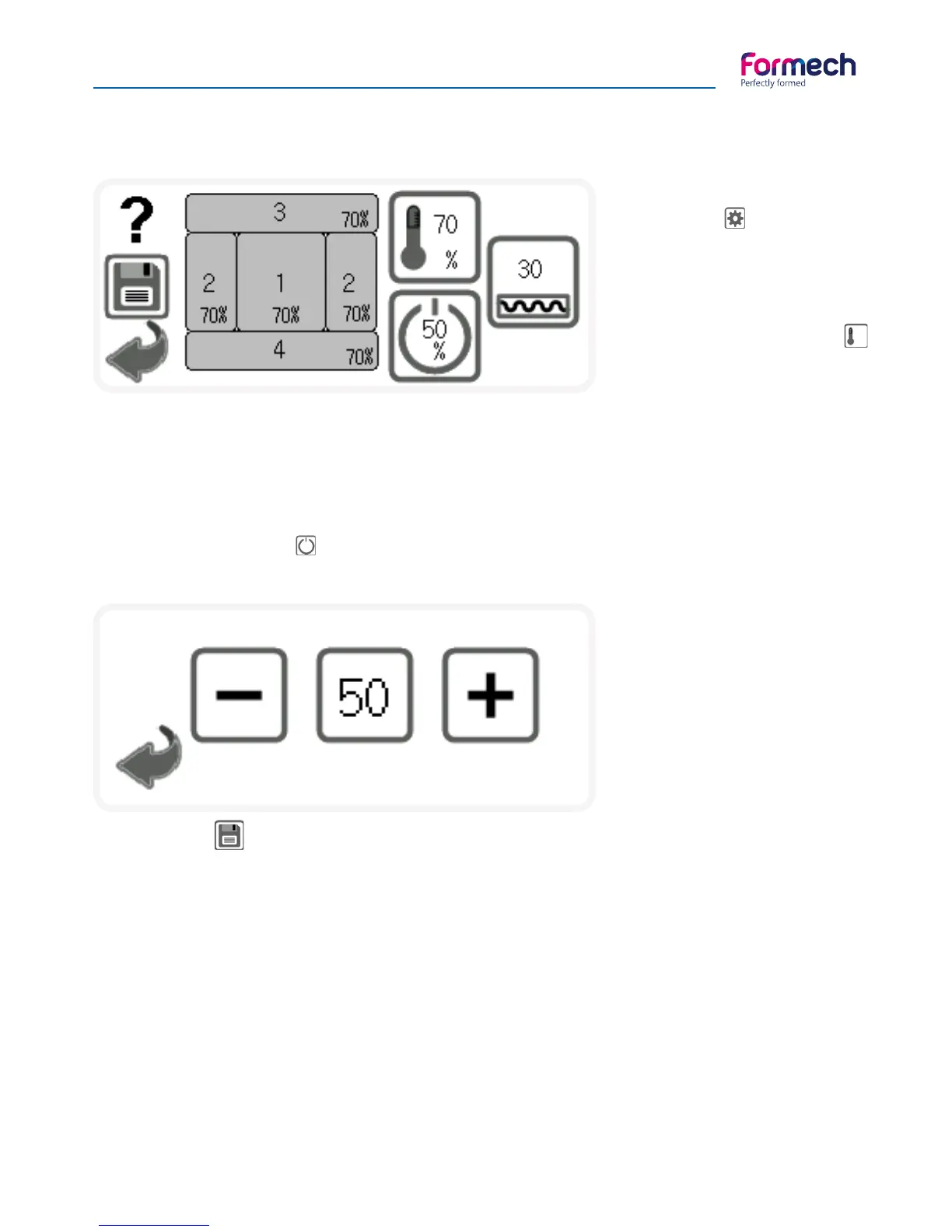
This screen will open when the
settings button on the 508DT
operation screen is pressed.
The Manual mode default heater
settings are shown above.
Heater power settings are adjusted
by pressing on the heater button
and changing the value using the
pop-up keypad.
Use the + & - buttons to adjust the
standby level and the back button
when complete.
Use the back button to exit the
settings screen and return to the
operation screen.
Operating Procedures - Quick start guide
508DT Settings
Once set to a required value, press on a zone and the value will transfer to that zone. Repeat the process on
the other zones to set the required heat power values.
Heat power may be set in 1% increments to achieve the required heat profile.
The standby feature allows the Heater to idle at a lower heat power when in the rear position. The default
level is 50% and is adjustable in 5% increments.
Press on the standby button to adjust. The following screen will open:
The save button on the operation screen will also open the settings screen but will also bring the timer
value from the manual operation across to the settings screen.
The heater power and timer parameters may be edited before saving into memory. The timer button will
open a Pop-up keypad for adjustment of the parameter. When complete, press the save button on the
settings screen to select a memory slot to save.
There are 20 memory locations.



 To Next Page