Introduction | 9
2.3.2 Rear ports
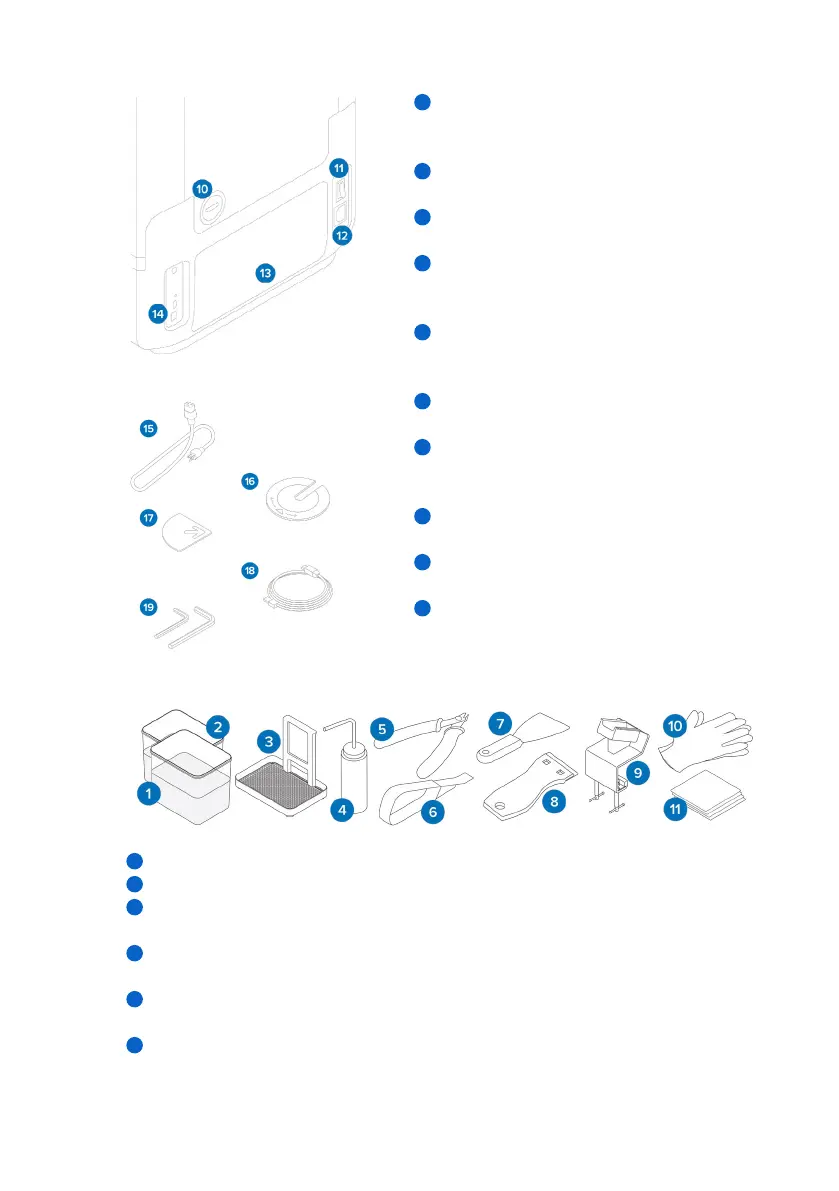
Optional fume exhaust port: A removable air
plug provides access to the print cavity for active
air handling.
Power switch: For powering the printer on
and o.
Power port: For connecting the printer to
mains power.
Rear mesh filter: Magnetically attaches to the
rear of the printer to prevent dust from reaching
the internal cooling fans.
USB and Ethernet ports: For connecting the
printer to a computer or network.
2.3.3 Included accessories
Power cable: Compatible with Form 4
generation printers".
Leveling disc: Slide the leveling disc included
around one of the leveling feet and rotate to
raise or lower the printer.
Parallelism shims: For adjusting and aligning the
build platform, if necessary. Included in the tool caddy.
USB cable: USB C-to-A cable for connecting the
printer to a computer.
Hex keys: 2.5 mm and 4 mm right-angle hex keys
for printer maintenance and repair. Included in
the tool caddy.
2.3.4 Form4B Finish Kit
1. Rinse buckets: Two plastic buckets to be partially filled with solvent.
2. Rinse bucket lids: Two plastic lids to cover the rinse buckets.
3. Rinse basket: Use to transfer parts from one bucket to the next. The basket can rest on
the edge of the rinse bucket to allow parts to drip.
4. Rinse bottle: Remove resin trapped in cavities and internal channels of prints. Use clean
solvent. Formlabs recommends isopropyl alcohol.
5.
Flush cutters: Snip to separate prints from their supports. Cut with the flat side on the prints’
surface for minimal support marks.
6. Removal tool: Pry under the raft to remove prints from the build platform. Do not use the
removal tool to clean the resin tank interior.
10
1 1
12
13
14
15
16
17
18
19
1
2
3
4
5
6



 To Next Page