20
4.7 Leveling the printer
The Form4B must be completely level before printing can begin. If prompted, use the leveling
disc to raise or lower each foot of the printer.
It is important that the printer sits level so resin does not overflow from the resin tank
during printing. All four leveling feet must rest on a solid surface to ensure optimal
print accuracy.
To level the printer:
1. Connect the printer to power. If necessary, the printer’s touchscreen prompts use of the
leveling disc.
°
The initial printer setup includes the leveling procedure.
2. Follow the on-screen instructions to adjust the feet under the printer.
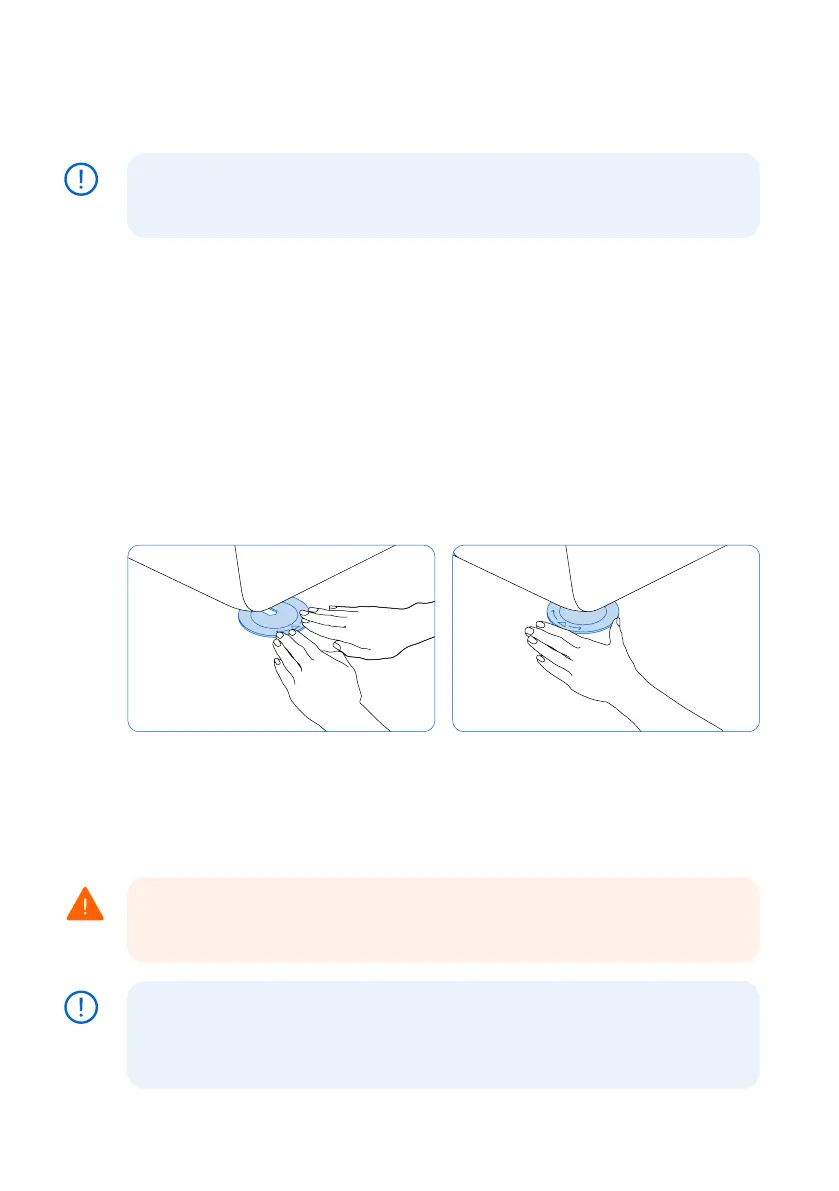
3.
Insert the round leveling disc under the designated corner. Push until the leveling disc
clicks onto the leveling foot.
4. Rotate the leveling disc clockwise to raise and counter-clockwise to lower the height of
the printer.
°
The printer ships with each leveling foot fully retracted. The height of the feet can only
be raised during the initial printer setup.
5. Adjust the feet until the printer’s touchscreen indicates the printer is level.
4.8 Inserting the resin tank and mixer
Resin is dispensed out of the resin cartridge into the resin tank. During a print, light shines
upward through the bottom of the resin tank and cures resin onto the build platform to form
a printed part. A mixer improves print consistency by clearing the build area and circulating
the resin.
Skin irritant: Resin and solvent may cause skin irritation or an allergic skin reaction.
Wear gloves when handling liquid resin, resin-coated surfaces, or solvent. Wash skin
with plenty of soap and water.
Spill hazard: Resin may spill over the tank walls if the resin tank tilts more than 5–10
degrees. Hold the resin tank level with two hands. To inspect and clean the resin
tank’s underside, empty the resin tank and/or take care to avoid spilling resin outside
the resin tank.
NOTICE
WARNING
NOTICE



 To Next Page