Preparation and setup | 21
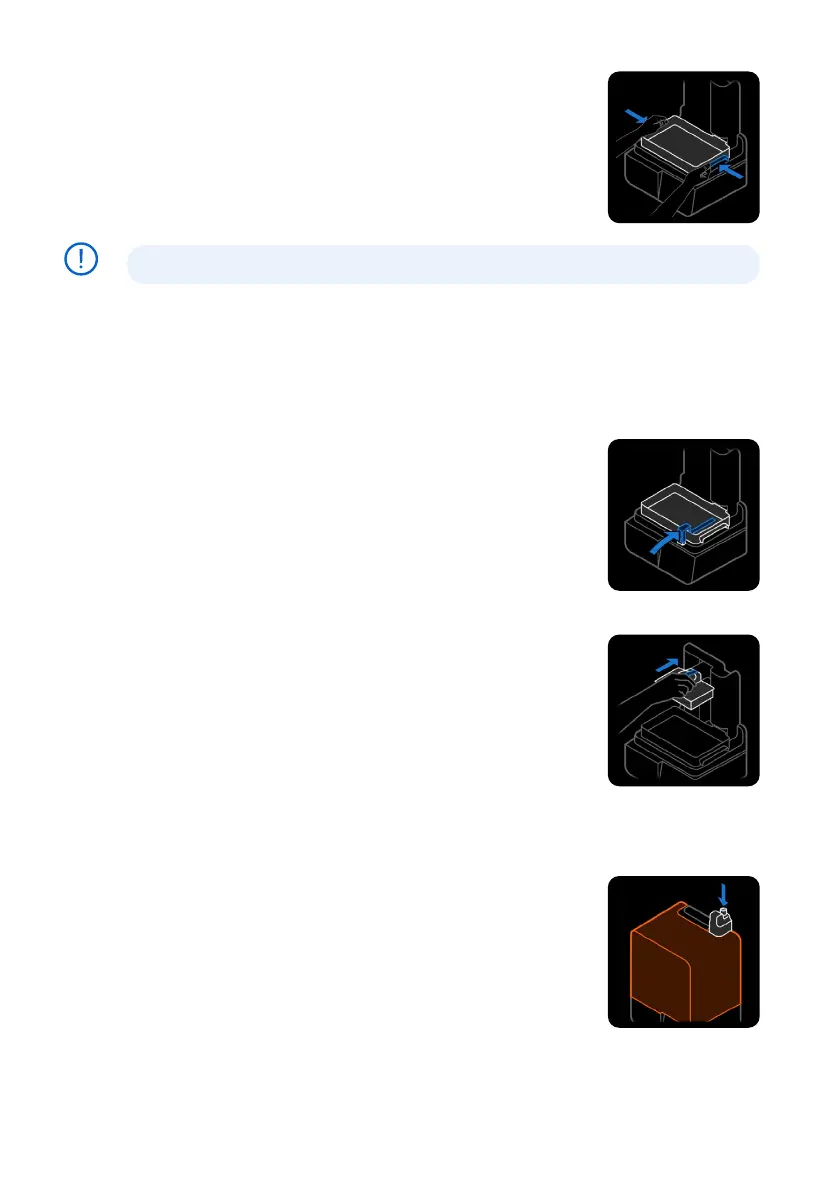
4.8.1 Inserting the resin tank
To insert the resin tank:
1. Open the printer cover.
2. Remove all packaging from the resin tank before inserting it into
the printer.
3. Remove the resin tank lid and set it aside.
4. Lift the resin tank with one hand on each side.
Avoid contaminating the resin tank’s underside with fingerprints or liquid resin.
5.
With the tank spout facing away from you, place the resin tank flat between the blue latches
in the middle of the printer.
6. Press down on the sides of the resin tank with your thumbs. Latch the tank into place by
closing the two latch handles on the sides. The printer detects its insertion and displays a
message on the touchscreen.
7. If you have not done so already, remove the resin tank lid and set it aside.
4.8.2 Inserting the mixer
To insert the mixer:
1. Open the printer cover.
2. Orient the mixer with its flat body facing away from you. Open the
latch on the mixer.
3. Insert the mixer into the mixer mount and place the flat body into
the tank.
4. Lock the mixer into place by closing the latch.
4.9 Inserting the build platform
The build platform is the surface onto which parts are printed. It is
secured in place on the build platform mount during a print with the
platform lock.
To insert the build platform:
1. Lift the build platform latch.
2. Align the build platform with the build platform mount and push
into place. The printer detects its insertion and displays a message
on the touchscreen.
3. Lower the build platform latch to secure the build platform.
4.10 Inserting the resin cartridge
Resin cartridges hold liquid resin before it is dispensed into the
resin tank.
To insert the resin cartridge:
1. Close the printer cover.
2.
Shake the resin cartridge before each print to ensure the resin
is mixed thoroughly. Shake each resin cartridge approximately
every two weeks during storage to keep resin well mixed for the
best print quality.
NOTICE



 To Next Page