69
w
w
w
w
w
w
w
w
w
w
w
w
w
w
w
w
ww.foscam.
ww.foscam.
ww.foscam.
ww.foscam.
ww.foscam.
ww.foscam.
ww.foscam.
ww.foscam.
us
us
us
us
us
us
us
us
Foscam
Foscam
Foscam
Foscam Digital
Digital
Digital
Digital Technologies
Technologies
Technologies
Technologies LLC
LLC
LLC
LLC
Telephone:
Telephone:
Telephone:
Telephone: 1-800-930-0949
1-800-930-0949
1-800-930-0949
1-800-930-0949
69
69
69
69
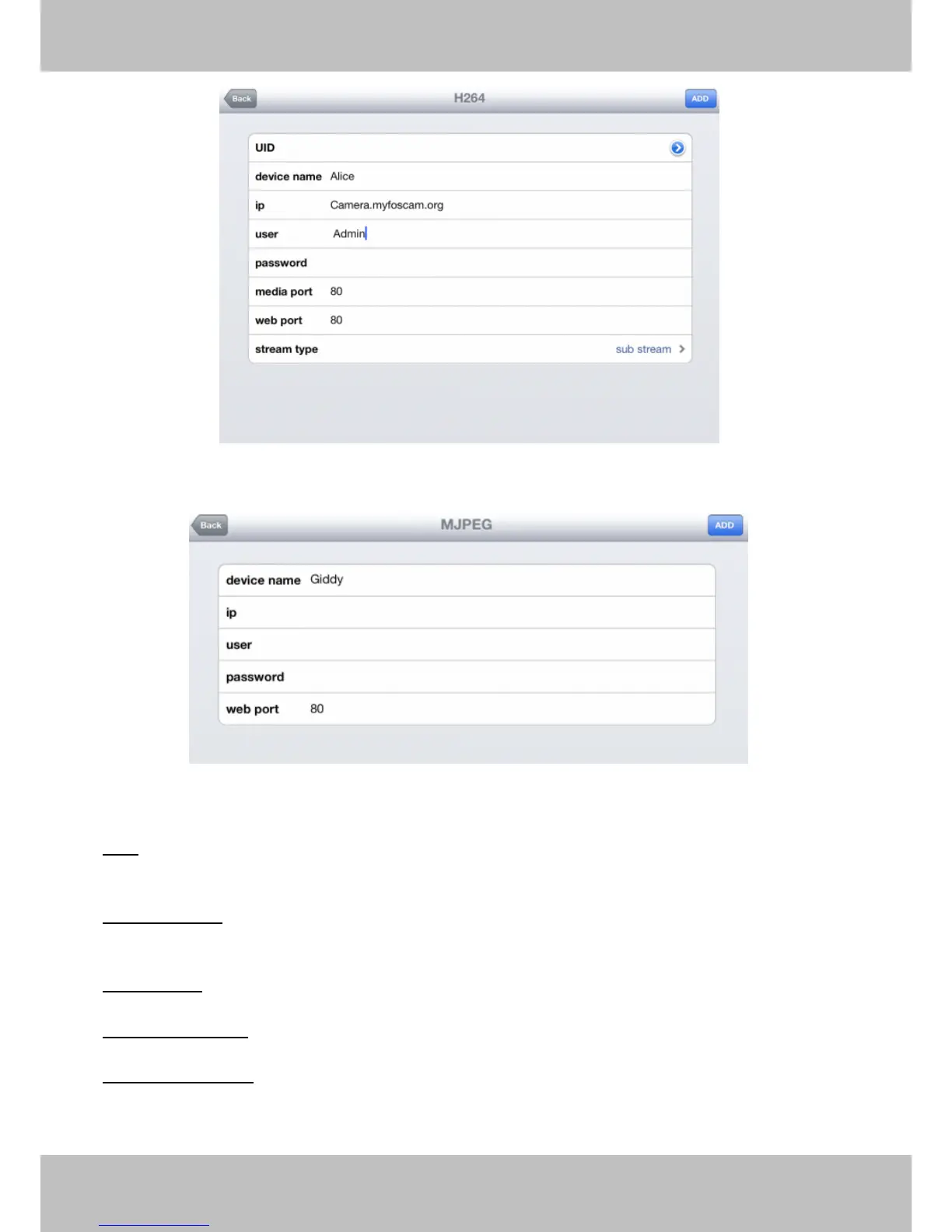
Figure 4.14a Add H.264 Device Page
Figure 4.14b Add MJPEG Device Page
UID:
UID:
UID:
UID: If your camera supports UID, here you scan UID number. Now FOSCAM camera does not
support UID.
Device
Device
Device
Device name:
name:
name:
name: The Device n ame is a unique name that you can give to your device to help you
identify it.
IP
IP
IP
IP address:
address:
address:
address: Fill in the camera ’ s DDNS host or WAN IP not LAN IP .
User
User
User
User &Password:
&Password:
&Password:
&Password: The camera ’ s user name and password.
Media
Media
Media
Media /
/
/
/ Web
Web
Web
Web port:
port:
port:
port: For MJPEG cameras, here only support web port.



 To Next Page