EasyManua.ls Logo

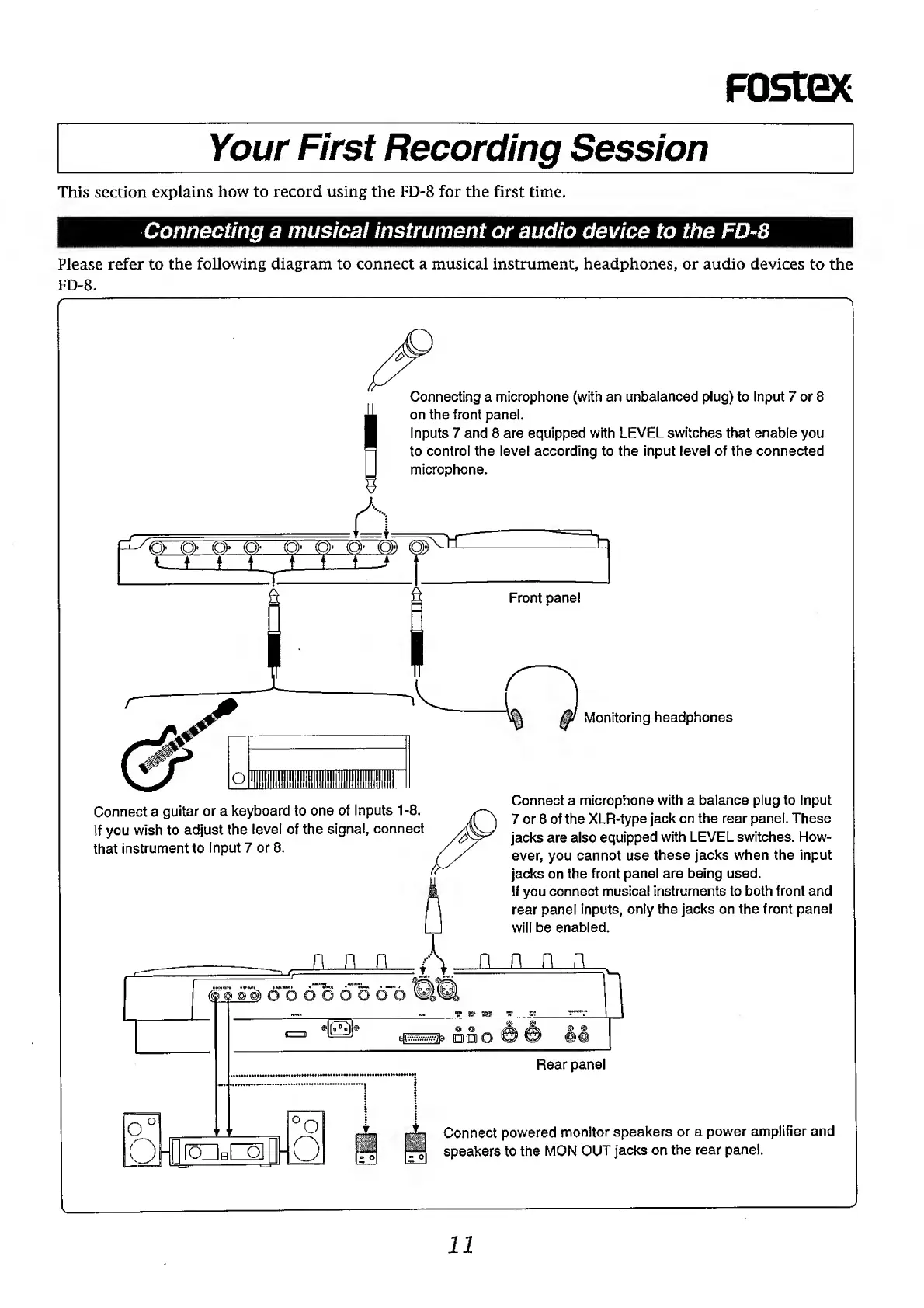
Fostex FD-8 - Connecting a Musical Instrument or Audio Device to the

Fostex FD-8
28 pages
Print Icon
To Next Page IconTo Next Page
To Previous Page IconTo Previous Page
Loading...
FOStQC
Your
First
Recording
Session
This
section
explains
how
to
record
using
the
FD-8
for
the
first
time.
Connecting
a
musical
instrument
or
audio
device
to
the
FD-8
Please
refer
to
the
following
diagram
to
connect
a
musical
instrument,
headphones,
or
audio
devices
to
the
FD-8.
Connecting
a
microphone
(with
an
unbalanced
plug)
to
Input
7
or
8
on
the
front
panel.
Inputs
7
and
8
are
equipped
with
LEVEL
switches
that
enable
you
to
control
the
level
according
to
the
input
level
of
the
connected
microphone.
(o)-
(o)>
(Q>
(o>
co>
(o>
O
Front
panel
Connect
a
guitar
or
a
keyboard
to
one
of
Inputs
1-8.
If
you
wish
to
adjust
the
level
of
the
signal,
connect
that
instrument
to
Input
7
or
8.
Monitoring
headphones
Connect
a
microphone
with
a
balance
plug
to
Input
7
or
8
of
the
XLR-type
jack
on
the
rear
panel.
These
jacks
are
also
equipped
with
LEVEL
switches.
How¬
ever,
you
cannot
use
these
jacks
when
the
input
jacks
on
the
front
panel
are
being
used.
If
you
connect
musical
instruments
to
both
front
and
rear
panel
inputs,
only
the
jacks
on
the
front
panel
will
be
enabled.
oooooooo
ok
°o
DFQ
^
ODO
Rear
panel
Connect
powered
monitor
speakers
or
a
power
amplifier
and
speakers
to
the
MON
OUT
jacks
on
the
rear
panel.
11