EasyManua.ls Logo

Fostex FD-8 - Precautions

Fostex FD-8
28 pages
Print Icon
To Next Page IconTo Next Page
To Previous Page IconTo Previous Page
Loading...
FOStBX
Connecting
a
SCSI
drive
to
the
FD-8
Connect
your
SCSI
drive
to
the
SCSI
connector
on
the
rear
panel
of
the
FD-8.
Refer
to
the
following
“Notes
on
connection”
and
connect
the
drive
correctly.
<Notes
on
connection>
*
Before
making
connections,
make
sure
that
both
FD-8
and
the
SCSI
drive
are
turned
off.
*
Up
to
two
SCSI
drives
can
be
connected
to
the
FD-8
SCSI
connector.
Normally,
for
real
time
record/playback,
one
SCSI
drive
is
connected
for
the
current
drive
(Refer
to
“Setup
of
ID
number”
below).
You
can
connect
two
drives
if
one
is
used
for
the
“current
drive”
and
the
other
for
"backup
(saving
and
loading
song
data)”
(Refer
to
“Setup
of
ID
number”
below).
Refer
to
“Saving
and
Loading
Song
Data”
in
the
Owner’s
Manual.
Current
drive
Backup
drive
Setup
of
ID
number:
Refer
to
the
guidelines
below
to
assign
SCSI
ID
numbers
for
the
connected
SCSI
drive(s).
Use
any
number
other
than
“6.”
^
Use
number
“6.”
*
The
SCSI
connector
on
the
FD-8
is
a
25-pin
connector,
compatible
with
Macintosh
computers.
Use
a
cable
with
connectors
that
conform
to
the
standards
for
SCSI
drive
connections.
*
The
last
SCSI
drive
on
the
SCSI
chain
should
be
terminated.
Install
a
SCSI
terminator,
or
turn
the
termination
switch
to
“on”
if
the
drive
has
such
a
switch
(such
as
a
Zip
drive).
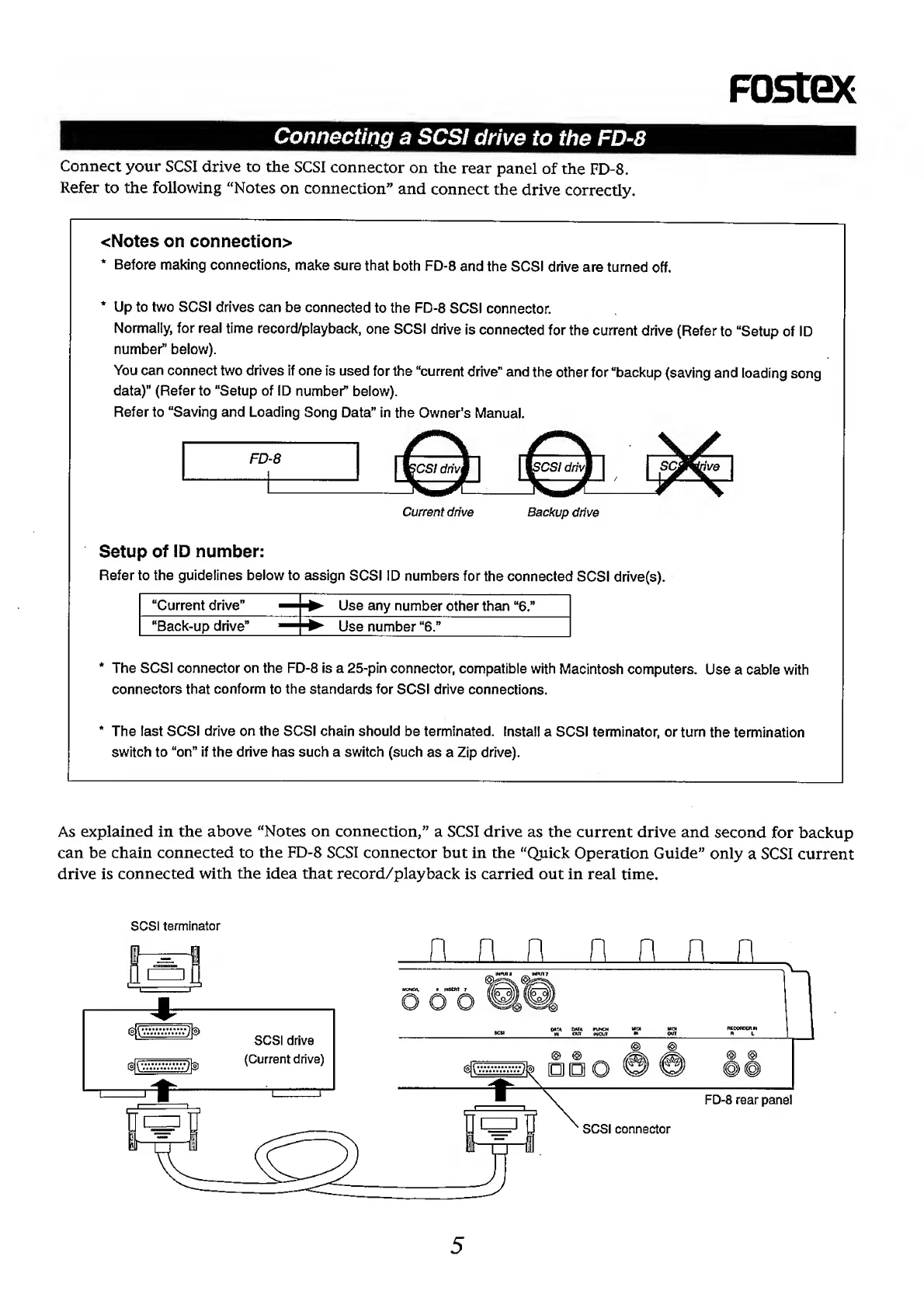
As
explained
in
the
above
“Notes
on
connection,”
a
SCSI
drive
as
the
current
drive
and
second
for
backup
can
be
chain
connected
to
the
FD-8
SCSI
connector
but
in
the
“Quick
Operation
Guide”
only
a
SCSI
current
drive
is
connected
with
the
idea
that
record/playback
is
carried
out
in
real
time.
SCSI
terminator
1

Other manuals for Fostex FD-8

Related product manuals