EasyManua.ls Logo

Fostex FD-8 - Input Monitoring and Playback Monitoring

Fostex FD-8
28 pages
Print Icon
To Next Page IconTo Next Page
To Previous Page IconTo Previous Page
Loading...
FDSteX
Creating
a
new
program
The
previous
explanation
of
how
to
record
and
play
data
on
the
FD-8
is
based
on
using
one
program
on
the
disk.
However,
you
can
set
up
multiple
programs
(up
to
99)
on
the
disk
as
described
in
the
Owner’s
Manual,
and
record
and
play
individual
programs.
This
section
describes
how
to
create
a
new
program
on
the
disk.
Note:
Although
you
can
create
up
to
99
programs
on
the
disk,
the
available
total
recording
time
is
not
affected
by
the
number
of
programs.
For
example,
if
you
use
all
available
recording
time
for
one
program,
you
will
be
unable
to
record
in
another
program.
Also,
additional
programs
do
require
a
very
small
amount
of
disk
space.
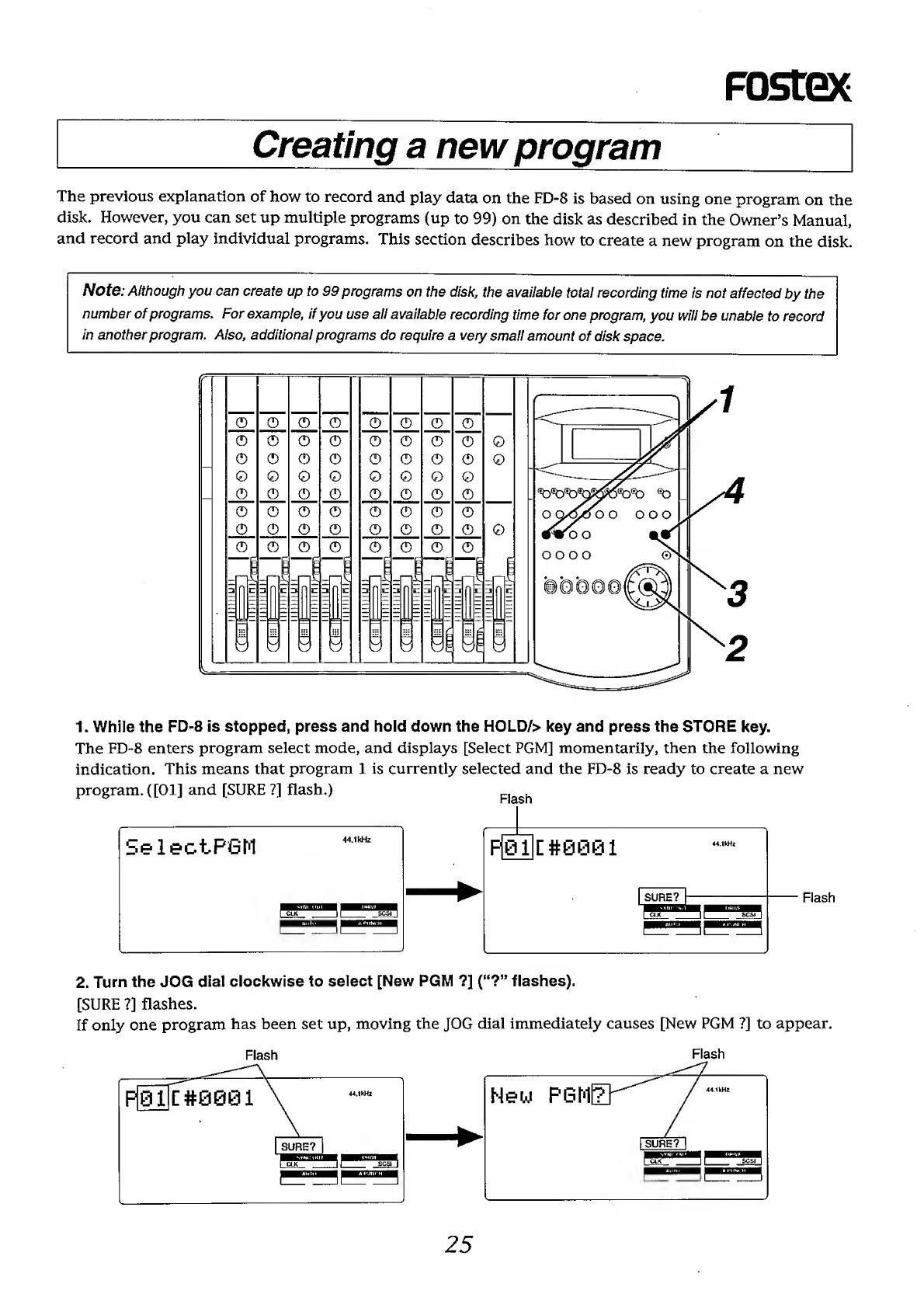
1.
While
the
FD-8
is
stopped,
press
and
hold
down
the
HOLD/>
key
and
press
the
STORE
key.
The
FD-8
enters
program
select
mode,
and
displays
[Select
PGM]
momentarily,
then
the
following
indication.
This
means
that
program
1
is
currently
selected
and
the
FD-8
is
ready
to
create
a
new
program.([01]
and
[SURE?]
flash.)
2.
Turn
the
JOG
dial
clockwise
to
select
[New
PGM
?]
(“?”
flashes).
[SURE
?]
flashes.
If
only
one
program
has
been
set
up,
moving
the
JOG
dial
immediately
causes
[New
PGM
?]
to
appear.
Flash
Flash
25