EasyManua.ls Logo

Fostex FD-8 - Introduction, Main Features, and Precautions; Introduction; Main features

Fostex FD-8
28 pages
Print Icon
To Next Page IconTo Next Page
To Previous Page IconTo Previous Page
Loading...
Fostex
Recording
Preparation
_
Please
do
the
following
preparation
before
you
start
recording,
playing,
or
editing
on
the
FD-8.
Preparing
recording
media
The
FD-8
is
not
equipped
with
a
recording
medium,
such
as
a
hard
disk.
You
need
to
connect
an
external
SCSI
drive
(MO
drive,
Zip
drive,
EZ
drive,
or
fixed
hard
disk
drive)
as
the
recording
media.
Fostex
does
offers
an
optional
internal
2.5-inch
IDE
hard
disk.
For
more
information
on
removable
SCSI
drives
and
disks
sup¬
ported
by
the
FD-8,
please
refer
to
the
“List
of
the
drives
with
guaranteed
operation”
in
the
Owner’s
Manual.
Be
sure
to
use
a
drive
and
disk
with
operation
guaranteed
by
Fostex.
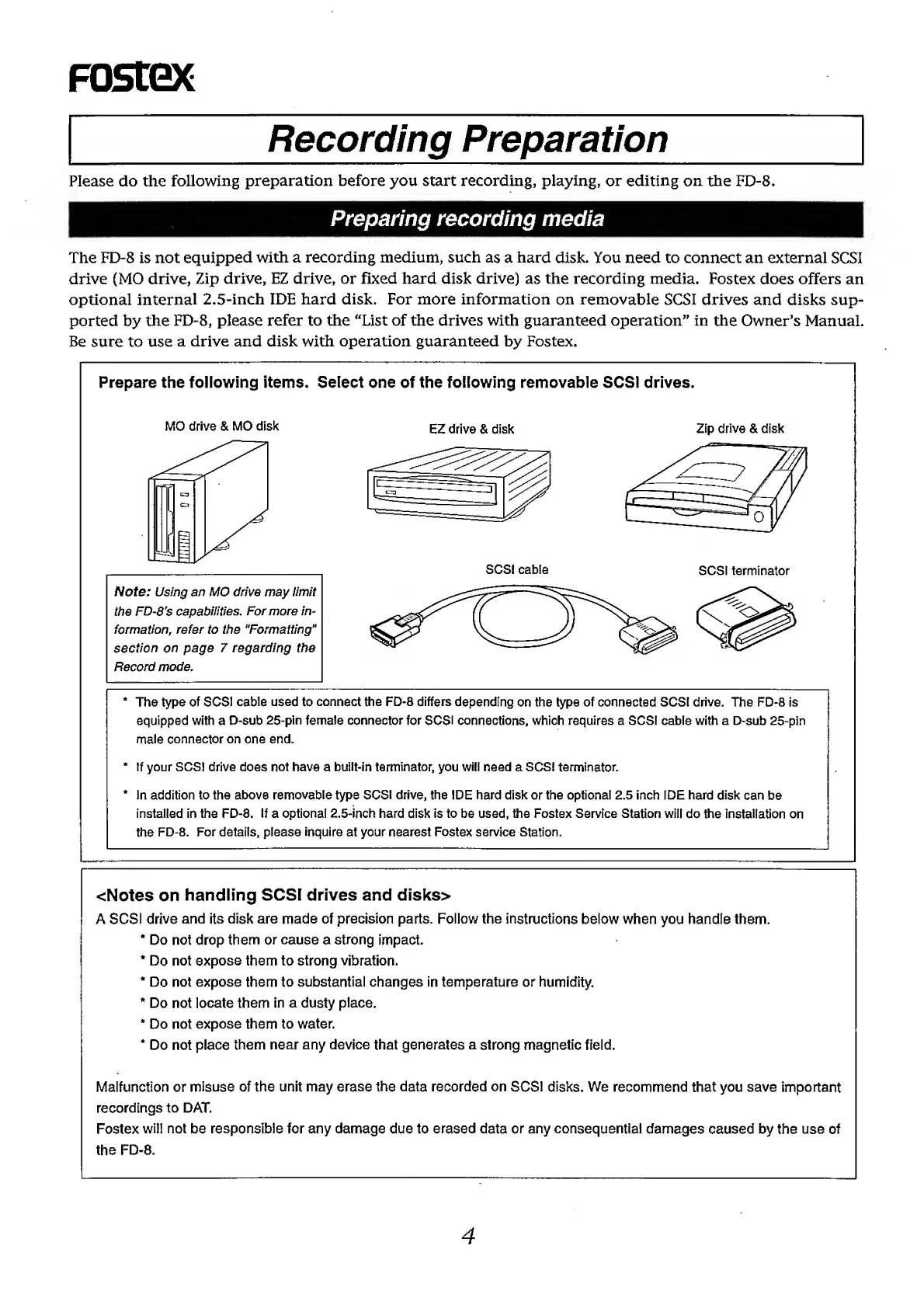
Prepare
the
following
items.
Select
one
of
the
following
removable
SCSI
drives.
MO
drive
&
MO
disk
EZ
drive
&
disk
Zip
drive
&
disk
Note:
Using
an
MO
drive
may
limit
the
FD-8's
capabilities.
For
more
in¬
formation,
refer
to
the
“Formatting"
section
on
page
7
regarding
the
Record
mode.
*
The
type
of
SCSI
cable
used
to
connect
the
FD-8
differs
depending
on
the
type
of
connected
SCSI
drive.
The
FD-8
is
equipped
with
a
D-sub
25-pin
female
connector
for
SCSI
connections,
which
requires
a
SCSI
cable
with
a
D-sub
25-pin
male
connector
on
one
end.
*
If
your
SCSI
drive
does
not
have
a
built-in
terminator,
you
will
need
a
SCSI
terminator.
*
In
addition
to
the
above
removable
type
SCSI
drive,
the
IDE
hard
disk
or
the
optional
2.5
inch
IDE
hard
disk
can
be
installed
in
the
FD-8.
If
a
optional
2.5'inch
hard
disk
is
to
be
used,
the
Fostex
Service
Station
will
do
the
installation
on
the
FD-8.
For
details,
please
inquire
at
your
nearest
Fostex
service
Station.
<Notes
on
handling
SCSI
drives
and
disks>
A
SCSI
drive
and
its
disk
are
made
of
precision
parts.
Follow
the
instructions
below
when
you
handle
them.
*
Do
not
drop
them
or
cause
a
strong
impact.
*
Do
not
expose
them
to
strong
vibration.
*
Do
not
expose
them
to
substantial
changes
in
temperature
or
humidity.
*
Do
not
locate
them
in
a
dusty
place.
*
Do
not
expose
them
to
water.
*
Do
not
place
them
near
any
device
that
generates
a
strong
magnetic
field.
Malfunction
or
misuse
of
the
unit
may
erase
the
data
recorded
on
SCSI
disks.
We
recommend
that
you
save
important
recordings
to
DAT.
Fostex
will
not
be
responsible
for
any
damage
due
to
erased
data
or
any
consequential
damages
caused
by
the
use
of
the
FD-8.
4

Other manuals for Fostex FD-8

Related product manuals