EasyManua.ls Logo

Fostex FD-8 - Recording a Performance on a Track.12

Fostex FD-8
28 pages
Print Icon
To Next Page IconTo Next Page
To Previous Page IconTo Previous Page
Loading...
Fostex
Recording
a
performance
on
a
track
In
tJiis
example,
we
will
record
the
sound
of
an
electric
guitar
connected
to
input
1.
This
procedure
assumes
that
program
1
has
been
created
automatically
after
the
disk
format
operation,
and
that
the
ABS
time
base
value
is
OOM
OOS
OOF
(top
of
the
program).
First,
initialize
the
FD-8.
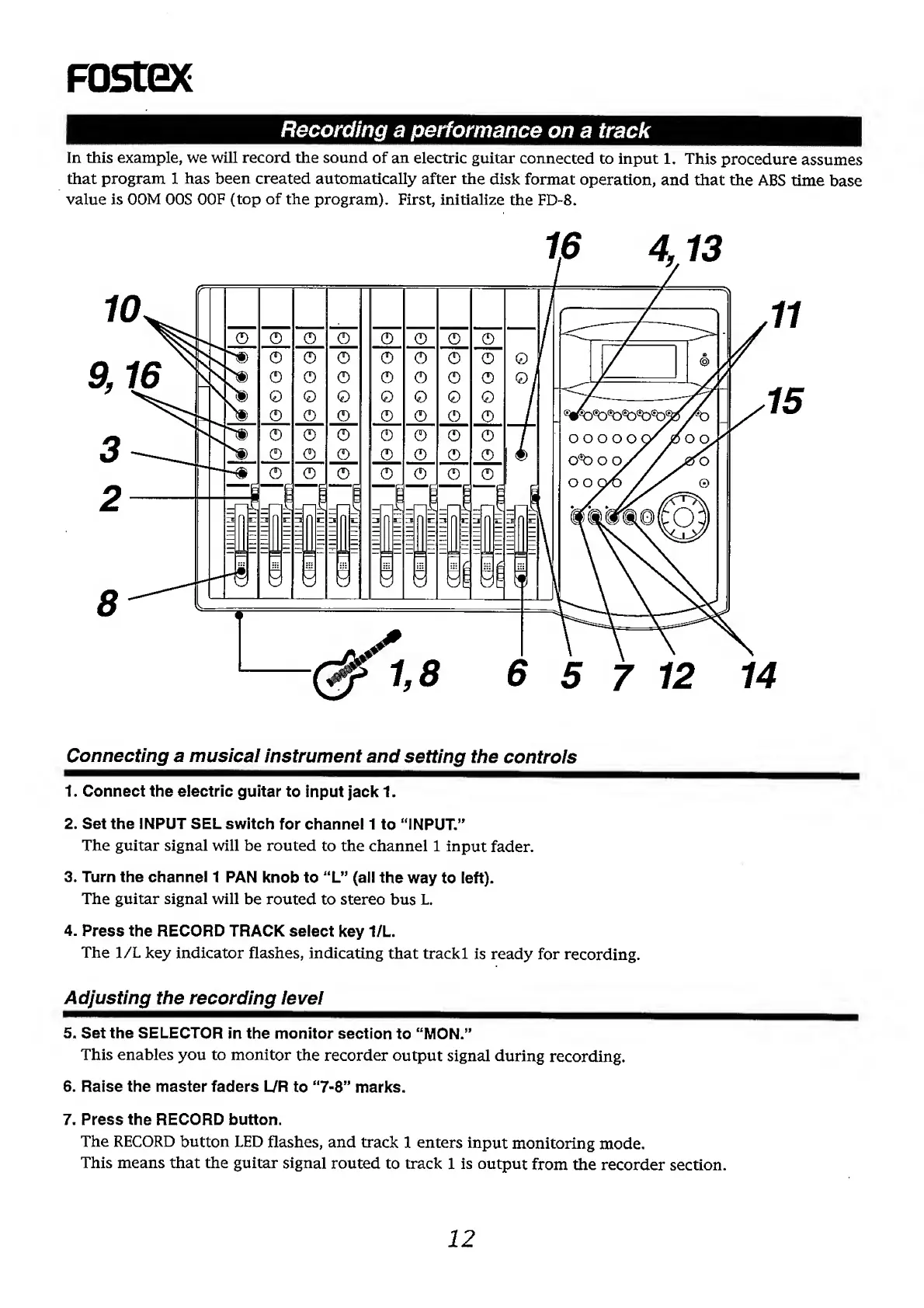
Connecting
a
musical
instrument
and
setting
the
controls
1.
Connect
the
electric
guitar
to
input
jack
1.
2.
Set
the
INPUT
SEL
switch
for
channel
1
to
“INPUT.”
The
guitar
signal
will
be
routed
to
the
channel
1
input
fader.
3.
Turn
the
channel
1
PAN
knob
to
“L”
(all
the
way
to
left).
The
guitar
signal
will
be
routed
to
stereo
bus
L.
4.
Press
the
RECORD
TRACK
select
key
1/L.
The
1/L
key
indicator
flashes,
indicating
that
trackl
is
ready
for
recording.
Adjusting
the
recording
level
5.
Set
the
SELECTOR
in
the
monitor
section
to
“MON.”
This
enables
you
to
monitor
the
recorder
output
signal
during
recording.
6.
Raise
the
master
faders
L/R
to
“7-8”
marks.
7.
Press
the
RECORD
button.
The
RECORD
button
LED
flashes,
and
track
1
enters
input
monitoring
mode.
This
means
that
the
guitar
signal
routed
to
track
1
is
output
from
the
recorder
section.
12

Other manuals for Fostex FD-8

Related product manuals