EasyManua.ls Logo

Fostex FD-8 - Names and Functions

Fostex FD-8
28 pages
Print Icon
To Next Page IconTo Next Page
To Previous Page IconTo Previous Page
Loading...
FDSCeX
Formatting
(initializing)
a
disk
After
you
make
connection,
follow
the
steps
below
to
format
(initialize)
the
disk
for
use
in
a
SCSI
drive.
The
FD-8
uses
FDMS-3
(Fostex
Disk
Management
System-3)
as
the
recording
format.
To
perform
real
time
recording
and
playback
on
the
FD-8,
you
need
to
format
the
disk
(regardless
of
whether
the
disk
has
been
used).
If
you
format
a
used
disk,
first
make
sure
that
the
disk
does
not
contain
any
important
data.
Formatting
a
disk
erases
all
existing
data.
1
Turn
on
the
power
to
the
connected
SCSI
drive
and
the
FD-8.
If
the
SCSI
connection
has
been
made
correctly,
the
SCSI
drive
will
start
running
and
the
display
on
the
FD-
8
indicates
the
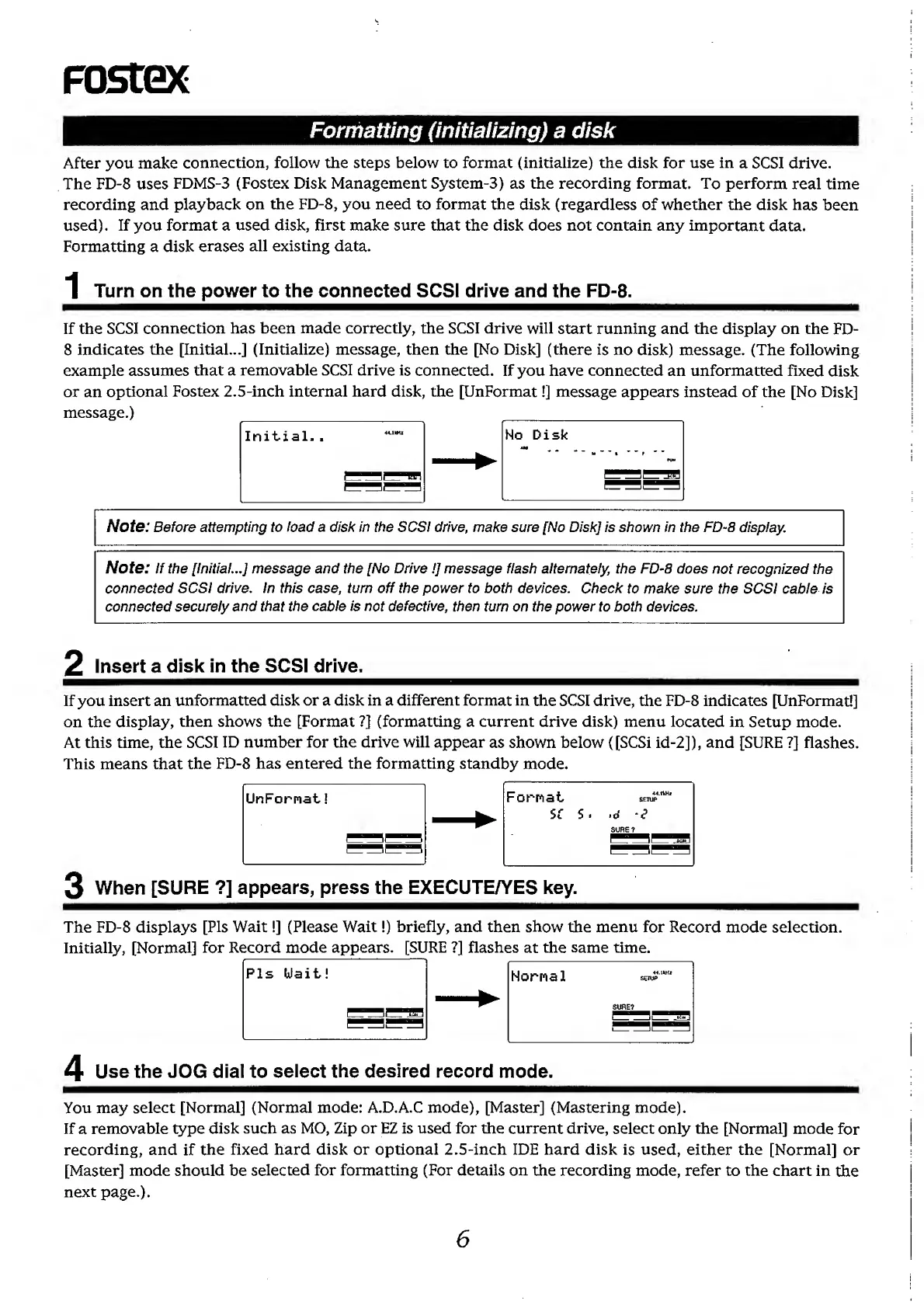
[Initial...]
(Initialize)
message,
then
the
[No
Disk]
(there
is
no
disk)
message.
(The
following
example
assumes
that
a
removable
SCSI
drive
is
connected.
If
you
have
connected
an
unformatted
fixed
disk
or
an
optional
Fostex
2.5-inch
internal
hard
disk,
the
[UnFormat!]
message
appears
instead
of
the
[No
Disk]
message.)
_
Initial..
_^
No
Disk
Note:
Before
attempting
to
load
a
disk
in
the
SCSI
drive,
make
sure
[No
Disk]
is
shovim
in
the
FD-8
display.
Note:
If
the
[Initial...]
message
and
the
[No
Drive!]
message
flash
alternately,
the
FD-8
does
not
recognized
the
connected
SCSI
drive.
In
this
case,
turn
off
the
power
to
both
devices.
Check
to
make
sure
the
SCSI
cable
is
connected
securely
and
that
the
cable
is
not
defective,
then
turn
on
the
power
to
both
devices.
2
Insert
a
disk
in
the
SCSI
drive.
If
you
insert
an
unformatted
disk
or
a
disk
in
a
different
format
in
the
SCSI
drive,
the
FD-8
indicates
[UnFormat!]
on
the
display,
then
shows
the
[Format
?]
(formatting
a
current
drive
disk)
menu
located
in
Setup
mode.
At
this
time,
the
SCSI
ID
number
for
the
drive
will
appear
as
shown
below
([SCSi
id-2]),
and
[SURE
?]
flashes.
This
means
that
the
FD-8
has
entered
the
formatting
standby
mode.
3
When
[SURE
?]
appears,
press
the
EXECUTE/YES
key.
The
FD-8
displays
[Pis
Wait!]
(Please
Wait!)
briefly,
and
then
show
the
menu
for
Record
mode
selection.
Initially,
[Normal]
for
Record
mode
appears.
[SURE
?]
flashes
at
the
same
time.
Pis
Uait!
Hornal
se
.
'
SURE?
4
Use
the
JOG
dial
to
select
the
desired
record
mode.
You
may
select
[Normal]
(Normal
mode:
A.D.A.C
mode),
[Master]
(Mastering
mode).
If
a
removable
type
disk
such
as
MO,
Zip
or
EZ
is
used
for
the
current
drive,
select
only
the
[Normal]
mode
for
recording,
and
if
the
fixed
hard
disk
or
optional
2.5-inch
IDE
hard
disk
is
used,
either
the
[Normal]
or
[Master]
mode
should
be
selected
for
formatting
(For
details
on
the
recording
mode,
refer
to
the
chart
in
the
next
page.).
6

Other manuals for Fostex FD-8

Related product manuals