EasyManua.ls Logo

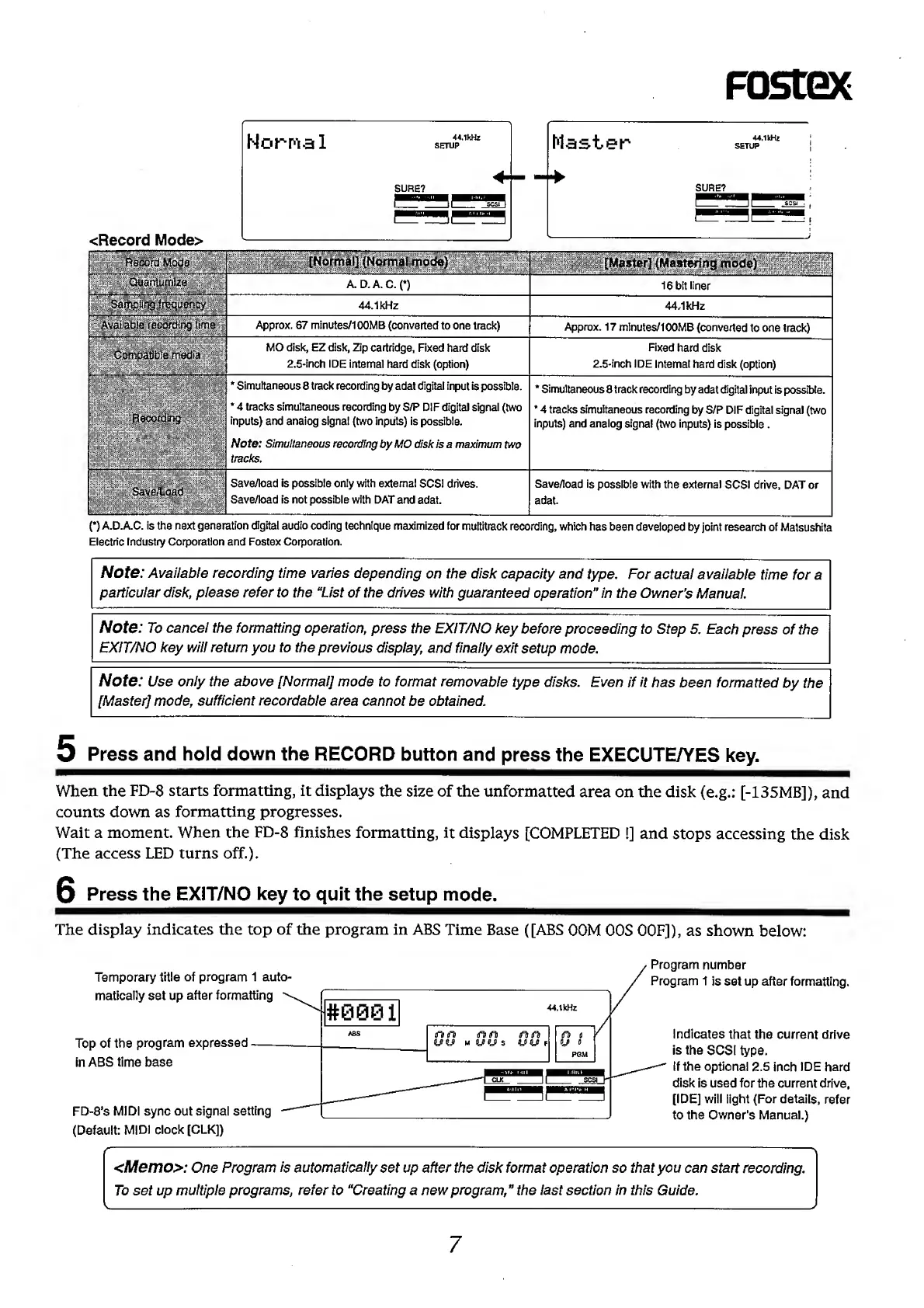
Fostex FD-8 - Control Panel (Mixer Section) Overview

Fostex FD-8
28 pages
Print Icon
To Next Page IconTo Next Page
To Previous Page IconTo Previous Page
Loading...
m
44.1kHz
44.1kHz
Approx.
67
minutes/100MB
(converted
to
one
track)
Approx.
17
mInutes/100MB
(converted
to
one
track)
MO
disk,
EZ
disk.
Zip
cartridge.
Fixed
hard
disk
2.5-inch
IDE
internal
hard
disk
(option)
Fixed
hard
disk
2.5-inch
IDE
internal
hard
disk
(option)
*
Simultaneous
8
track
recording
by
adat
digital
input
is
possible.
*
4
tracks
simultaneous
recording
by
S/P
DIF
digital
signal
(two
inputs)
and
analog
signal
(two
inputs)
is
possible.
Note:
Simultaneous
recording
by
MO
disk
is
a
maximum
two
tracks.
*
Simultaneous
8
track
recording
by
adat
digital
input
is
possible.
*
4
tracks
simultaneous
recording
by
S/P
DIF
digital
signal
(two
inputs)
and
analog
signal
(two
inputs)
is
possible.
Save/load
is
possible
only
with
external
SCSI
drives.
Save/ioad
is
not
possible
with
DAT
and
adat.
Save/load
is
possible
with
the
external
SCSI
drive,
DAT
or
adat.
n
A.D.A.C.
is
the
next
generation
digital
audio
coding
technique
maximized
for
multitrack
recording,
which
has
been
developed
by
joint
research
of
Matsushita
Electric
Industry
Corporation
and
Fostex
Corporation.
Note:
Available
recording
time
varies
depending
on
the
disk
capacity
and
type.
For
actual
available
time
for
a
particular
disk,
please
refer
to
the
“List
of
the
drives
with
guaranteed
operation”
in
the
Owner’s
Manual.
Note:
To
cancel
the
formatting
operation,
press
the
EXIT/NO
key
before
proceeding
to
Step
5.
Each
press
of
the
EXIT/NO
key
will
return
you
to
the
previous
display,
and
finally
exit
setup
mode.
Note:
Use
only
the
above
[Normal]
mode
to
format
removable
type
disks.
Even
if
it
has
been
formatted
by
the
[Master]
mode,
sufficient
recordable
area
cannot
be
obtained.
5
Press
and
hold
down
the
RECORD
button
and
press
the
EXECUTE/YES
key.
When
the
FD-8
starts
formatting,
it
displays
the
size
of
the
unformatted
area
on
the
disk
(e.g.:
[-135MB]),
and
counts
down
as
formatting
progresses.
Wait
a
moment.
When
the
FD-8
finishes
formatting,
it
displays
[COMPLETED
I]
and
stops
accessing
the
disk
(The
access
LED
turns
off.).
G
Press
the
EXiT/NO
key
to
quit
the
setup
mode.
The
display
indicates
the
top
of
the
program
in
ABS
Time
Base
([ABS
OOM
OOS
OOF]),
as
shown
below:
7

Other manuals for Fostex FD-8

Related product manuals