87
Saving and Loading Song Data
SCSI
OUT
IN
DATA PUNCH
IN/OUT
DATA
MONO/L
8 INSERT 7
INPUT 8 INPUT 7
R
RECORDER IN
L
IN
MIDI
OUT
MIDI
Current drive
Save
Backup drive
(ID number = “6”)
Load
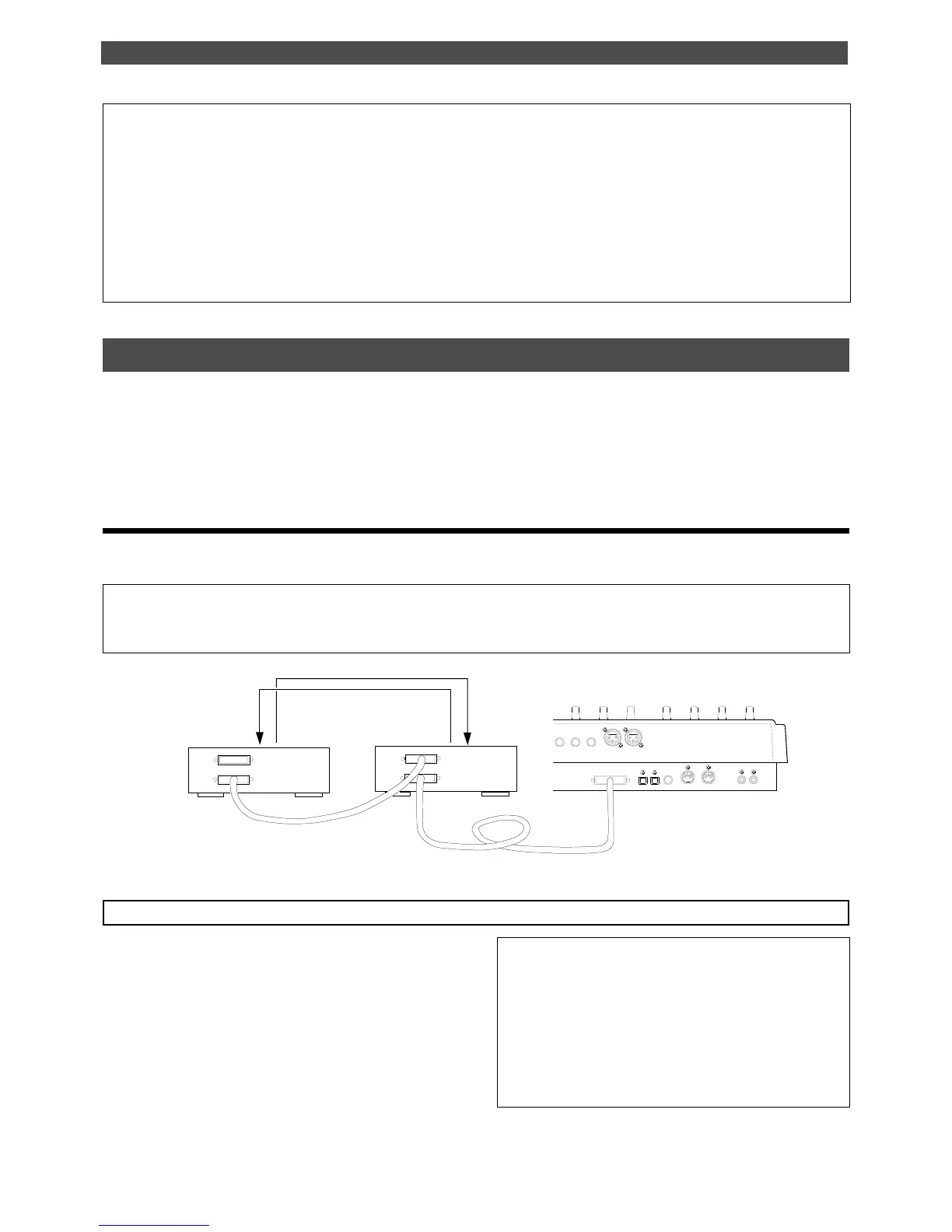
Saving and loading data using a SCSI drive as the current drive
If the current drive is a SCSI drive (removable disk or fixed disk), you can save and load data to and from a
backup SCSI drive, DAT, or adat. If the backup drive is a SCSI drive, the save and load operations are not limited
by the type of recording mode used for the current drive. If you are using a DAT or adat as a backup drive and
using a fixed disk as the current drive, the fixed current drive should be formatted in Mastering mode to enable
saving and loading.
Saving/loading data using another SCSI drive
This section explains how to save and load data to and from a removable current SCSI drive and a backup SCSI
drive. Turn off the power to all connected devices before you make connections.
Note:
Unlike the save/load operation using a DAT or adat, you cannot abort the save/load operation that uses a SCSI drive. Nor
can you monitor audio data during the operation. Also, you cannot load data to a disk formatted in a recording mode that differs
from that on the backup disk. For example, you cannot load data from a backup disk in Normal mode to a disk in Mastering mode.
SCSI drive connection and preparation
<Title of data to be saved to a backup SCSI disk>
Data recorded in the current drive has a name, such as
Program 1 or Program 2. (These titles appear abbreviated,
such as [P01], [P02]).
On the other hand, a backup disk manages data using dif-
ferent titles, such as Backup 1 or Backup 2. (These appear
abbreviated, such as [B01] or [B02] on the display.)
For example, Program 1 (P01) on the current drive disk is
saved as Backup 1 (B01) for the backup disk.
* The following items can be saved and loaded as song data:
Memory data (CLIPBOARD IN/OUT, AUTO RTN START/END, AUTO PUNCH IN/OUT points)
Time base (ABS, MTC, or BAR/BEAT/CLK)
SETUP mode: * Time signature setting (BAR BEAT), * Tempo setting, * Click On/Off setting, * Preroll time setting,
* MIDI sync out setting, * MTC frame rate setting, * MTC offset time setting, * MTC offset mode setting,
* Rec protect On/Off setting, * Slave mode On/Off setting, * Slave type setting
* The following items cannot be saved and loaded as song data:
Auto Play mode and Auto Return mode On/Off setting
Vari-pitch mode On/Off setting, and Pitch data
SETUP mode: * Digital In setting, * Digital Out setting, * Bar/Beat Resolution On/Off setting, * Device ID setting
* Connect your backup SCSI drive to the SCSI connec-
tor on the current SCSI drive. Be sure to attach a ter-
minator on the second SCSI drive to terminate the
SCSI chain.
* Be sure to set the ID number for the backup SCSI
drive to “6.”
* Prepare the disk recorded as the current drive and
a backup disk (unformatted disk).



 To Next Page