5
106
2. Copy section 5-2, BIOS Conguration.
Shut down the computer, connect SATA hard disks to SATA ports, power on
computer again.
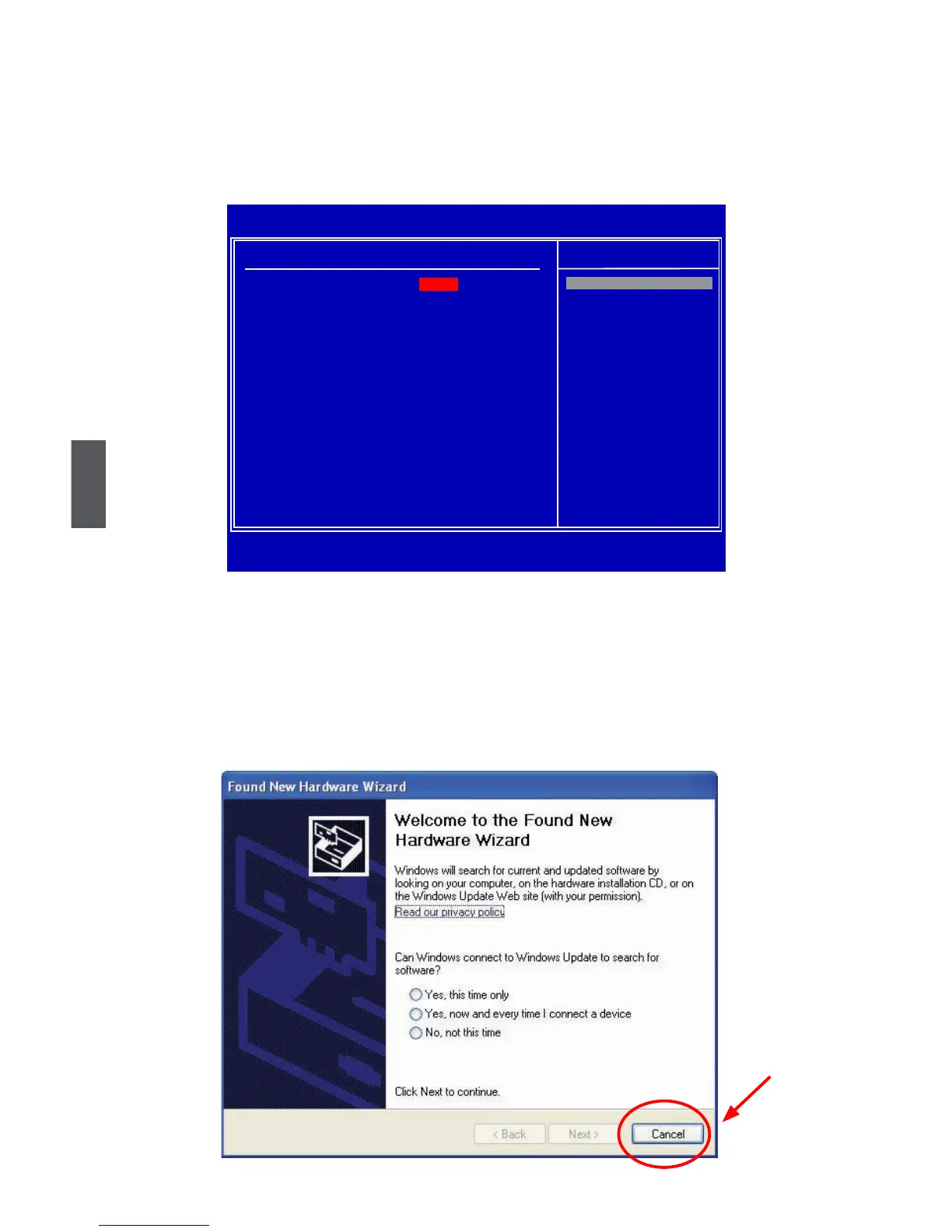
Press <Del> key, get into BIOS, set SATA mode to [RAID], press <F10> to save and
exit BIOS. PC will reboot.
3. Copy section 5-3, Create RAID in BIOS.
Press <CTRL><I> simultaneously to get into RAID BIOS set up (Intel
®
Matrix
Storage Manager option ROM utility).
Congure your new hard disks to RAID0, 1, 5 or 10. Exit RAID BIOS. PC will reboot.
4. The Windows XP is running again and a new hardware of RAID disk was found.
Click [Cancel] to skip this Wizard.
Click to exit.
CMOS Setup Utility - Copyright (C) 1985-2008, American Megatrends, Inc.
IDE Conguration
IDE Configuration Help Item
Configure SATA#1 as [RAID]
► Primary IDE Master [Not Detected]
IDE
► Primary IDE Slave [Not Detected]
RAID
► Secondary IDE Master [Not Detected] AHCI
► Secondary IDE Slave [Not Detected]
Hot Plug [Disabled]
Hard Disk Write Protect [Disabled]
IDE Detect Out [35]
↑↓←→:Move Enter:Select +/-/:Value F10:Save ESC:Exit F1:General Help
F9:Optimized Defaults
Options
[RAID]













 To Next Page