1
5
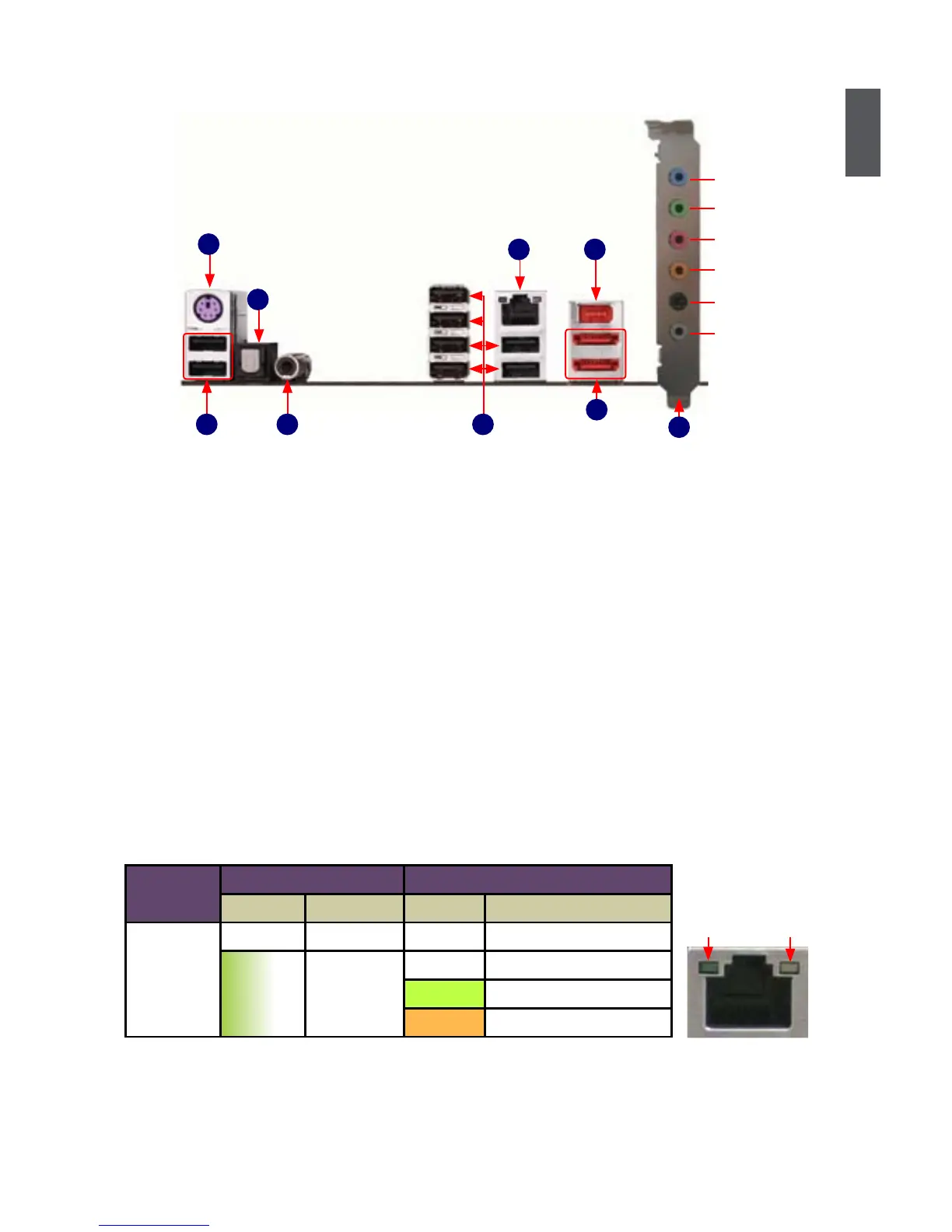
1-3 Back Panel Connectors
LAN Port
PS/2 Keyboard Port
5
USB Ports
1
7
1394a Port
External
SATA Ports
3
Coaxial S/PDIF Out Port
1. PS/2 Keyboard Port
Use the lower port (purple) to connect a PS/2 keyboard.
2. USB Ports
The USB port supports the USB 2.0/1.1 specication. Use this port for USB devices such as an
USB keyboard/mouse, USB printer, USB ash drive and etc.
3. Optical S/PDIF Out Port
This port provides digital audio out to an external audio system that supports digital optical
audio.
4. Coaxial S/PDIF Out Port
This port provides digital audio out to an external audio system that supports digital coaxial
audio. Before using this feature, ensure that your audio system provides a coaxial digital audio
in connector.
5. RJ-45 LAN Port
The Ethernet LAN port provides Internet connection at up to 10/100/1000Mb/s data rate.
6. External SATA Ports
To connect external SATA device(s) to your system by expanding the internal SATA port(s) to
the chassis back panel. External SATA device shall provide power by its own.
7. 1394a Port
This port is used to connect a 1394a device.
LAN Type
Left: Active Right: Link
Status Description Status Description
1000M
Off No Link Off No Link
Green
Blinking
Data
Activity
Off 10Mb/s Connection
Green 100Mb/s Connection
Orange 1000Mb/s Connection
Active
LED
Link
LED
2
6
42
USB Ports
Optical S/PDIF Out Port
8
Audio Ports
Line Out
Microphone In
Subwoofer
Rear Speaker
Side Speaker
Line In













 To Next Page