5
77
5-2 BIOS Conguration
1. Enter the BIOS setup by pressing <DEL> key during the POST(Power On Self Test).
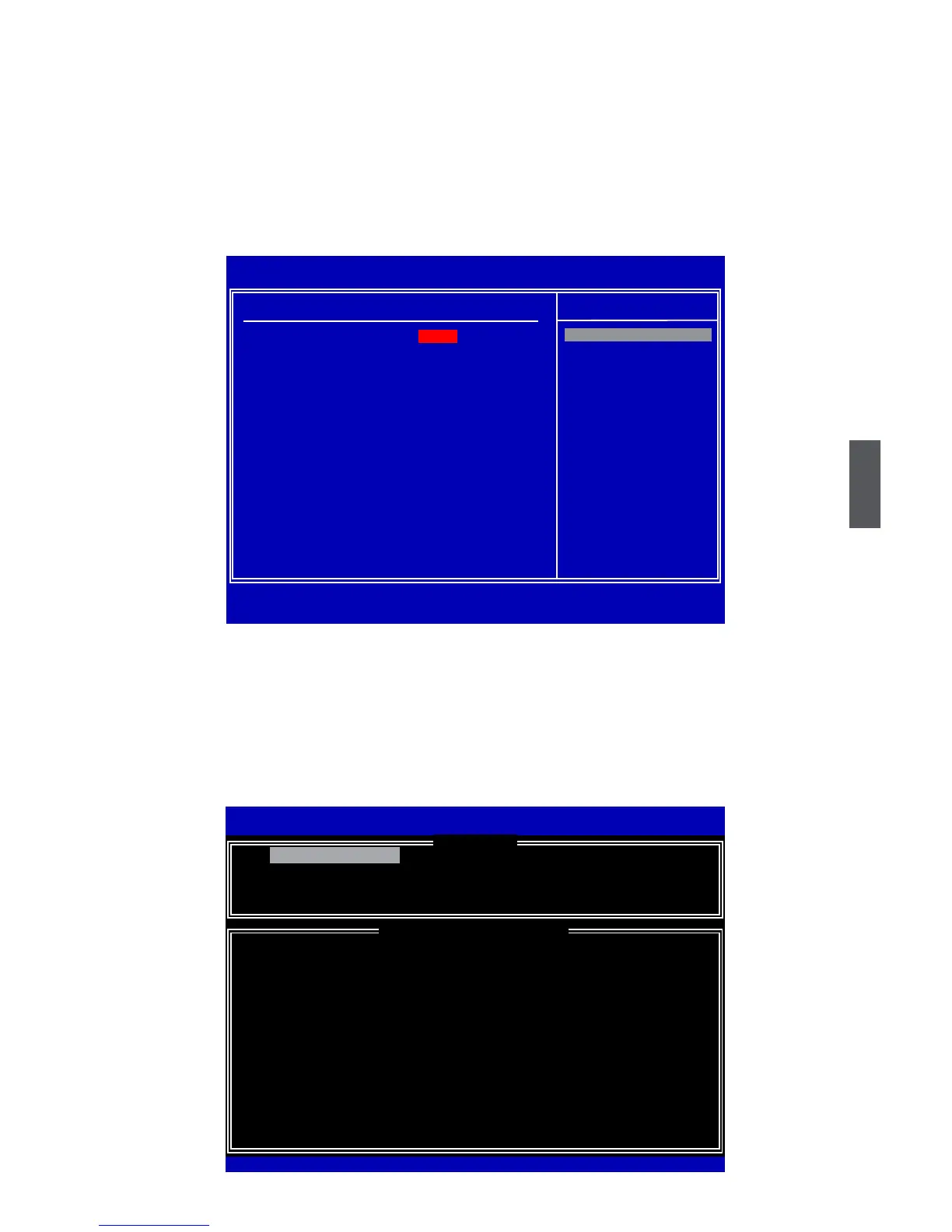
2. Select the “Advanced BIOS Features” from the “Main menu”, then select the “IDE
Conguration” item and press <Enter> to go to the conguration items.
3. Select and Set the “Congure SATA#1 as” option to [RAID].
4. Press <F10> to save the setting then PC will reboot itself.
5-3 Create RAID in BIOS
Enter RAID BIOS Setup
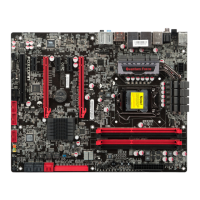
When BIOS is restarted, it will display a message asking you to press <Ctrl>+<I> keys
simultaneously to enter the main menu of Intel
®
Matrix Storage Manager Option ROM
Utility. Press the <Ctrl>+<I> to enter Conguration Utility.
Intel(R) Matrix Storage Manager option ROM v5.0.0.1011 ICH9R wRAID5
Copyright(C) 2003-04 Intel Corporation All Rights Reserved.
1. Create RAID Volume 3. Reset Disks to Non-RAID
2. Delete RAID Volume 4. Exit
RAID Volume :
* = Data is Encrypted
None Dened.
Physical Disks:
Port Drive Model Serial # Size Type/Status(Vol ID)
0 WDC WD2500JS-60N WD-WCANKC865380 232.9GB
Non-RAID Disk
2 Maxtor 6L250S0 L50SKP4G 232.9GB
Non-RAID Disk
4 ST3320620SV 9QF4YJGQ 298.1GB
Non-RAID Disk
5 ST3300831AS 3NF02XH2 279.5GB
Non-RAID Disk
[↑↓]-Select [ESC]-Exit [ENTER]-Select Menu
Intel(R) Matrix Storage Manager option ROM v8.5.0.1030 ICH10R/D0 wRAID5
Copyright(C) 2003-08 Intel Corporation. All Rights Reserved.
[ DISK/VOLUME INFORMATION ]
[ MAIN MENU ]
1. Create RAID Volume
CMOS Setup Utility - Copyright (C) 1985-2008, American Megatrends, Inc.
IDE Conguration
IDE Configuration Help Item
Configure SATA#1 as [RAID]
► Primary IDE Master [Not Detected]
IDE
► Primary IDE Slave [Not Detected]
RAID
► Secondary IDE Master [Not Detected] AHCI
► Secondary IDE Slave [Not Detected]
Hot Plug [Disabled]
Hard Disk Write Protect [Disabled]
IDE Detect Out [35]
↑↓←→:Move Enter:Select +/-/:Value F10:Save ESC:Exit F1:General Help
F9:Optimized Defaults
Options
[RAID]













 To Next Page