57
Next Generation Diagnostic Platform NT726TS User's Manual V1.0
NT726TS is easy to use with a proven efficiency and guaranteed accurate
results.
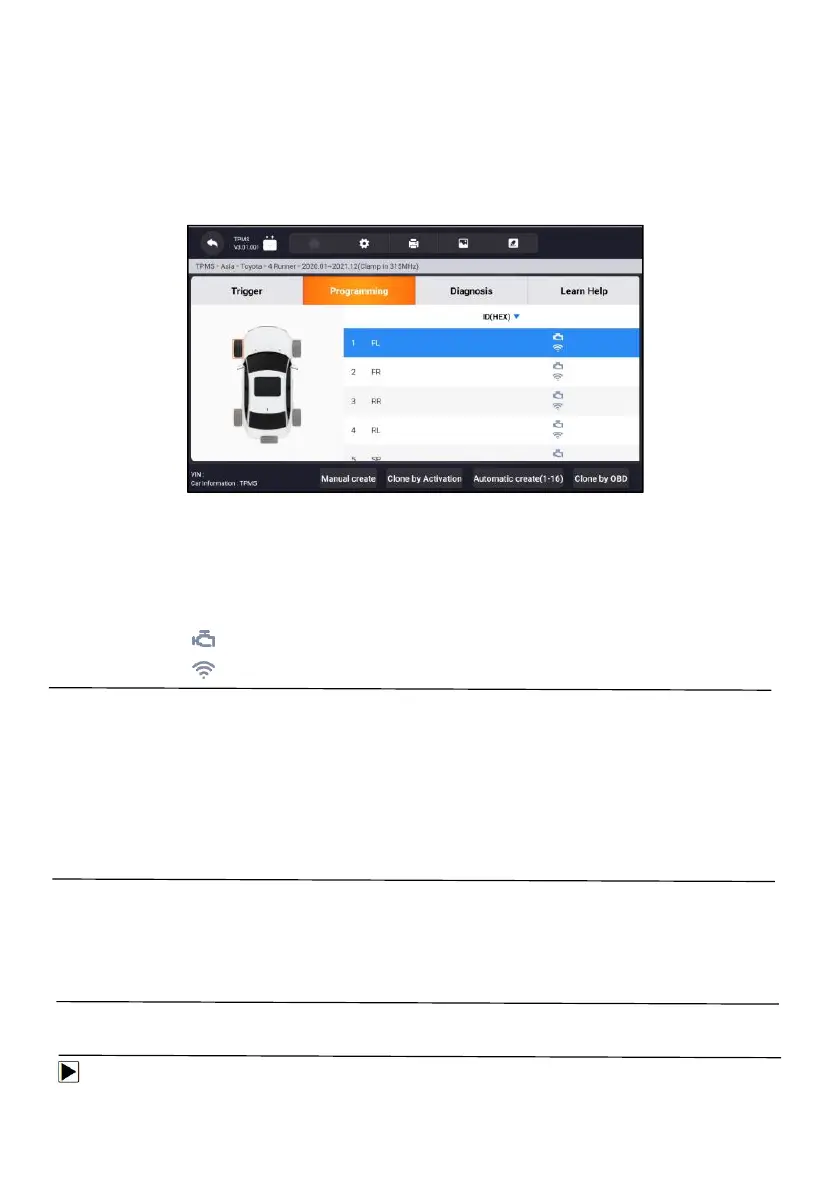
There are four options available when programming Foxwell sensor T10
using the Display Tablet: Manual Create, Clone by Activation, Automatic
Create (1-16), Clone by OBD.
Figure 11- 6 Sample Programming Function Screen
Main Section
Column 1 – displays wheel positions
Column 2 – displays programming IDs
Column 3 – displays the retrieved sensor IDs by activation
Column 3 – displays the retrieved sensor IDs by OBD
NOTE:
Programming function will only work with Foxwell sensor T10. Currently,
there are two models available: Clamp-in Sensor and Snap-in Sensor, both
with two types, one with 433MHz frequency, and one with 315MHz frequency.
The Clamp-in Sensor is taken as an example in this manual. Please choose
the proper Foxwell T10 sensor when programming.
11.2.1 Manual Create
This function allows you to manually enter sensor IDs. You can enter a
random ID or the original sensor ID.
NOTE:
Do not enter the same ID for different sensors.
To manual create
1. Tap the Programming tab.



 To Next Page