April 2022 Franka Emika GmbH © 24
11 USING THE HAND
Falling objects/tools
Objects or tools could fall at any time (e.g., due to loose couplings,
malfunctions that can cause the Hand to open or when a compatible Franka Emika robot is switched off,
or the power to robot system is cut) which could lead to injury to fingers, hands, toes, and feet.
• Take this into consideration while performing a hazard and risk assessment.
• Take also the SEEPO into account in the risk assessment because the Hand will only be powered if
brakes are open due to a configuration of the SEEPO.
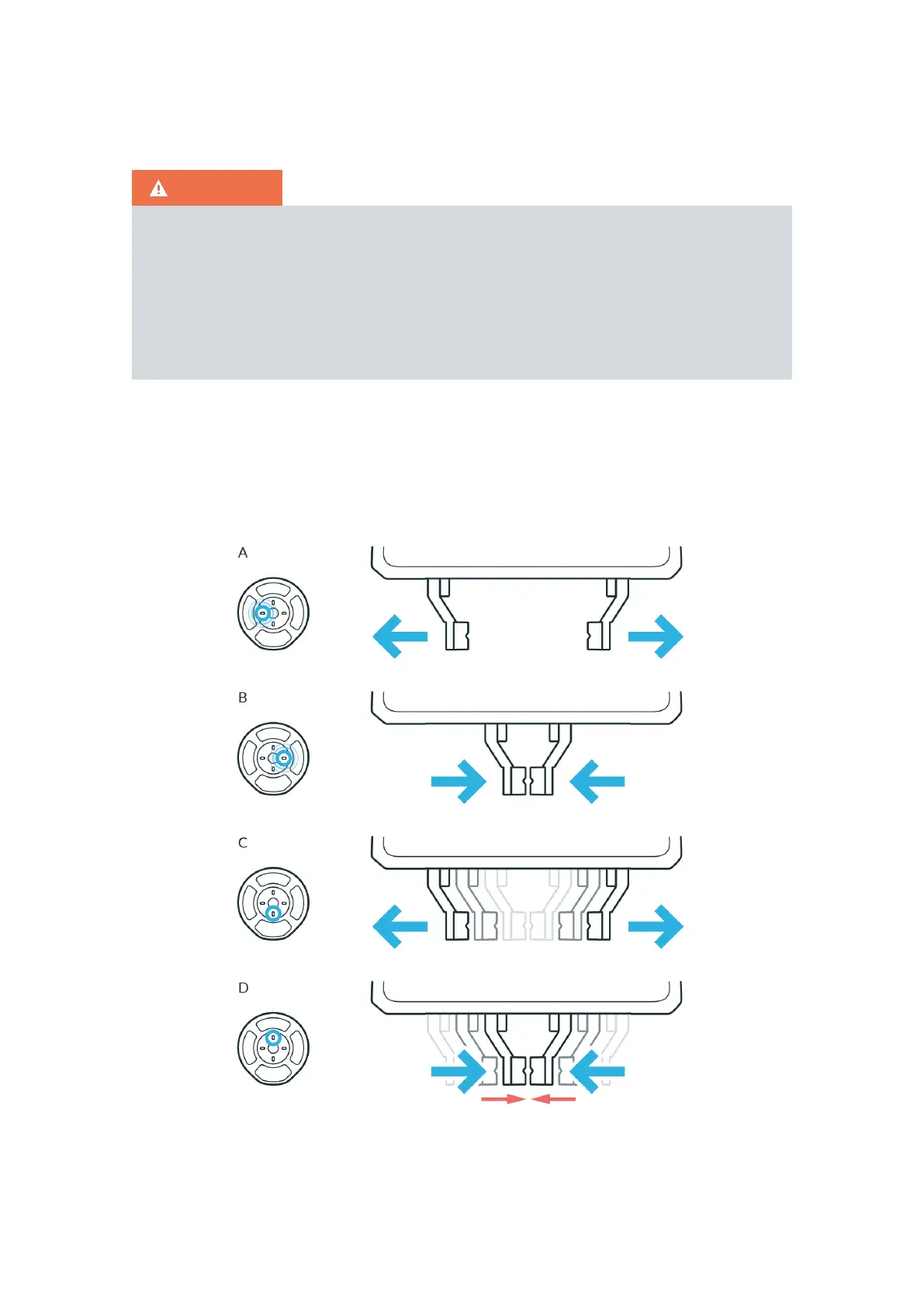
To control the end effector, press the Pilot-Mode button of the Pilot-Disc on a compatible Franka Emika
robot. The fingers of the Hand can be steered via the arrow keys:
A To slowly open the Hand, keep the "left" key pressed.
B To slowly close the Hand, keep the "right" key pressed.
C To open the Hand to full width, press the "down" key once.
D To make the Hand grasp with its holding force, press the "up" key once.
Figure 11.1



 To Next Page