Franke Kaffeemaschinen AG Cleaning | 9
User manual SB1200 55
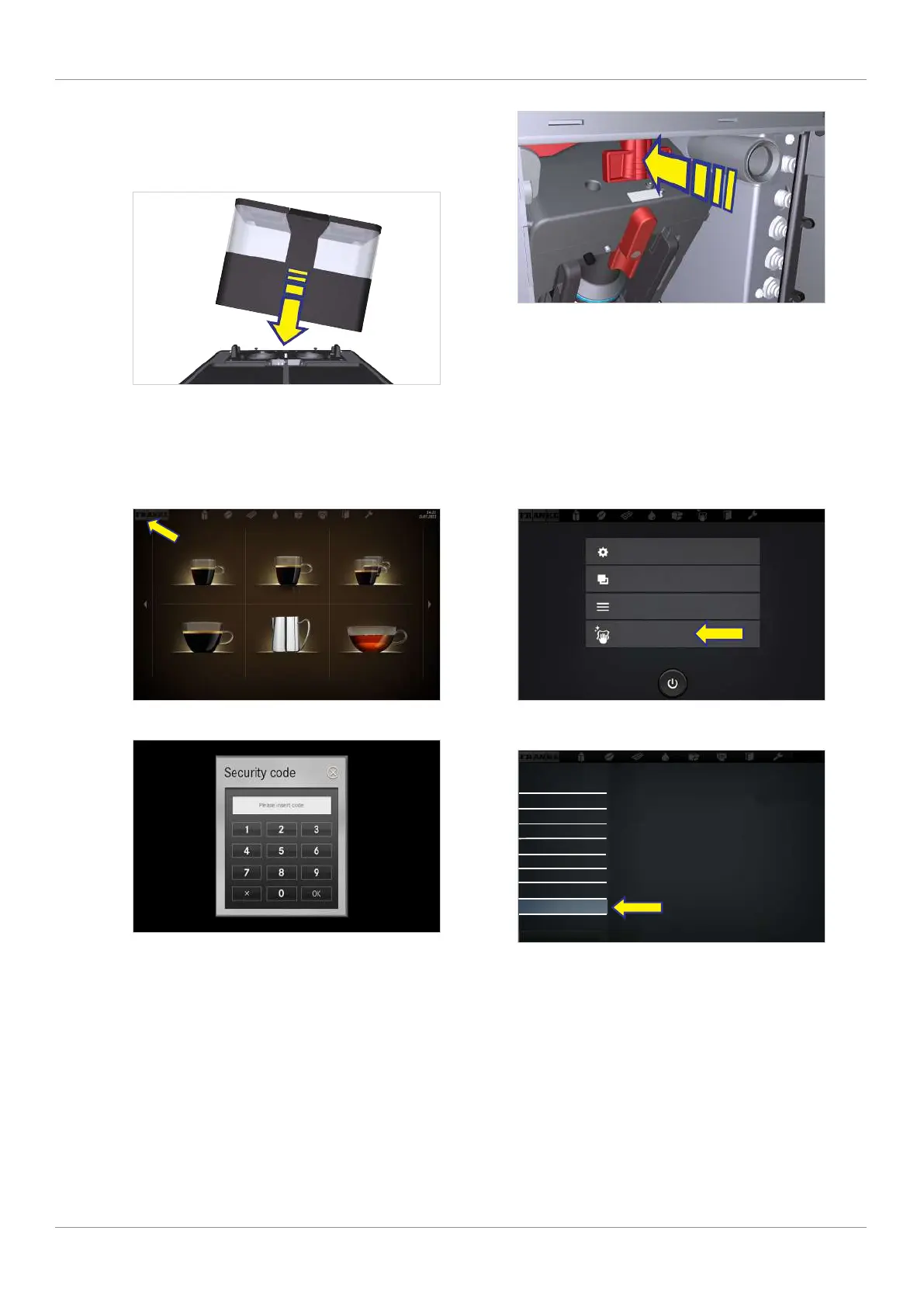
6. Clean the powder hopper with a cloth. Use
detergent if necessary. Wipe the inside of the
hopper with a dry cloth.
7. Attach the bean hopper and powder hopper
(if applicable).
8. Push the locking slide all the way in.
9. Close the door.
9.5.3 Cleaning the screen
Espresso Double Espresso 2 Espressos
Caffè Crema To Go Steam Tea water
1. Tap the Franke logo.
2. Enter the PIN.
PIN codes [
}
57]
3. Press Ok.
2020-03-02
10:54
My settings
Individualization and data transfer
Counter(s)
Cleaning and maintenance
4. Select Cleaning and maintenance.
10:54
2020-03-02
Clean system
Clean system and FSU/Clean
Flavor Station
Rinse coffee machine
Prepare cold media
Prepare Flavor Station
Water quantity for filter
Wipe protection
Error/event log
Cleaning and maintenance
5. Select Wipe protection.
ð The user interface is locked for 20 sec-
onds.
6. Clean the screen.
ð The maintenance level appears.



 To Next Page