Standard Cruise Control
WARNING
Do not use the cruise control system when
driving conditions do not permit maintaining a
constant speed, such as in heavy traffic or on
roads that are winding, icy, snow-covered,
slippery, or roads with a loose driving surface.
Failure to follow this precaution could cause a
collision or loss of vehicle control, possibly
resulting in personal injury or property damage.
NOTICE
When the cruise control is engaged, do not
attempt to shift gears without using the clutch
pedal. Failure to follow this precaution may result
in a temporarily uncontrolled increase in engine
speed. Transmission damage and gear stripping
could result.
NOTE: If the vehicle is equipped with a Detroit
DT12 automated transmission, setting the cruise
control with the engine brake on activates cruise
descent control mode. Moving the transmission
shift lever to the top position resumes the set
cruise speed. Moving the lever down to engage
the engine brake after the cruise control has
been set activates deceleration mode. See
‘Cruise Descent Control and Deceleration
Modes’ in this chapter.
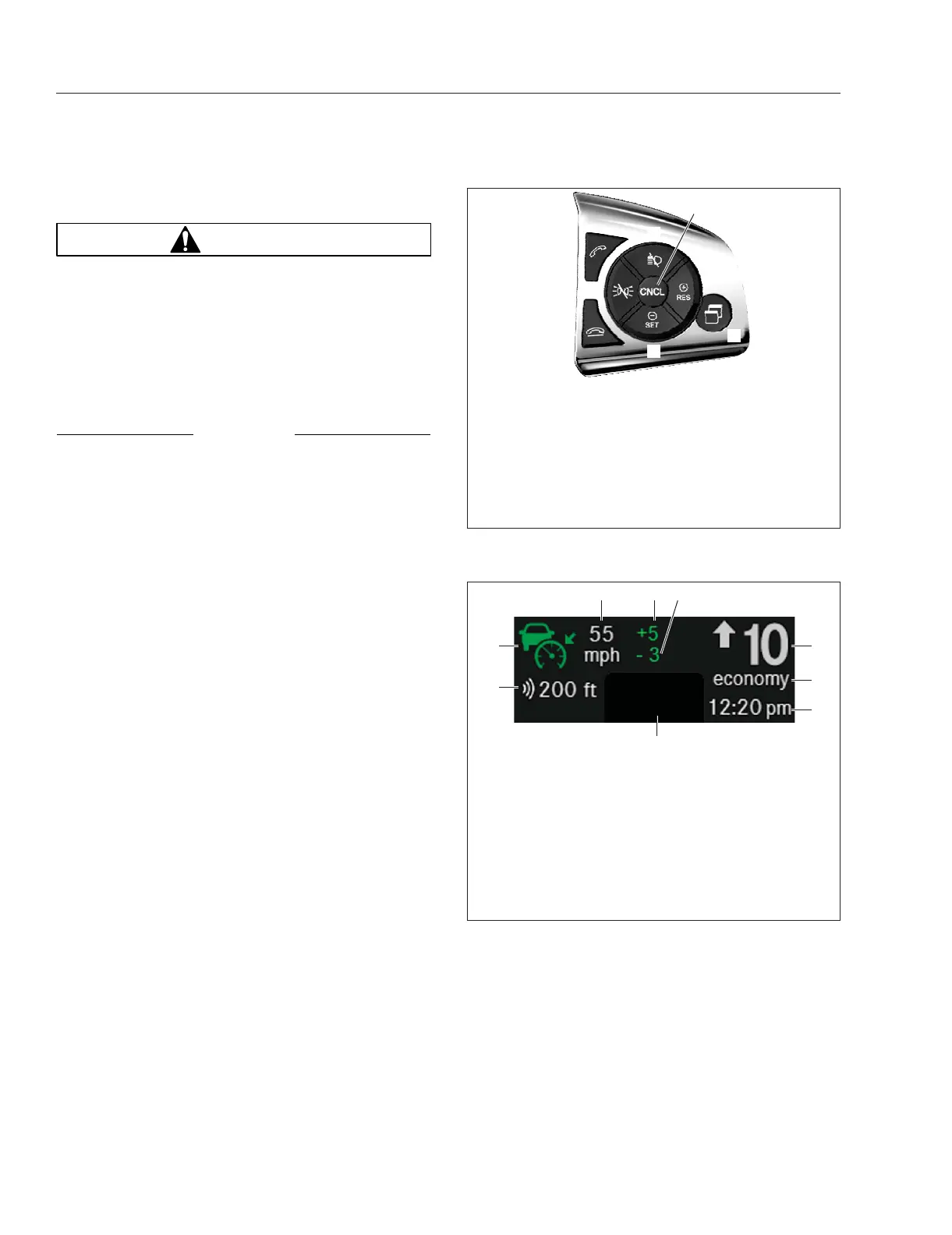
In the ICUC, standard cruise control is operated by
three switches mounted in the right-hand switch pod
of the steering wheel. See Fig. 7.1.
•
Cruise Decelerate/SET Button—Press to set
the cruise speed while the vehicle is traveling
at the desired speed. Press and hold to
decrease the set cruise speed by 5 mph
increments (Detroit Diesel engines only).
Single press decreases cruise speed by 1
mph. When cruise control has been set, the
driver display static menu in the ICUC shows
relevant cruise control icons and the set speed.
See
Fig. 7.2. The speed memory is retained
until the ignition is turned off.
•
CNCL Button—Press to pause the cruise
control, while retaining the speed setting in
memory. The cruise control can also be
disengaged, while retaining the speed memory,
by depressing the brake or clutch pedals.
•
Cruise Accelerate/RES Button—Press to
resume the set speed. Press and hold to
increase the set cruise speed by 5 mph
increments (Detroit Diesel engines only).
Single press increases cruise speed by 1 mph.
If no previous set speed is stored, pressing the
button sets the cruise speed.
1.
To cruise at a particular speed:
f611352e11 18 22/ /20
8
7
1
2
3
4
6
5
1. Cruise Accelerate/Resume
2. Quick Access System Settings
3. Cruise Decelerate/Set
4. Phone Hang-Up/Reject
5. Marker Interrupt (not available in all markets)
6. Phone Pick-Up
7. Headlamp Interrupt (not available in all markets)
8. Cancel Cruise Control
Fig. 7.1, Steering-Wheel-Mounted Right-Hand Switch
Pod, ICUC
f61136406/13/2016
1
4
2
3
6
5
7 8 9
1. Gear Indicator
2. Gear mode
3. Time
4. Soft Telltale Area
5. Adaptive Cruise Control Following Distance
6. Adaptive Cruise Control Telltale
7. Cruise Control Set Speed
8. Cruise Control Overspeed Amount
9. Cruise Control Underspeed Amount
Fig. 7.2, Static Menu, ICUC
Driver Assistance Features
7.1














 To Next Page