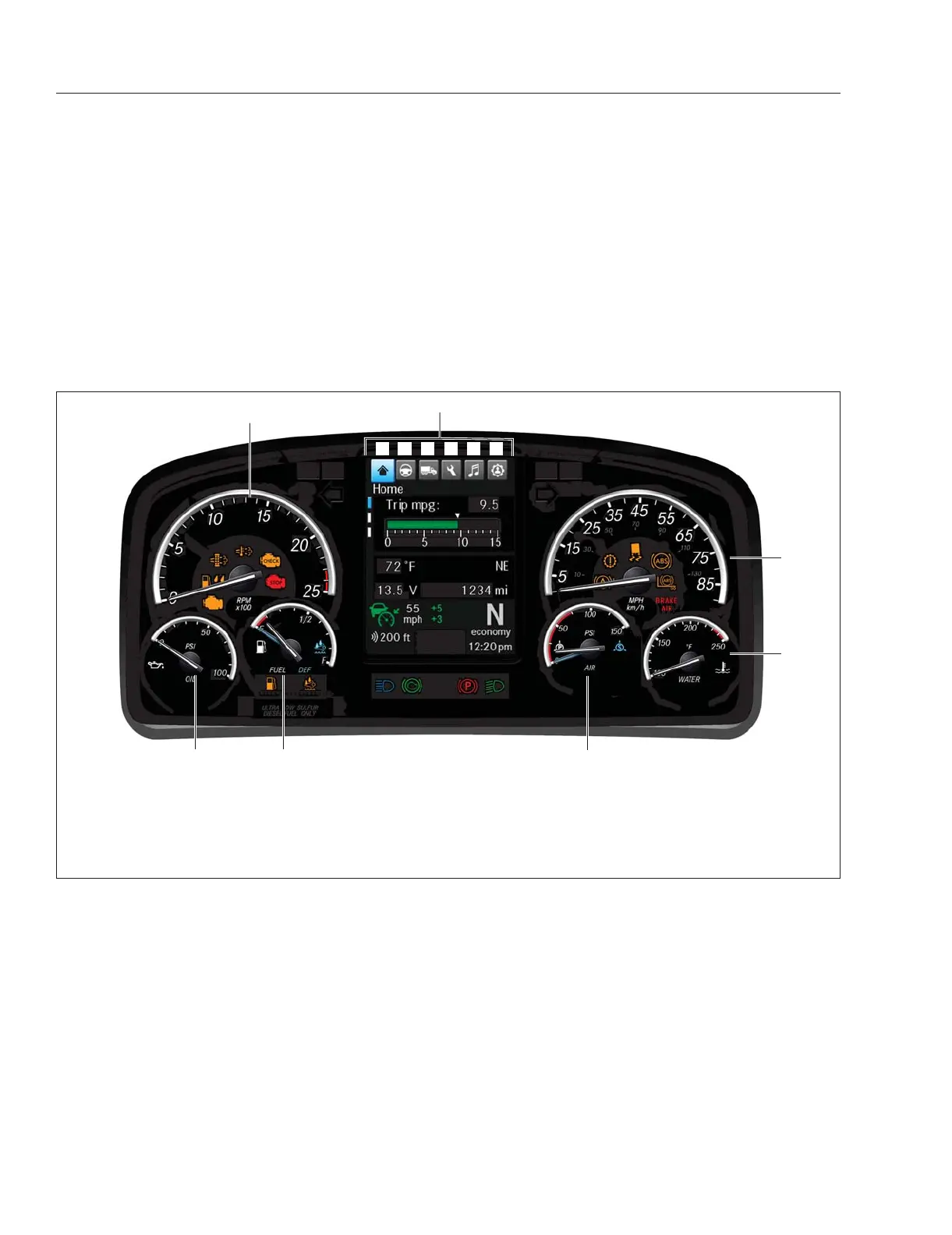
Instrumentation Control Unit:
ICUC
The instrumentation control unit (ICU) provides the
driver with engine and vehicle information. An M2
Plus vehicle will be equipped with an ICUC. See
Fig. 3.1 for a typical ICUC layout.
This section provides general system and operating
instructions for ICUC components. Following sections
provide more detailed information.
ICUC
The instrument cluster unit is comprised of six
physical gauges, indicator lamps (telltales), a six inch
portrait driver display screen, steering wheel
mounted switches, and audible warning systems.
Warning and indicator lamps illuminate in red
(warning), amber (caution), green (status on), or blue
(informational).
The driver display screen provides information on
various vehicle systems as well as warnings,
cautions, and notifications on systems status.
Ignition Sequence
When the ignition is turned on, the ICU runs a self-
check. Observing the ignition sequence is a good
way to ensure the ICU is functioning properly.
IMPORTANT: Do not crank the engine until the
ICU self-check is complete.
ICUC
NOTE: Air gauges in the ICUC do not complete
a sweep of their dials during the ignition
sequence.
When the ignition is turned on, the following actions
should occur in the ICUC:
•
Freightliner and engine logo displays on the
driver display until startup is complete
•
Speedometer and tachometer complete a full
sweep of their dials
•
Warning and indicator lamps illuminate, then
are extinguished (if not active)
f61136206/28/2018
7
1
3
4
5
6
2
A B C D E F
1. Speedometer
2. Coolant Temperature Gauge
3. Primary and Secondary Air
Pressure Gauge
4. Fuel and DEF Level Gauge
5. Engine Oil Pressure Gauge
6. Tachometer
7. Driver Display
A. Home
B. Drive Time Systems
C. Vehicle Operations
D. Maintenance
E. Infotainment
F. User Settings
Fig. 3.1, Instrument Cluster Overview - ICUC
Instruments
3.1














 To Next Page