NOTICE
Extended idling in reverse may cause
transmission overheating and damage.
Do not idle in reverse for more than 5 minutes.
Select neutral when time at idle exceeds 5 minutes.
NOTE: The shift into reverse may not succeed if
a range inhibitor is active. When reverse is
selected, always be sure that R is not flashing.
N (Neutral)
WARNING
When starting the engine, make sure that the
service brakes are applied. Failure to apply the
service brakes may result in unexpected vehicle
movement, which could cause severe personal
injury or death. Failure to apply the vehicle
parking brakes when the transmission is in
neutral may allow the vehicle to move
unexpectedly, possibly causing property damage
or personal injury.
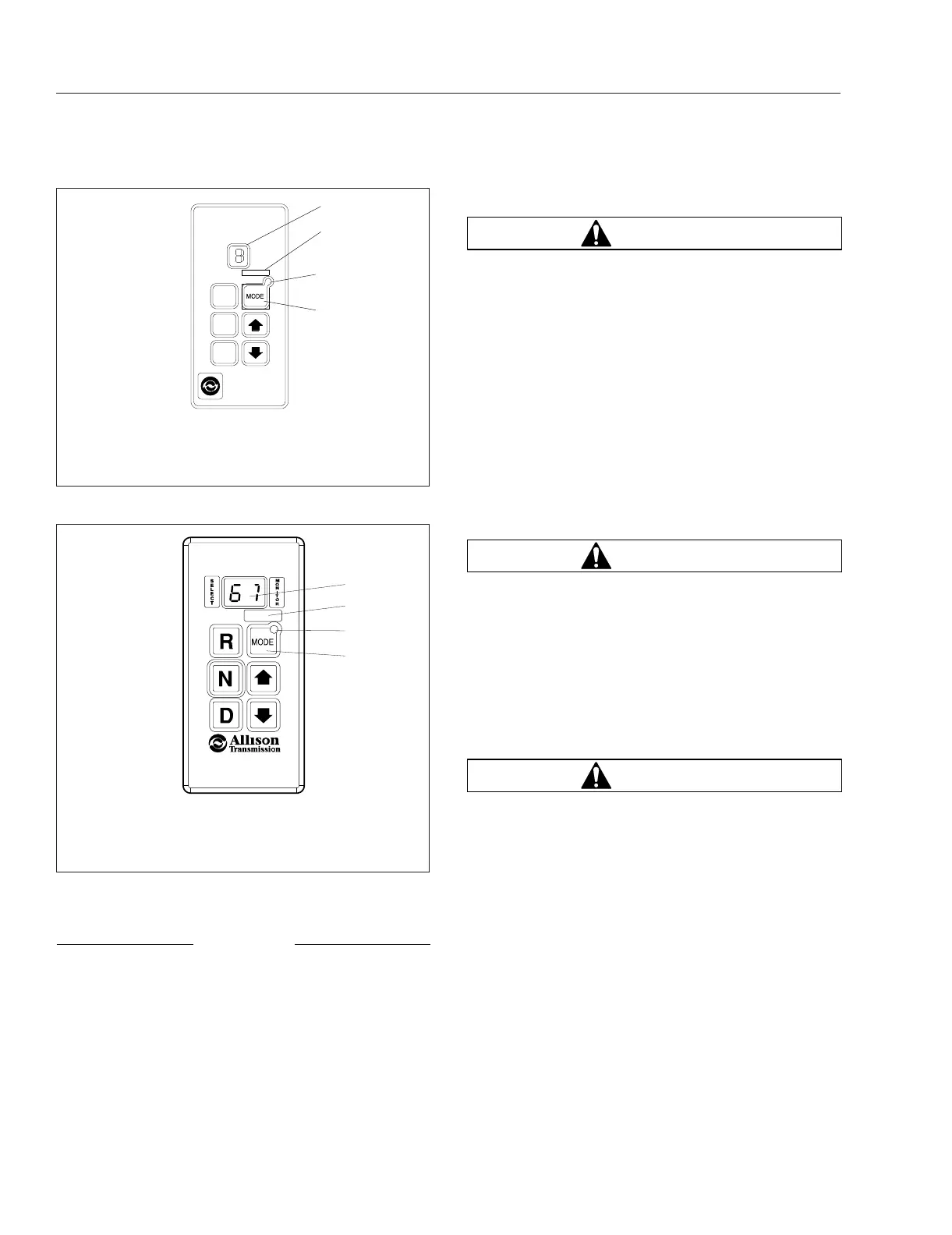
Press the N button to select neutral. The digital
display will display N when neutral is selected. It is
not necessary to press neutral before starting the
vehicle. The ECU (electronic control unit) or TCM
(transmission control module) automatically places
the transmission in neutral at start-up.
WARNING
Failure to apply the vehicle parking brakes when
the transmission is in neutral may allow the
vehicle to move unexpectedly, possibly causing
property damage or personal injury.
When neutral is selected, the vehicle service brakes,
parking brake, or emergency brake must be applied.
Selecting neutral does not apply vehicle brakes
unless an auxiliary system to apply the parking brake
is installed.
WARNING
Do not coast in neutral. Coasting in neutral can
cause an accident, possibly resulting in severe
personal injury or death.
Do not let the vehicle coast in neutral. If the vehicle
is allowed to coast in neutral, the engine brake will
not work and you could lose control of the vehicle.
Always select neutral before turning off the engine.
Neutral is also used during stationary operation of
the power takeoff if your vehicle is equipped with a
PTO.
D (Drive)
When the D button is pushed, the highest forward
range will appear in the display. The transmission will
normally go into first range when drive is selected
(except for those units programmed to start in
second range). As vehicle speed increases, the
N
R
D
f270113
1
2
3
07/27/2006
4
1. Digital Display
2. Mode Identification
Label
3. Mode Indicator LED
4. Mode Button
Fig. 14.16, WTEC III Push-Button Shift Selector
1
2
3
f610804
07/27/2006
4
1. Digital Display
2. Mode Identification
Label
3. Mode Indicator LED
4. Mode Button
Fig. 14.17, Fourth Generation Push-Button Shift
Selector
Automated and Automatic Transmissions
14.19














 To Next Page