34
SECTION 4 - COMPONENT TEAR DOWN
4 - 4
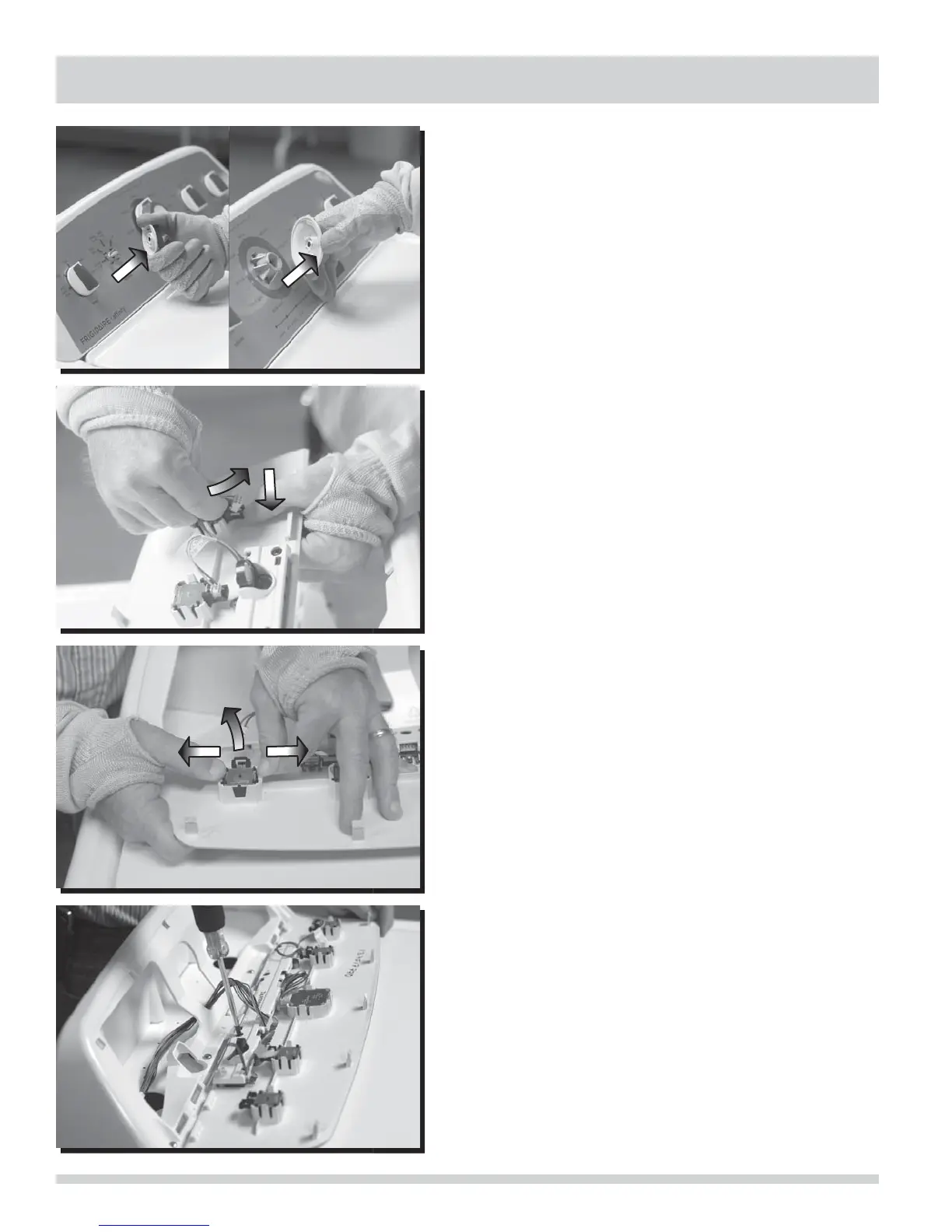
Cycle Selector and Modifi er Knobs
Cycle selector and modifi er knobs are pressed onto “D”
shafts.
To remove the cycle selector and modifi er knobs:
1. Grasp knob and pull straight out.
2. To reinsert knobs, align fl at side of knob hole to fl at side
of shaft and press straight inward.
Console Switches
Cycle selector and modifi er switches are held in place with
retaining tabs on the back side of the control panel faceplate.
To remove the cycle selector switch or any modifi er switch:
1. Disconnect the washer from electrical source, remove the
cycle selector and/or modifi er knobs, and control panel
faceplate.
2. Press downward on terminal retention tab while pulling
terminal away from switch.
3. Pull outward on each retention tab while pulling switch
from control panel.
User Interface Board
The User Interface board is held in place with four screws on
the back side of the control panel.
To remove the UI board:
1. Disconnect the washer from electrical source and remove
the control panel faceplate.
2. Disconnect the wiring harness to the UI board and the
wires from each switch to the UI board by pressing
downward on the terminal retention tabs while pulling
terminals away from UI board.
3. Remove four screws with #2 square bit screwdriver.




 To Next Page