63
SECTION 6 - PUSH BUTTON SELECTION WASHER TECHNICAL DATA
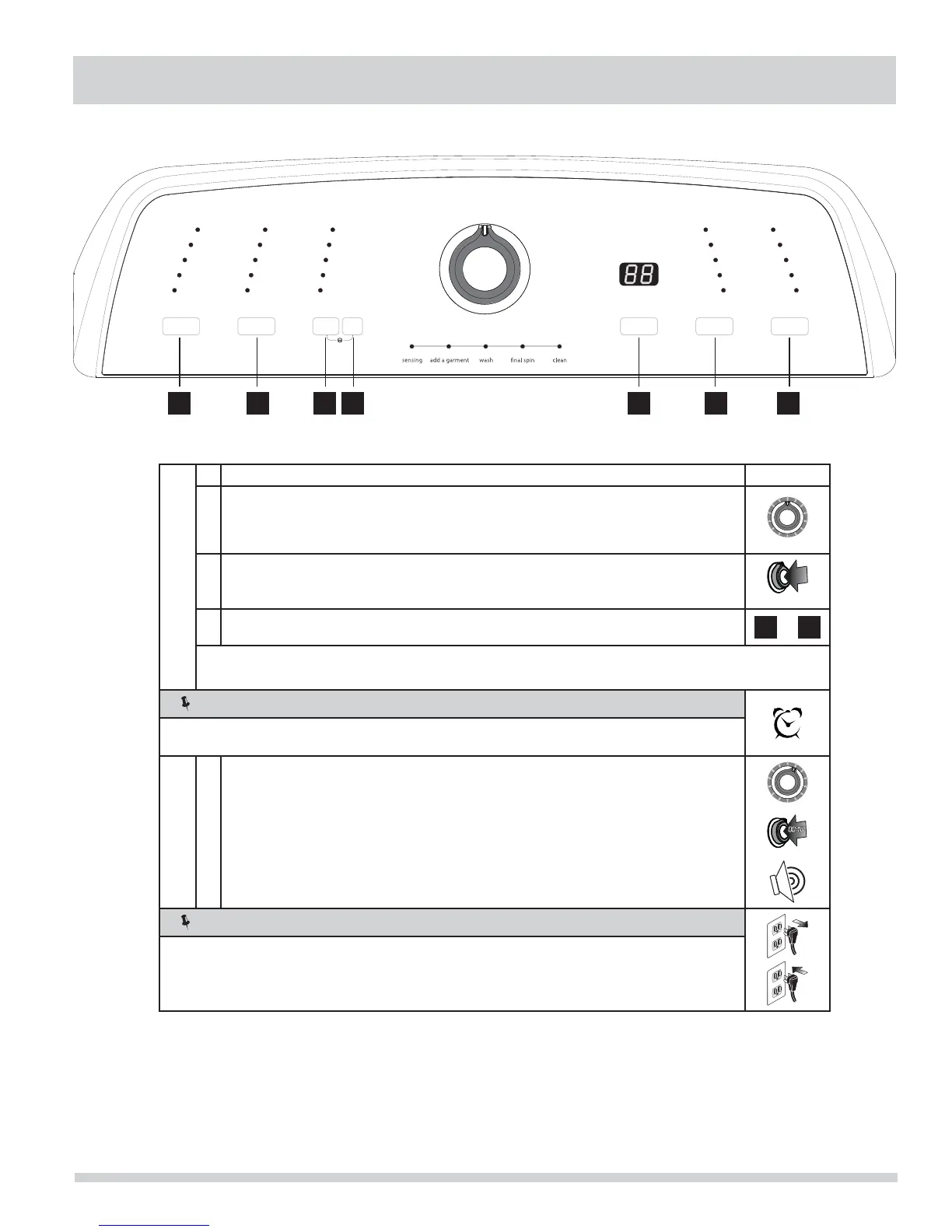
Diagnostic Mode
Entering Diagnostic Mode
1. Wake up unit.
2. Turn cycle selector knob to the normal cycle position.
normal
normal
3.
Press and hold the cycle selector knob until all the LED status lights go out. Release
cycle selector knob.
normal
4.
Within three seconds of Step 3, press and hold buttons 3 (options) and 6 (spin speed)
until both columns of LED lights are lit.
3
&
6
NOTE
If left unattended in Diagnostic Mode for more than 5 minutes, the unit will automatically exit
Diagnostic Mode and return to normal functionality.
Exiting Diagnostics
1.
Turn the cycle selector switch to the number 1 position as defi ned by the tech data
sheet and immediately press and hold the cycle selector knob for 10 seconds.
You will hear three short beeps to indicate you have exited Diagnostic Mode.
position 1
position 1
NOTE
You may also unplug the unit and wait 10 seconds to exit Diagnostic Mode.
It will enter normal functionality when plugged back in.
1 2 3 4 5 6 7
6 - 11




 To Next Page